Tips for Cisco Wireless Performance on Mobility Express

Recently I was working on my lab network, and I have an 1831 access point and a 3702 AP.   My comments are specific to Mobility Express, which to be fair is just a regular WLC, running on an access point,  with all AP’s in FlexConnect mode only.   The AP’s are responsible for all packet processing, NBAR/AVC, anything you are doing goes on in the AP’s.

Naturally, I wanted to get the most out of my network, but I ran into a few challenges, and I will document them here….

First, I am far from a CLI expert on the WLC stuff,  I have spent most of my life running WLCs with the GUI – but the Mobility Express series GUI is very simple.     I got much better at the CLI during this.

The latest GUI on 8.5 has an “expert” mode now that lets you play with some of the RF settings, the 8.3 version is pretty simplistic.   So I popped in the 8.5.103 version, and was liking the new GUI.     Everything seemed like it was working….     I applaud Cisco for improving the Mobility Express GUI – it was more simple than some home Linksys offerings in the beginning, this is a step in the right direction.

Let me outline my environment….

  1.  I live in a rural area – there is ZERO wireless noise here, and I control the spectrum pretty well.  I don’t deploy stuff without considering the impact.
  2. I have about a dozen client devices
  3. For all my testing – I kicked everyone off 5ghz, and ran on just a single AP.   Nothing else was in the air – I confirmed this using a spectrum analyzer.

Running the latest bit me

Until I had a problem with my Macbook Air (Early 2014 Model).  If you go and look, many people complain about Apple Macbook Air’s and wireless issues – so many different opinions, some blame Apple, some say replace your “router” or access point but I couldn’t find any kind of real problem.

Not a surprise.  I ran 8.5.103 – and I was having weird problems.    All of my clients were fine except my Macbook Air – as long as it was on 2.4ghz, it was fine – but bump it up to 5ghz, and as soon as traffic started flowing – the AP would simply start ignoring the client.  Client thought it was associated, AP saw it as associated — but no traffic moved.     It would sometimes come back, sometimes not, if I bounced client adapter – it would come right back.  2.4 was solid.

Doing what I always tell my clients – run the “Gold Star” release in this case 8.3.122 – So I put that version in, and let the APs upgrade.    Everything seemed better now – connectivity was solid.      After my findings below, I went back to test 8.5.103 again…

AVC Hurting Performance

So being that it was “working”  I switched to performance testing.   I run a iPERF3 server on my QNAP here at home – confirming performance I was getting 995mb/sec from my wired desktop to the NAS…  Ok we are good to test.

My Macbook Air was connected with the following…

Performance Signal Strength: -53 dBm

Signal Quality: 43 dB

Connection Speed: 867 Mbps

Channel Width: 80 MHz

Capabilities 802.11ac (5GHz) Spatial Stream: 2

Time for a test…

Connecting to host QNAP, port 5201
[ 4] local port 56551 connected to QNAP port 5201
[ ID] Interval Transfer Bandwidth
[ 4] 0.00-1.00 sec 15.5 MBytes 130 Mbits/sec
[ 4] 1.00-2.00 sec 16.1 MBytes 135 Mbits/sec
[ 4] 2.00-3.00 sec 16.0 MBytes 134 Mbits/sec
[ 4] 3.00-4.00 sec 15.9 MBytes 133 Mbits/sec
[ 4] 4.00-5.00 sec 16.1 MBytes 135 Mbits/sec
[ 4] 5.00-6.00 sec 15.8 MBytes 133 Mbits/sec
[ 4] 6.00-7.00 sec 15.8 MBytes 132 Mbits/sec

Ok this isn’t right…  Something isn’t working….   So I contacted my good friend @wifijanitor – Steve to bounce some ideas off him.    We quickly got to “It’s all configured correctly”
So I started disabling this and that 802.11(insert feature here) and everything one by one. Problem remained.
Finally, I disabled AVC – Application Visibility and Control…

[ 4] 71.00-72.00 sec 46.4 MBytes 390 Mbits/sec

[ 4] 72.00-73.00 sec 46.3 MBytes 389 Mbits/sec

Well look at this…    The only thing we could figure out is that the AP must be getting hammered by the AVC…   So, I investigated that….

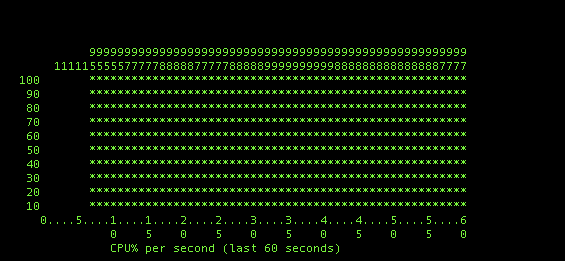
AP CPU with AVC Enabled

Whoa, that is 100%…  This is with my iPerf, i’m getting 140-150 mbit. Ok, let’s try with it disabled.
Screen Shot 2017-09-13 at 9.46.09 PM

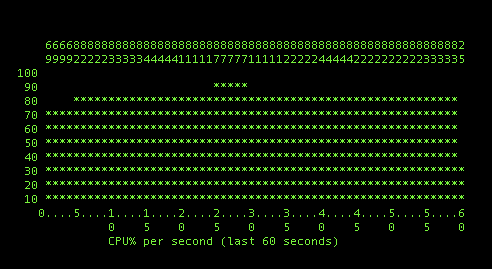
AP CPU with AVC Disabled – Heavy Load with iPerf

Whoa…  That’s not a good thing…    That means even the performance i’m getting now is probably being hampered by the CPU on board…   Close to 400mbit throughput, and the CPU is high.  According to the system it is nothing but packet process.  There has to be  a choke point…    I wonder what would happen if I had more CPU – i’m not able to clear up any more CPU, everything (I think) is disabled.
Screen Shot 2017-09-13 at 9.46.09 PM

AP CPU with AVC Disabled – 100 Mbit Stream

Ok so i’m trying to prove my theory…  This is AVC Disabled, 100MB Stream using iPerf.  About 30% CPU utilization…

Screen Shot 2017-09-13 at 10.17.18 PM

AP CPU with AVC Enabled – 100 Mbit Stream

Now I re-enable AVC and run the exact same 100mbit stream.   wow ok we are looking at 75%-ish cpu.    Clearly AVC is causing a CPU bump – that has to be my problem at higher speeds.

Screen Shot 2017-09-13 at 10.12.25 PM

Conclusions and Recommendations

– With AVC running in FlexConnect mode, the AP is responsible for the nBAR engine, which is limited compared to what you get in a real WLC.    If you need/want AVC – plan on installing a full WLC, between the limited AVC capability (well document) in FlexConnect mode, and the un forseen performance issues I have seen (not well documented)  It shouldn’t be used in Mobility Express or FlexConnect installs.
– Running the latest code can bite you (I knew this!)
– Always validate your installations, not just for connectivity, but for performance
– If you are using Mobility Express – Learn the CLi, because there are just some things you cannot do in the GUI.
– I did go back to the latest 8.5 release to see if AVC was the cause of my 5GHZ issues in 8.5.103 – but it was not.

Cisco Connect Toronto with Chuck Robbins

In a splash we are not used to seeing it has been announced that at Cisco Connect Toronto on October 12 (Also known as “Mini Live”) – the keynote speaker will be Chuck Robbins.

chuck_robbins_cisco_ceo.0

In the past the Cisco Canada President – currently  Rola Dagher would keynote this event, but this year with Chuck Robbins coming on site, I think we will see an increase in attendees.

But will Chuck Robbins upstage Rola Dagher?   Will they stand side by side on stage?   Will Chuck and Rola have sit down and talk about technology and specifics about Canada?

This could be a pivotal moment in history for Cisco Canada – as in the past, the great white north has felt cut off from the super power that is Cisco USA.   With Chuck coming here, it may give customers a feeling of connection back to the mother-ship in California.

No doubt the focus of conversation from Chuck Robbins will be DNA-Centre, SD-Access and Catalyst 9K technologies – but how will he customize the keynote for the Canadian audience.

I will be there – and will bring reaction back to the blog.

Information on the event CLICK HERE


Meraki Launches Community

In order to enable collaboration between customers, the team at Cisco / Meraki has launched a new community page located at

community.meraki.com

MerakiCommunity

The program is aimed at partners, customers, and technical folks.    As you know the Meraki team has always been about “What do you want to see”.   Consider the success of the “Make a wish program”

This is a great place to discuss problems, ideas and solutions – and Meraki will be watching.   This is a great place where “Make A Wish” could grow into real discussion by the Meraki community to help push ideas back directly into the Meraki team.

Sign up today, and join the discussion.

Meraki changes cloud IP’s


Some customers have very stringent outbound firewall rules (Oh, and good on you by the way!) – just an FYI, Meraki is about to change the IP’s of their back end gear on some of their shards.

In an email to customers blasted out from the green heavens today, Cisco/Meraki let customers know that they are going to make some changes in the back end with different control IP addresses.

The good news is that if you forget, or don’t make the change your network will not go down, but you won’t be able to make any changes to configuration, and use data will be cached.

So, go ahead and make that change now before you lose connectivity.     This comes after Meraki had some block storage issues a few weeks ago which saw some configuration data impacted.   This may be part of the remediation and resiliency upgrades to deal with that situation, but I don’t know and cannot confirm (Looking into it).


MerakiLogo

Dear Meraki Customer,

As part of ongoing efforts to improve the performance and resiliency of the Meraki Cloud we will be changing the IP addresses used by Cisco Meraki devices to contact the Meraki Cloud.

In order to ensure that customers have time to make these updates, the change will take place 8 weeks from first notice, or after all affected networks have updated their firewalls, whichever comes first. You can prepare for this change by opening up access in your firewall to the IPs and ports listed on your organisation’s Firewall Information page ( https://dashboard.meraki.com/manage/support/firewall_configuration ).

Your Meraki network will continue to operate, but your Meraki devices may experience degraded performance and connectivity to the Meraki cloud if your firewall rules are not modified to include the IPs and ports listed on that page.


If you have any questions regarding this message, please contact Meraki Support at support@meraki.com or +1-415-632-5994.

Cisco releases Spark and Jabber Interop

Good news the Cisco Spark and Cisco Jabber interoperability is up and running and working.   People using Jabber 11.9+ can now see and chat with people on Cisco Spark, but one to one only.   Soon spark spaces will also be supported.  There is some presence sharing between the platforms.

jabberplusspark

The Jabber Platform does not support access to Spark Spaces, ad-hoc group chats, the share of attachments or screen sharing across platforms at this time.  So 1 to 1 chat is all users get for now.   Details of new features in this link.

A few deployment requirements….

Jabber must be CLOUD DEPLOYED – so no on premise deployments are currently supported.  You will need to contact Cisco to get your system added to the Cisco Spark platform identity service.

This is a long time coming feature many clients have been asking for as customer embrace both platforms, however, most clients looking to migrate are probably using an on site implementation of Jabber today.  Hopefully, Cisco will support on premise migration strategies soon.

The FlightChops teams reaches 100K Subs!

So many of you know I am good friends with Steve Thorne from www.flightchops.com and also his amazing YouTube channel located HERE

I want to take this moment to congratulate Steve and his team for reaching 100K subs, as of this writing he is actually at 107K.   This has been an amazing story about someone who was passionate about a topic, took that online in their own way.   People attacked Steve alot in the beginning, and even now for posting mistakes, troubles and pitfalls of learning to fly but the truth is – that is what made his channel popular.

Sponsors have taken note, and big names too like Bose and ForeFlight have put some support behind Steve.  Even with the big name support he still receives a significant contribution from Patreon (including me) and he never forgets those who got him here, by running many contests for everything from Bose Aviation headsets to a San Juan Islands Adventure trip!

Content is king – bottom line – and Steve and his team of editors and videographers have amassed a ton of content and gone from twice monthly to sometimes 4 times per month publishing this amazing content.      Steve continues to do this his way, and sponsors do not impose on content.   His “day job” of video and media production has brought a significant professional flair and production quality to his episodes and that production quality has been steadily increasing.

Will this ever reach “Mainstream” television?  You mean YouTube isn’t mainstream?   I would appear to me that the likes of “Outdoor Network” are only interested in fake shows auctioning off storage units sadly.

So if you are a private pilot, or just an airplane nerd like me – go and check out his humble little channel and I promise you will learn something along the way, as Steve says “Keep your Flight Chops Sharp!”

Congrats again Steve on your channels success!

Cisco dCloud Team Releases SD-Access V2

The Cisco dCloud team has released SD-Access V2 lab which includes DNA Center.

Due to the dCloud environment being so popular you may need to wait until later this week to get your hand on it, but the good news is, it delivers.    Many have been asking about getting their hands on DNA Center.     This is a BETA – so following the lab guide is advisable or things may not work – keep in mind it isn’t actually programming real switches in the back end.

2017-07-11 15_20_06-4D_SD_Access_v2 (1).pdf

Well it is here, and you get to setup a new network, deploy SSID’s, and build policy.   Right now this is just a DNA Center demo walk through.   You will get the change to design, provision and build policy in the live demo.   DNA Assurance – NDP or Network Data Platform is not available at this time.

The team was quick to get this demo in our hands, so go out there and get your hands on DNA and see how intuitive you think it is.


Cisco Announces “The Network. Intuitive.”

With content courtesy of Cisco Systems

Last year I broke down the Cisco DNA – Digital Network Architecture in an article called “Beyond Marchitecture”, because quite frankly, it was a ton of marketing with little substance.

This year at Cisco Live! 2017, Cisco has done this the right way.   With a new campaign, backed by the technical prowess we expect from Cisco and launched with all the big names, and big programs we expect.  This was well thought out, and if this is what Chuck Robbins is going to bring to the table of Cisco Systems – there should be some big things ahead.

In a series of interviews with different business units, it was revealed that the “Handcuffs are off” and departments have been given the ability to innovate, collaborate and tear down the silos.  This new program demonstrates that.

The Network.  Intuitive.

2017-07-05 11_36_44-DNA for CL Vegas.pdf - Adobe Reader

First get past the grammar related issues of the new DNA Campaign, and realize that is it not “The Network Intuitive” it is “The Network. Intuitive.”  – punctuation matters here

The key to understanding “The Network.  Intuitive.” is in two powerful words.

Intent

As announced by Chuck Robbins in the Cisco Live keynote, they want you to power your network with business intent.   No more programming VLANs, or setting up routing, but truly going into a unified console and telling it what you want to do.

“A computer will do what you tell it to do, that may be totally different from what you had in mind” — Quote Unknown

The idea that “Machine A” can talk to “Server B” and “User Y” and talk to “System X” without worrying about the underlying infrastructure is where they are going.

This is a construct, not a product, but unlike DNA-2016, there is a strong technical basis for this idea.

Context

Intent does not do you any good, unless you have context in your network.   We need to understand, who is where, and understand what they are before we can set our intent against that object.

Chicken before the egg syndrome a little bit, how do we secure, route and prioritize our network, if we do not know what this traffic, who they are and what they are trying to do.  Today context generally comes from things like IP Addresses and subnets.    In DNA-2017, this context come from Cisco ISE.

The Network. Intuitive.  InfoGraphic.

2017-07-05 14_38_42-DNA for CL Vegas.pdf - Adobe Reader

The latest info-graphic from Cisco really does provide a good overview of this new architecture.

The underlying technology for this new intuitive network technology is SD-Access – Software-Defined Access.  This of “ACI – Application Centric Infrastructure” but now it is user centric – make our decisions and policies and apply them to users, and where they are is unimportant.

SD-Access Building Blocks

SDAccessInfoBlock

I want to help build the SD-Access story for you, so you can understand how this technology comes together.  Like like years DNA announcement, SD-Access is a reference architecture, but there are bespoke technologies around it.

Transport Layer – Network

At the very basic transport layer, SD-Access relies on a few switch options that are available today.      Supported on Catalyst 9K, 3650, 3850, 4500E, 6500/6800 and Nexus 7K.  Wireless options are 3800, 2800, 1560 and controllers 8540, 5520 and 3504.

The new one to this party is the Catalyst 9000, developed by the team at Cisco with the new DopplerD series CPU with tons of power and supporting ETA – Encrypted Traffic Analytics.    Please see my future blog post on the Catalyst 9000 series.

These devices do all the transport and implementation of policy in the background of SD-Access and move the bits around your network

cat9k

Understanding the Campus Fabric

The underlay network will transport your traffic from place to place, this is what makes up your campus fabric.   True virtual networking to the endpoints through encapsulation, not just through VLANs anymore.    The idea is we want to segregate the forwarding plane, from the services plane, why should our physical network dictate how traffic flows around our network, but how can we add capabilities without massive complexity.

2017-07-09 07_46_09-(48) TechWiseTV_ A Deeper Look at Software-Defined Access - YouTube

If you want me to sit here and admit that this is as easy as the old VLANs and IP addresses in your network – it simply is not.   However the security, control and simplicity once it is implemented is worth it.  The automation and contextual data you will receive.

The transport does not need to be complex, by using an overlay, we can deliver features through the overlay, and the underlay network, the hardware does not need to be complex.

LISP – Location Identity Separation Protocol – Layer 3

This bring together location and identity.    Think of the old way for a moment, we know switch port, and IP address or subnet, and we have a weak idea of the context of a user, who and where they are.  LISP takes the IP and Location and segregates them so that IP and Location are not tied anymore.

LISP is like DNS for packets,  when a switch needs to forward packets from place to place, LISP identifies to the network device locations and the routes required using a map server or resolver.   This could be an IOS device or a virtual machine somewhere.   LISP allows a device to live in any place on the network.  Getting in and out of the LISP environment is via a tunnel router or “XTR”.

This is what provides mobility of devices around your network, even if a user moves to another building or another floor, the IP address of that user does not change – they just move from place to place and the map system handles where that user is

VXLAN – Layer 2

Wait, why is VXLAN showing up in the access layer?   Well, LISP is really a layer 3 technology, it ensures that packets can route, but what if we have users across multiple layer 3 areas that need layer 2 connectivity?   What about multicast and broadcast traffic.

VXLAN provides the transport of our layer 2 traffic across our campus fabric.

Transporting Policy with Cisco TrustSEC

We can now add contextual information into the VXLAN headers through “SGT” or scale-able group tags.   We need to use TrustSEC so that we can apply policies against objects but not based on their IP, but their identity.     Instead of using the IP address, we use the SGT – tag to tell the rest of the network who owns this packet so we can make decisions based on security.  SGT is applied by ISE and then access lists and rules are applied against security groups, users are placed in those groups within ISE.

Identity Layer – Context

This is where the context comes in.   ISE – Identity Services Engine is used to create network identity for objects, users and systems.    I know what some of you are thinking “Oh no – ISE”.   Have you taken a look at ISE 2.1+ ?  They have vastly improved the experience.    There is no question that adding ISE will complicate your life, but it is the contextual engine that provides the data you need to secure your network.   There is no avoiding ISE anymore, you will need to have it in your life, and your network.

ISE

There are benefits here, once ISE is implemented, all of your network devices start to see things are user activity, firewalls show users names not systems, you can start deploying policy against groups of objects and network authentication becomes very easy.   Your wireless network becomes easier to manage from a security perspective.

Interface Layer – Intent

This is the real veggies.   DNA Centre is the new package for the APIC-EM platform.    This is Cisco’s single pane of glass attempt by Cisco so make a UI front end for your network, the intent is a single pane of glass for your ENTIRE network.

dnacentre

This is where your contextual groups from ISE like users and servers will meet up with the policy you want to create.   There is no denying the interface is a little “Meraki” like, clearly they borrowed some design concepts.    All of the complex components of SD-Access meet here in DNA Centre, and are then pushed out to the rest of your network.   The automation from DNA Centre will automate everything for you.  From dealing with ISE to programming those Catalyst switches.   This is the automation layer.  Set what intent you want, and automation will turn that into action down on your hardware layer. Worrying about all this VXLAN and LISP stuff?  No worries, DNA Centre will help you here.

2017-07-09 07_56_42-(48) Cisco SD-Access - Campus Fabric with DNA Center Automation & Assurance with

NDP – Network Data Platform

No shortage of data about our network, we have NetFlow and Syslog and any number of tools to deliver data.   In the coming months as we get a better look into the new Network Data Platform, we will learn how this will help correlate network data and provide analytics.   This is where the old “Proverbial lead into gold” promise is supposed to deliver.   For me this is a wait and see approach, right now there just isn’t enough data out there, for now that is all I have to say.  This is still very early.


More to come in future posts about Catalyst 9000 and DNA Centre, NDP and ETA.


With content courtesy of Cisco Systems


Denise “Fish” Fishburne Designing new security focused “Network Detective Series”

If you have read my blog, you know I am a huge fan of Denise “Fish” Fishburne’s sessions, not only because Fish is an amazing dynamic speaker but these are not your typical sessions.

The Network Detective Series has been well reviewed, both here on my blog, and on other blogs.  If you are new to networking, and even old to networking this series will make you a better troubleshooter. Check it out HERE.

Screen Shot 2017-06-29 at 8.35.20 AM.png

During the event it was well known that “The Network Detective” series was ending this year as Denise transitioned to a security focus. In a series of tweets during Cisco Live, Denise announced that “Techniques of a Network Detective” will continue next year.


Screen Shot 2017-06-29 at 8.50.52 AM

networkdetective-229x229

In an adhoc interview after the Cisco Live Customer Appreciation Event we learned that not only will Network Detective continue with fresh content for Cisco Live! in 2018, but after that the old content will hit the floor and a new Security Content / Focused version of “Network Detective” will launch for 2019.

You know I will be there, front row to hear all the new “Techniques of a Network Security Detective” and will report back here.