Getting Squiddy With it with Meraki MX

Everyone here who has used web caches, or Squid proxy knows that sometimes — it just doesn’t go as planned.

Meraki MX devices have an option for this…   Security Appliance,  Traffic Shaping

webcache

Enabling this turns on the Squid Proxy.  So if you have sites with issues — you would turn this off too during troubleshooting — as I did.

Well here is the problem —- there are three ways to enable Squid that you don’t know about

1) Enabling HTTP Content Caching in the Traffic shaping

webcache

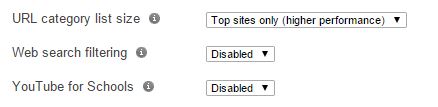
2) Enabling “Full List” for the URL Category Size in Content filtering

3) Enabling Web Search Filtering

4) Enabling Youtube for Schools

fulllist

Unless these options are set as above — SQUID PROXY IS ON.   I have caught Squid malforming HTTP requests in the past, and had it happen recently with a proxied session that didn’t like being proxied (yes say that 5 times fast)  bottom line, until I set as above – Squid was on and there is no real way to know.

So when in doubt – lose the calamari and test your surfing.

Dedication Sickness – How working hard can hurt you permanently.

In the IT industry, we work evenings, nights and weekends.  It is just part of the job that we do.   In our early years many of us worked very hard trying to earn our place among the technology greats, and part of doing that was paying our dues at 1:00 AM.    These were great times for many of us, and the best learning opportunities were under pressure.

This is my story.   This is not some contrived blog post based on studies, this is what happened to me 15 years ago, so if you are new to the industry — keep reading.

The longer you work, the more you become sleep deprived.  The National Highway Traffic Safety Administration estimates that fatique is the cause of 100K accidents and 1,550 fatal accidents every year — the great risk is with people under the age of 25.   So what does that do to a coder up at 1AM, or how about a network analyst working on a BGP problem after being up for 18 hours.

Dr Eric Olson from Mayo Clinic explains that during sleep your system releases cytokines, which help you sleep but also increase to help with infection and inflammation – or help deal with stress.   If you do not get enough sleep, your system does not have what it needs and your entire immune system suffers.

I could go on for paragraphs about lack of sleep, insomnia, depression and anxiety, but the issue I want to bring light to is more about something I will call “Dedication Sickness”
200316789_4c557467c0_b

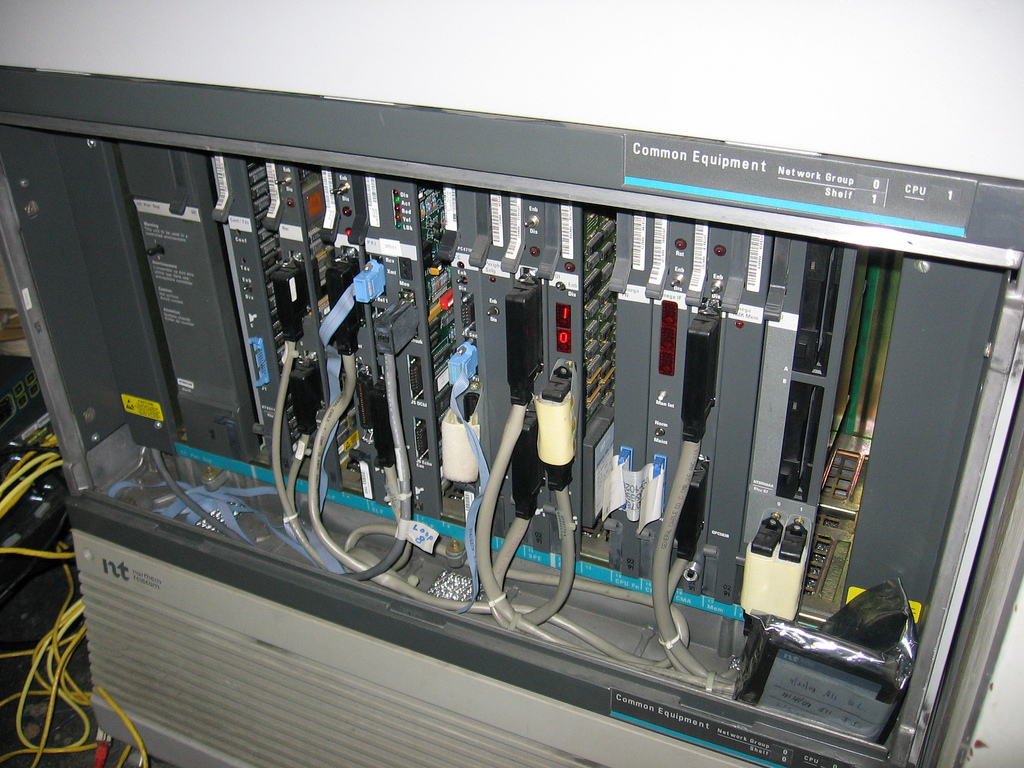
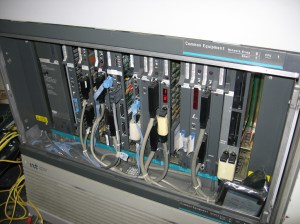
In 1999, while working for a large telecom company, I was a young 19 year old professional working on high end Nortel Networks platforms.  It was a great time in my career, working Option 11 all the way up to the big 81C PBX systems.    Large voicemail platforms even cut my teeth of Symposium Contact Centre.    Right in the middle of my career boom, and while at the top of my game I had a Friday night that would tickle any geeks fantasy.   Thursday was super busy, I was assisting with a large roll out at an insurance company that week and was pulling extra hour, and extra credit with the bosses by working until midnight – 1 AM every night deploying handsets.   Tonight I didn’t leave until 4.

M2250-2

I had started my day Friday morning with 2 hours sleep and my typical list of field tickets, a few phones to program, a card to install, nothing major.   I headed into downtown Toronto and started my work.      That evening I had a voicemail upgrade planned from Meridian Mail or CallPilot 1.07.   Why do I remember the version?  Well, if you are a CallPilot person you will know why, the upgrade was planned to go basically without a hitch.    I arrived around noon to start work, and the cut over was planned for 8PM.    At 8:01 I throw the switch, and everything was great, I was on cloud nine and packing up.
31czkDK+a4L

That’s when I got a call from someone else at a large financial firm, they had been working on an integration issue with Symposium Link for several hours and were getting nowhere.   I headed over at around 9 PM only a few blocks from where I was working.   This was an integrated contact centre with screen pops, desktop integration, database dips, the works — in 1999, I was super stoked to be helping on this one.   We worked until some time around noon the very next day.   Just before I left I remember using the bathroom and while washing up, my right eye was not closing right and I felt weird.   I also had some pain in my right ear.

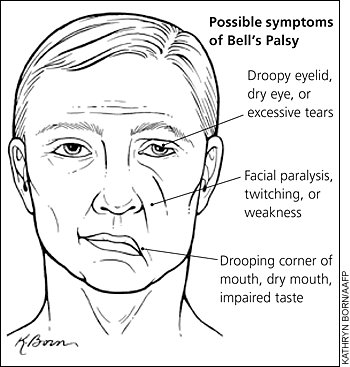
Sunday is where it all went pear shaped.   I woke up unable to see out of my right eye, my eye was crusted shut.    I immediately got myself off to hospital where I was told that I had a condition called Bell’s Palsy.
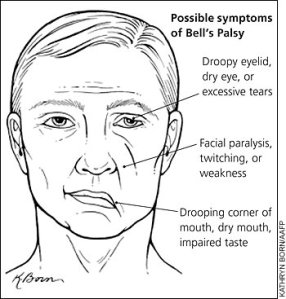
bells-palsy-symptoms

It turned out I had an ear infection I didn’t know I had, and my lack of sleep over the past few days coupled with almost 48 hours without sleep resulted in that infection spreading to my facial nerve.

From Wikipedia..

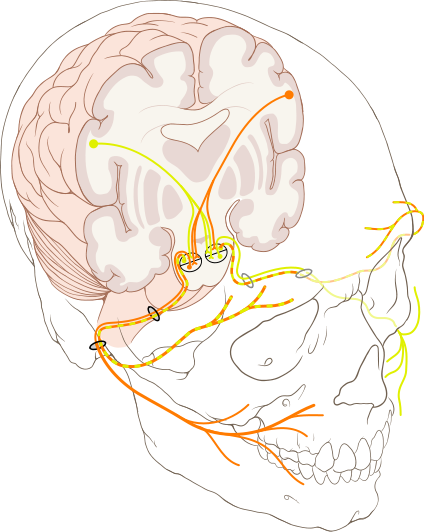
Bell’s palsy is a form of facial paralysis resulting from a dysfunction of the cranial nerve VII (the facial nerve) causing an inability to control facial muscles on the affected side. Often the eye in the affected side cannot be closed. The eye must be protected from drying up, or the cornea may be permanently damaged resulting in impaired vision. In some cases denture wearers experience some discomfort. The common presentation of this condition is a rapid onset of partial or complete paralysis that often occurs overnight. In rare cases (<1%), it can occur on both sides resulting in total facial paralysis.
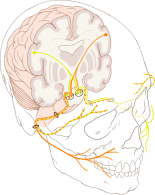
424px-Cranial_nerve_VII.svg

I spent the next 8 months in recovery, taking drugs that cost me close to $600 / Month, but luckily my employer foot the bill (actually the owner foot the bill on his personal credit card).  You know how people say you don’t know how someone feels till you walk a mile in their shoes?   Well, I spent 8 months with a physical disability, and I saw every single one of you that looked at me funny.  I was treated differently, spoken to differently and I felt awful.

Crazy anti-viral medications,  steroids that turned my stomach inside out and electro shock therapy.     I had to lubricate my eyes with goo every night and tape them shut.    The list goes on and on.  It was not a fun time.

This condition never went away 100%, to this day I have partial facial paralysis that I can feel constantly – as I write this I can feel it.   All because that many years ago, I didn’t know when to say enough is enough.

I now have a condition called synkinesis.    When the nerves broke during my condition, they normally grow back correct, but some of mine crossed (yes insert all the — yes Justin does have crossed wires jokes) the regrowth of nerves that controlled my eye lid, crossed with my chin and now when I blink, my chin moves sometimes, it’s quite annoying – and something that cannot be repaired.   I also ended up with Tinnitus – which seems to come and go since then.

Am I getting my point across?

If you are an employer,  you have a duty to watch out for your people.   I am proud to say I work for a company that closely monitors the work level of the staff to ensure things like this never happen, but I am sad to say most employers I have worked for not only fail to monitor for this, they drive people to work as many hours as they can.

If you are a professional, and somehow came across this blog entry and feel this affects you – send this blog entry to your employer.    Don’t do it,  I have permanent physical effects from working myself too hard, and they are with me for life.   Be reasonable with your work expectations with your employer, and do not think “but I need this job” — but you need your body and your life.

Thank you.

Rally Pace Notes… What does it all mean?

Ever watched Rally videos and wondered —  What is all that talk?

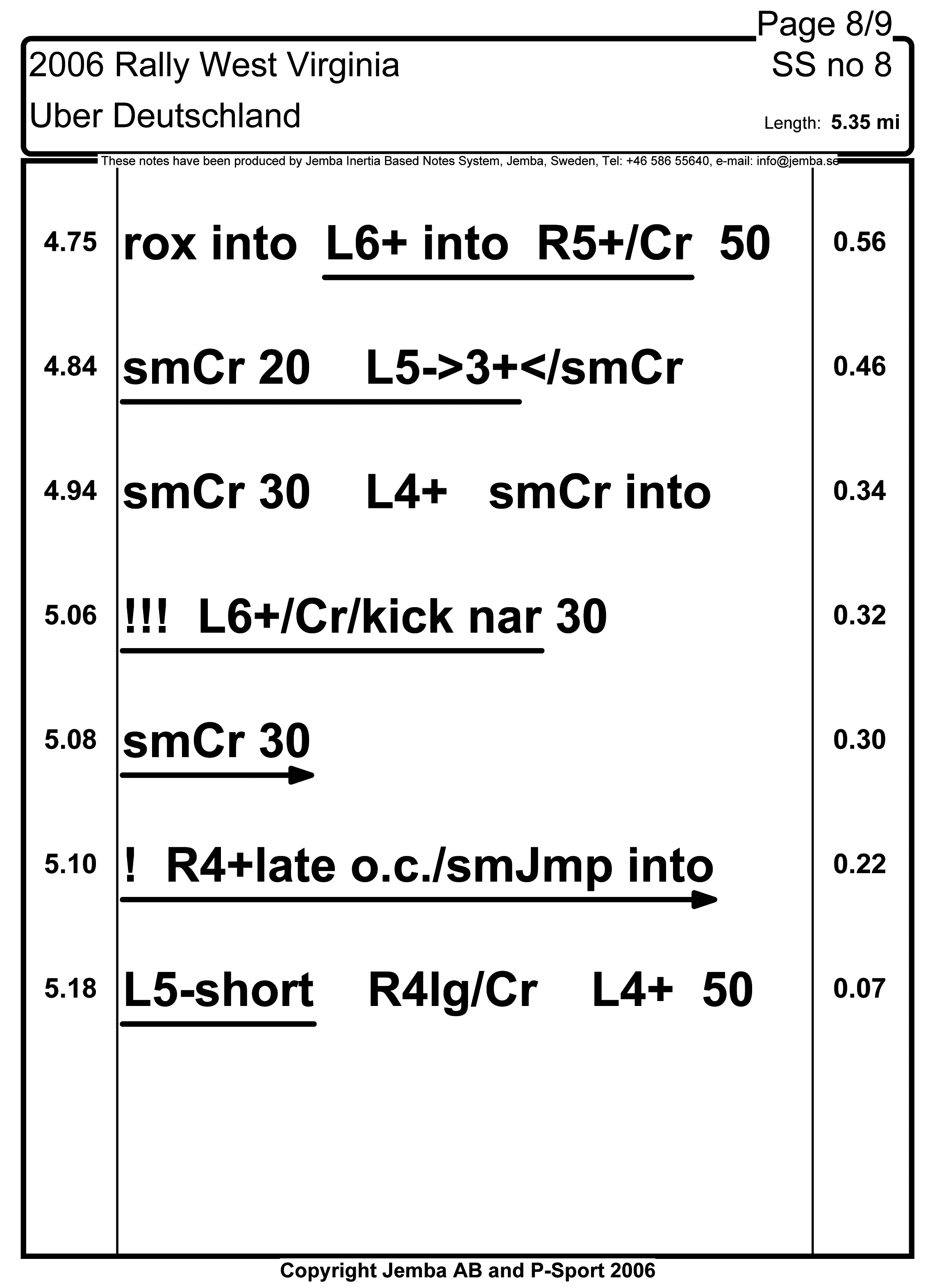
Those are pacenotes – a system used to tell the driver what is coming next.   However not all pace notes are made equal.     The idea is if done perfectly a driver could operate a rally car with their eyes basically shut.     The co-driver / navigator is reading notes, provided by the Rally, or written by them like this….

S8P8

Drivers use different systems depending on the driver.   Russian born but Canadian rally driver Leo Urlichich @crazyleo has a very custom notes system that includes finnish words and other phrases that only those who have worked with him will ever know, but he claims helps him greatly.

A co-driver can actually control the speed of the rally car, by adjusting note pacing, inflection, and timing the driver will actually drive faster or slower.   Many co-drivers really feel that they are actually in control of the rally car.   Co-Drivers / Navigators play a very significant role in the sport, they write/revise and arrange pace notes, do timing calculations, and are very involved in vehicle service on the roadside.    With the amount of work going on by the co-driver, many get road sickness from not looking out the window while reading notes and some use ginger, anti motion sickness patches and other methods to help deal with it.   Most cars — have a bag somewhere on board.

Canadian co-driving champion Alan Ockwell recently sat down with CRC Rally TV to talk pace notes and explain what this all means.  Alan also runs a co-driving school with the Maple Leaf Rally Club for those who really want to learn from one of the best co-drivers in Canadian history.

Canadian Rally Update – Baie Highlights / Black Bear

The CRC episode from the team at CARSRALLY on You Tube is not out yet, but we do have some highlights from the recent Rallye Baie Des Chaleurs in New Richmond QC saw some amazing action.     With Antoine L’Estage and Alan Ockwell taking the event by 3 Minutes and 28 seconds — it really was a good battle.  With Antoine dropping to third during only the second stage there was time to make up.    Smart choices throughout the day resulted in catching up and by the seconds leg at B1, Antoine took the lead and didn’t lose it, with Joël Levac / Stéphanie Lewis on their heels the entire event, at one stage within 1 second finish time.

Look for the CARSRALLY team to release a full CRC episode in the near future.

Continuing with coverage of the regional Ontario Provincial Rally Championship saw Sylvain Vincent and Dominique Cyr bring home the win with only 17 seconds lead with Martin Donnelly and Angela Cosner trading stage finish wins throughout the day.  An unfortunate conflict with a tree hurt Gary Sutherland and Kelly Mathew who were in contention to win the 2WD For this event, the car was not damaged, but with nobody to pull them out they had to wait for help from the sweep team.

IMG_7029

I provided CAR 99 support for this event and we helped 6 drivers throughout the day, with only 11 entries that means we put the hook on at least half the field with the Ontario Rally Sweep Team.   Good news, no medical support was necessary so my co driver Scott

11737888_10155779064795291_3936161399896219707_n

Black Bear is without a doubt a preview for regional competitors for the National Rally of the Tall Pines with many of the roads shared between the events.  Black Bear has a reputation as a “Car Killer” — including my own Car 99 took significant body damage and a hurt power steering system.

IMG_6782

One major off saw a competitor with large jump, bounce and then off against a tree.  Reminding us again that safety is a must and please – do not try this at home.   More coverage from the OPRC team when the video arrives.

Photos are courtesy of the  team at CDNRALLY.COM

IMG_6868

Three weeks to the Galway Cavendish Forest Rally and we are providing navigational support for the Ontario Rally Sweep Team.

Troubleshooting Like a Fish

When visiting an event like Cisco Live! it amazes you how some sessions strike a chord.   Smaller sessions like Catalyst 3K with Samer Theodossy @SamerTheodossy and his amazing team, innovating on the 3K platform.   Larger sessions like this one..

2015-07-13 15_50_20-BRKARC-2002.mp4 - VLC media player
You can search by BRKARC-2002 – I highly recommend watching the 2015 edition from San Diego, as it far exceeds the 2014 version.    The session is available on Cisco Live 365.

https://www.ciscolive.com/online/connect/sessionDetail.ww?SESSION_ID=83413   — Registration required

CCDE and Dual CCIE – Denise “Fish” Fishburne @denisefishburne is the Customer Proof of Concept Team Lead at Cisco.   Basically this means that Denise troubleshoots for a living and “makes things work” or works on the “Yeah show me that working” team.

Denise runs a great web site with even more great information – http://www.networkingwithfish.com/ – A bio from the website

Denise “Fish” Fishburne, (CCIE #2639, CCDE 20090014) is a team lead with the Customer Proof of Concept Lab (CPOC) in RTP, NC. In this role, Denise has the unique opportunity of helping customers see their network dreams move from conception to a reality. Denise has been with the CPOC for over 13 years and has been with Cisco 18 years. Fish loves troubleshooting, learning, & passing it on. She has been regular speaker at Networkers/Cisco Live since 2006.

The attempt here is in 2 hours to take 30 years of troubleshooting experience from Fish and download the method into our brains.   As someone only 18 years into my career, yes, some of this was a bit of a review, however reminding yourself about method, avoiding tunnel vision and getting out of your own way and the importance of good documentation was excellent.

I was accused of being a “sick pup” by Fish when I suggested that intermittent problems were fun (That’s me in the bright green golf shirt in the front row)

This was my favorite session at Live! and it was not even heavily “technical” – however the message was spot on.     It does not matter if you have been in tech for 2 years or 20 years, this session is a must.    If you are a manager of junior resources – give that resource 2 hours and have them watch this session as the concepts explained by Fish are absolutely spot on.   It is technology experts, with 30+ years experience who take the time to share their knowledge and experience with others in the industry that are a special bunch of people; not to mention Fish is an absolutely amazing human being.

On our last day I mentioned to Fish that the work she was doing, teaching sessions like this and sharing knowledge is of such amazing benefit to young professionals, and to never let anyone take that away as it is so vital in our industry for this type of knowledge and experience to be passed on.

Meraki Guest Access – The Better Way

More and more clients are providing MORE access to guests, than corporate users, Meraki works very well when you assume the old way (Open for office users, restricted for guests) which means that you need to do a few things different from the manual or normal.   The major benefit here is the flexibility of group policies when you use this method.

The original title of this could be a few things (Link Bait!)

Meraki Guest Access W/Group Policies

Meraki Guest Access In Bridged Mode W/Client Exclusion…

Meraki Guest Access where guest access is less restrictive than default

More Flexible Meraki Guest Access

Issues Discussion

One of the best things about Meraki is that Guest Wireless is only a few clicks away, typically you use NAT Mode to provide client exclusion,  firewall the users from accessing corporate resources, shape the traffic, and then perform content filtering at the edge.

The only downfall is – this assumes that your default filter on your firewall is what you want for guests.   Unless clients authenticate with active directory, there is no way to assign a policy to them as they are all NAT’d with some random IP address by the access point.   Even using the built in Meraki RADIUS and creating a “guest” account does not allow you to assign a group policy.

This is where the Meraki Integration falls over a bit,  the extended content filtering capabilities of the security appliance, live on the security appliance.  In order for me to filter content (web) I need to get the traffic over there first, in a way that can be identified, and then I can put a content filter on it.

It would be easier if I could in some way just tell that SSID — all users on this SSID, have this group policy, but I cannot do that, those policies are a security appliance feature – not wireless.

There are 3 ways we can content (web) filter any traffic on Meraki

1) Default Policy – If it does not have a policy, we use this.

2) AD Authentication – We can assign AD Groups a Meraki Group Policy.

3) Segregated VLAN – If you create a VLAN in the security gateway, you can assign a group policy to anyone on it (I wish I could do that, to an SSID!)

The issue is that the very easy to manage NAT MODE which also provides client exclusion – only goes over the default VLAN of the AP – you cannot select which VLAN the SSID is on, if it is in NAT mode.     Which means that I’m stuck with default policy for unauthenticated users.     This also means no client exclusion.

Solution

Here is a way to run guest wireless on a segregated SSID and segregated VLAN

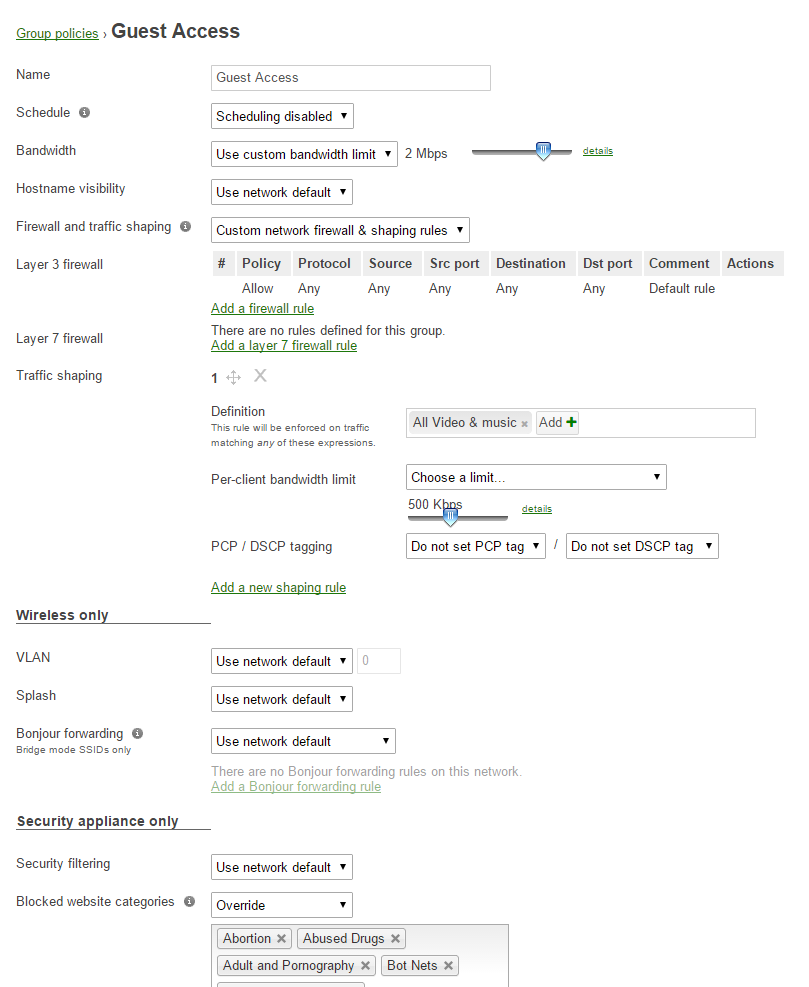
1) Go into group policies and build your guest policy.  This is the real benefit of this method, you can build a policy for guest networks now, along with schedules, shaping and content filtering and it is all visible in this one screen.  You can even create flexible filtering based on schedules which you cannot do the other way.

2015-07-13 14_42_54-Group policies configuration - Meraki Dashboard - Montreal QC - wireless

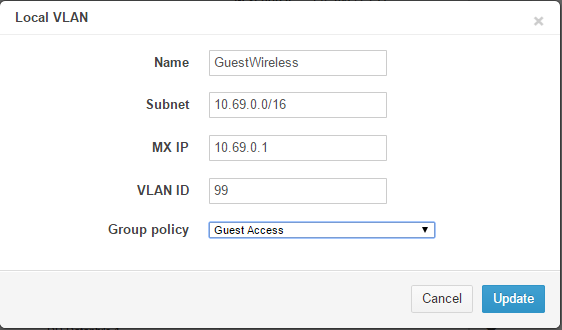
2)  Create your new VLAN in the security appliance,  put it in some kind of futz IP scope that will not interfere or be used anywhere else.  Assign your guest policy to this VLAN

2015-07-13 14_41_54-Addressing & VLANs - Meraki Dashboard - Montreal QC - appliance

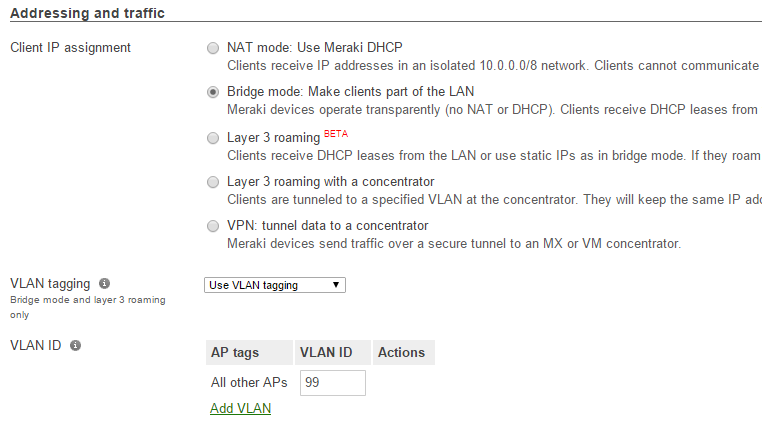
3) Create the new SSID, and assign it to that new VLAN.  You can use any Association or Splash page option that you want at this step.   Make sure you use Bridge mode and Tag to VLAN 99

2015-07-13 14_45_15-Access Control Configuration - Meraki Dashboard - Montreal QC - wireless

4)  Now create a firewall rule by clicking above on the firewall and traffic shaping link

2015-07-13 14_46_51-Access Control Configuration - Meraki Dashboard - Montreal QC - wireless

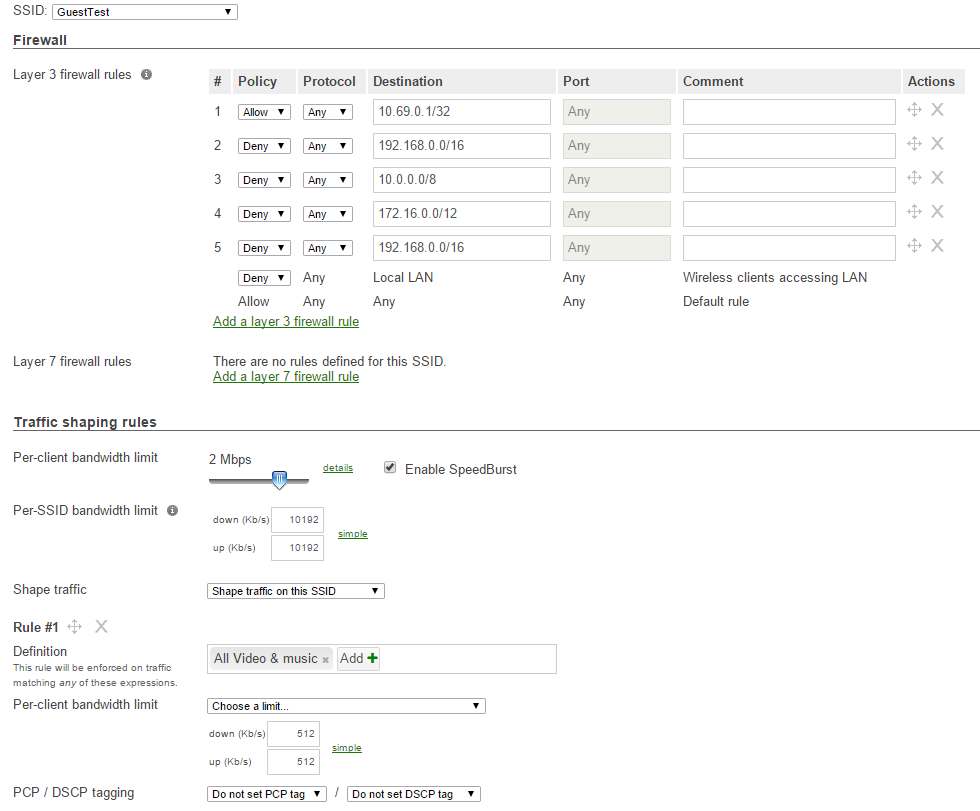
5)  You want to DENY all the RFC 1918 (Private) addresses,  but ALLOW your default gateway address, and also click “Deny” for the “Local Lan” option.  This will prevent users from talking to each other (even on the same AP).  If you want some extra shaping, do it below, on guest I like to limit their media streaming to 512K, it provides enough for Youtube SD, but does not allow 1080P streaming.

2015-07-13 15_06_35-Traffic Shaping - Meraki Dashboard - Montreal QC - wireless

6)  TEST!

You are done,  test it out and make sure it works, ensure you cannot reach any resources you want restricted and enjoy your new “Group Policy” controls for guests

Windows NAP as RADIUS in a Windows 7 Server 2012 Wireless World

Microsoft, this is why people do not deploy NAP, NAC and other things like this, small little problems that take hours to fix – and then when something goes awry later on, people pull their hair out.

If you are running Windows 2012, with Windows 8 Desktops,  everything is happy in your world.

The same is true for Windows 2008, and Windows 7 Desktops.

However as Microsoft changes things, and starts to deprecate protocols, features and functionality we keep running into cross version funnies, here is one.

A typical wireless network with 802.1X Enterprise Auth requires a few things.

  1. AP’s or a controller that knows where to go for authentication
  2. Some kind of RADIUS server that can respond to auth requests
  3. A certificate that is trusted by everyone involved — trusted and apparently formatted right.

The 1st and 2nd parts are pretty easy, but the 3rd, that’s where things get interesting.  First it’s not totally obvious that Microsoft NPS needs a certificate, and to add insult, you need to use PEAP instead of Password Authenication — but more on that later.

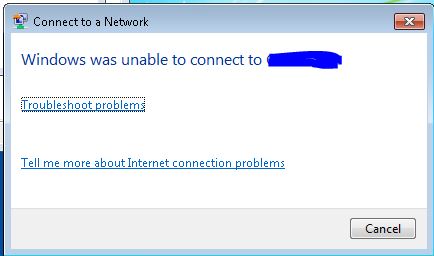
While configuring a clients Wireless for 802.1X authentication, I ran into clients who would refuse to connect, they were Windows 7 clients.    Windows 8 clients, mobile devices were all fine.

Capture3

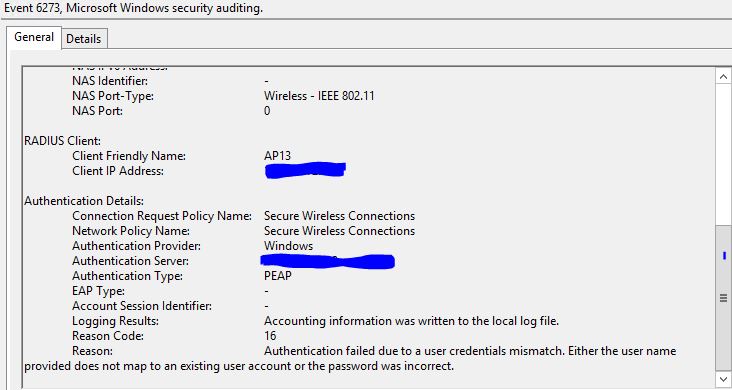
Ok….. So let’s go check our event log on the NPS server….   We see Error 6273 Reason 16

Capture4

Ok..  so Authentication failed due to a user credentials mismatch.  Either the user name provided does not map to an existing user account or the password is incorrect.      This is easy…  Wait..  is it?     I clicked on the network, it used my WINDOWS CREDENTIALS..  I did log on to this laptop right?    Let’s do the logoff/logon dance, make sure we are wired, and we know the cred’s are right…  Did that.  Logon to another PC — check.  Logon to a DC directly with same test account — check.  Ok we know this user and password are fine.

I wish I could find something that proves why this isn’t working but I ran across this article
https://technet.microsoft.com/en-us/library/cc731363(v=ws.10).aspx

When selecting a certificate for NAP
“Certificates that do not contain a Subject name are not displayed.”

Oh, well in 2012 they are…  That’s because Windows 8 clients are OK with that…   Except Windows 7 clients ARE NOT.

I was also tossed the wrong way by multiple articles that claimed it was something to do with the “validate certificate” checkbox — which by the way, should be checked, why would you EVER turn off certificate validations checking!    If you do that, cred’s are easily stolen by nearby attackers.

http://blogs.catapultsystems.com/jstocker/archive/2013/12/13/mystery-solved-windows-7-and-windows-8-treat-validate-server-certificate-differently-in-802-1x/

So yes, this is a bit of a ranty post, but I want to get down to this…   Let’s make this work.

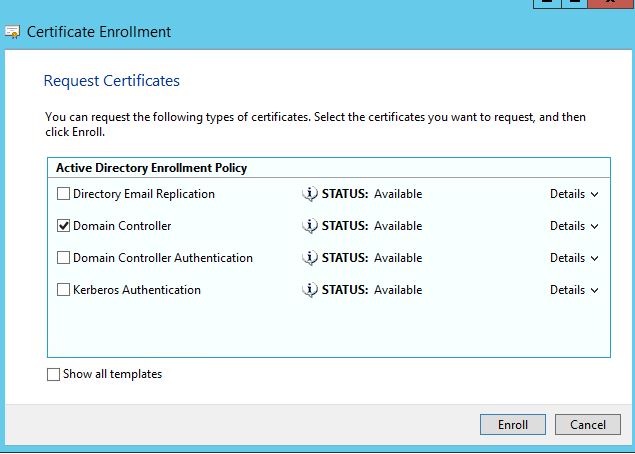
The key is when you request your machine certificate.

Start your enrollment

Capture5

MAKE SURE YOU SELECT DOMAIN CONTROLLER — Not Authentication or Kerberos — as much as those might sound like what you want.  Those certs would be published, without a subject.   Click Enroll, no need to modify more

Capture9

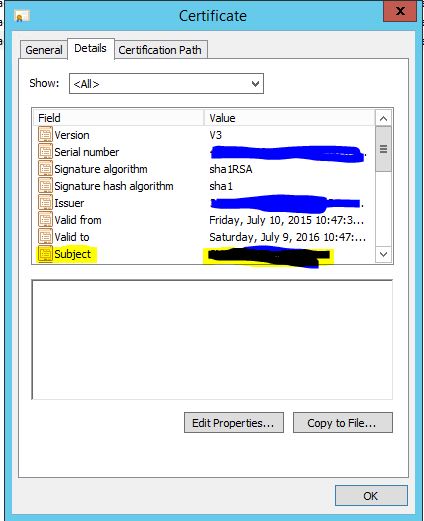
No go back and open the cert you just created…    Make sure the “Subject” line has something in there,  yes, the yellow bit that I have blacked out, should have the computer name in there.

Capture10
Here is a good guide an example to RADIUS with NAP for Meraki.   It is the same for any other wireless provider.    Use this guide to finish up.

https://shabiryusuf.wordpress.com/2012/12/24/meraki-network-policy-server-nps-and-radius-with-wpa2-enterprise/

In the above guide it calls out the PEAP section, make sure you select the cert you just created.

Capture11

Another common mistake…  In the box below you should see Protected EAP (PEAP)   DO NOT ADD MSCHAPv2 “secured password”  — again, it might sound like what you want, but it is not.

Capture15

So that’s it, yes a little bit ranty.    This needs to be easier, if I was a powershell guy, I am certain I could write a script that just does this for me,  you can even add radius clients with New-NPSRadiusClient and create all the policies in PowerShell, but I am simply not a programmer.

Microsoft — this does not need to be this difficult.

Meraki MX, The Block Page, and DNS.

Ran into an interesting issue today related to a Meraki MX deployment for a large multi site customer.

Normally in a Microsoft built network, you want all your clients and servers to use the Microsoft DNS infrastructure.    Let us be clear, it does make things a little easier when Microsoft machines just know about each other.

I ran into a problem where the Meraki MX block page was not showing when users attempted to use regular HTTP web sites.   On HTTPS sites, no block page is shown, that is by design, however non SSL sites should see a block screen.

A little background..  When you try to visit a page that is blocked by Content Filtering with Meraki – you will be greeted with a screen like this..

merakiblock

How do we get this page to display?    The Meraki MX intercepts the session and sends a HTTP 302 Moved Temporarily message to the browser and redirects the browser to a URL like this.

http://wired.meraki.com:8090/blocked.cgi?&blocked_server=&blocked_url=http%3A%2F%2Fwww.beretta.com%2F&blocked_categories=bc_036

If you resolve wired.meraki.com on the internet it resolves to an IP of 54.241.7.184

Locally the DNS for wired.meraki.com will resolve to your Meraki MX — that is if you were using your Meraki MX as your DNS.   In large Microsoft deployments that DNS server might use root hints or forward lookups somewhere else on the network,  so the response would be 54.241.7.184.

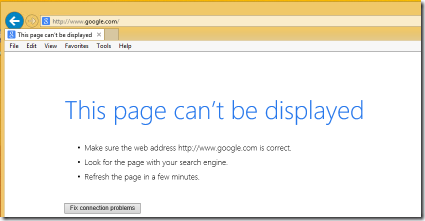
Why is this a problem?  If you look at the URL, you will notice that it opens port 8090,  a quick check of the internet IP 54.241.7.184 will show that port 8090 is not open on that IP, so if the client resolves wired.meraki.com and does not get an IP of an MX SOMEWHERE on the network — your client is greeted with

image_thumb12

So how do we fix this?   You have two options

1) Make all your clients use a Meraki MX, or a DNS server that always sends forward lookups through a Meraki MX device  (Good luck, the Microsoft Server team is probably not going to want you to change your client DNS settings)

2) Add a host file entry to the workstation (No!)

3)  Add wired.meraki.com to your Microsoft DNS.

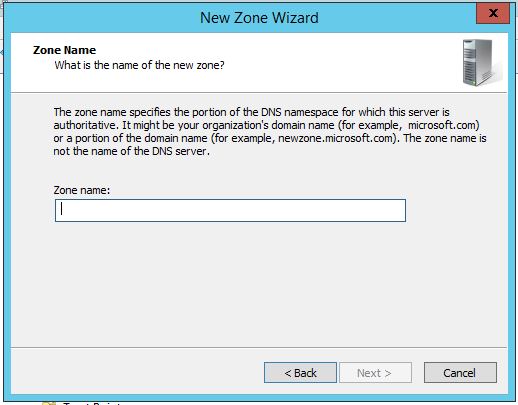
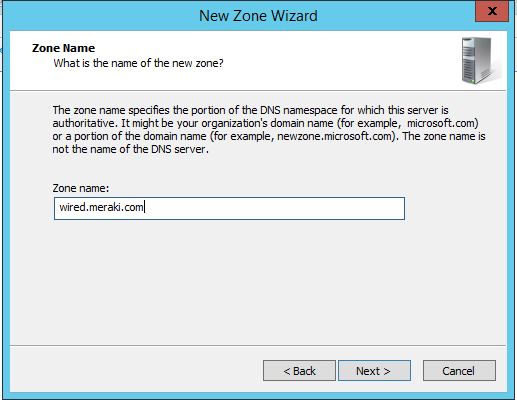
So going with option 3,  if your Microsoft DNS add a forward looking zone called “wired.meraki.com”  and then create an entry pointing towards your MX, like this.

1) Create a forward lookup zone called “wired.meraki.com”   — NOT MERAKI.COM  if you do this you will prevent your devices from contacting the Meraki Cloud Controller.

merakidns1

merakidns1

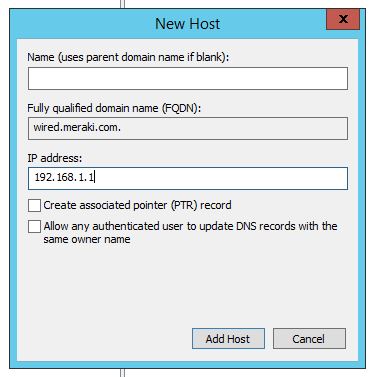
2) Create a Host (A) record like this – nothing under the name, as we want the wired.meraki.com domain to respond,  replace the IP address with the IP of your MX.

merakidns

If you have multiple Meraki MX devices create multiple entries in your DNS,  the machines will always choose the device within their local subnet first, if for some reason they do not – it does not matter as the other devices will technically respond, but we do not want those responses from over the WAN.

Hopefully someone else runs into this problem and this can be of assistance.

Disabling 802.11b for Performance – and The Fitbit Performance Tax.

We all look to optimize networks, none more than a geek like myself.    I also recall some of the design discussions I recently had at Cisco Live with @wifijanitor – Steve about how he optimizes wireless networks and decided perhaps I could speed things up.  I was having some issues with my media streamer strangely buffering sometimes, and an AppleTV that sometimes had to buffer,  strange things going on.

Typical geek, I have three AP’s at home, in various locations, I do find that even though I walk around, where I associated originally is where I tend to stay – which as we all know, this is not optimal.  Off I went to start disabling data rates on particular AP’s ( No controller for me 😦 all autonomous at home )

A great article on the topic of 802.11b disabling –  http://blogs.cisco.com/wireless/bring-out-yer-dead-5-steps-to-eliminate-802-11b-from-your-networks

Disabling 802.11b rates is well known to increase performance significantly.    How many 802.11b clients could I possibly have at home,  I checked, not a single device.   Right now.  So I disabled some rates, and things sped up, even some of my media streaming appeared to be running better.

If you have not disabled 802.11b rates on your networks, look into it, recently one of my customers went from 5-6 complaints daily about performance to “Wow the wireless is running great now!” simply by disabling “B” rates.   There is a significant performance increase and it is worth looking into.

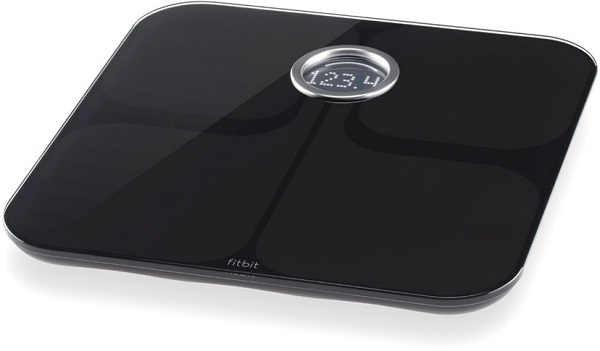
After disabling the rates I received a report a week later our FitBit ARIA Scale pictured below was no longer communicating with the internet.      I spent awhile debugging the scale itself, thinking “This isn’t a wireless problem” — I was wrong.

fitbitmain

A quick show command of my scales association to the AP shows me this.

Current Rate : 11.0 Capability : ShortHdr ShortSlot
Supported Rates : 1.0 2.0 5.5 11.0
Bandwidth : 20 MHz

802.11b only?   Really?    Well it turns out the “scale” would jump on and off the network occasionally, and when it did the “B” tax was just enough to slow things down momentarily.   File transfers would hiccup, videos streams would interrupt.

Another good article on the “B” tax..  http://blogs.cisco.com/wireless/wi-fi-taxes-digging-into-the-802-11b-penalty

Hey @fitbit – it’s 2015, and your device is being a nuisance to our networks.  We are trying to eliminate these 802.11b clients and you are running around selling one.    I’m just waiting for some executive who has one in their office to call IT and say “Why has my scale stopped connecting to the corporate WiFi”  — as disabling “B” rates is pretty standard in the enterprise world.

On the Fitbit web page they do “admit” to it – HERE – but no consumer knows the difference.   It doesn’t come with a warning label that says “May slow down the rest of your home network without warning”.  So if your home router is set to 802.11g only or anything other than 802.11b/g — your Fitbit ARIA Scale is not going to work.

What is my solution?   Well, for now it means turning the 802.11b rates back on, also creating a 5ghz specific SSID network for clients that are 5ghz capable.

The problem is Fitbit is using a $20 GS1011 SoC (System on a chip) from Gainspan, and that module only supports 802.11b  instead of the $25 GS2000 — these prices are QTY 1,  Yes I get it, if you product 1 million of these, even an extra dollar is 1 million dollars in extra cost.

Fitbit is creating a product that is a nuisance to networks and they should fix this as it is hurting thousands of home networks performance, and I am willing to bet 99% of consumers don’t even know.

Cisco’s “Security is Everywhere” Campaign…

One of the campaigns at the recent Cisco Live! in San Diego was “Security is Everywhere”.  During the keynote they even launched one of the new advertisements.  I am highly supportive of this type of advertising, simply because I think it delivers a very realistic message that is believable.     The lead actor actually LOOKS like a few professional penetration test guys I know (and yes, many pen-testers were hackers at some time).    The basis is “Think you’ll spot us?   You haven’t so far”   which is a very truthful and powerful message that will resonate with corporations.

On the other hand, recently I was sent a link to this.   Talk about a 180 degree swing,  this isn’t the message.   I get it, someone who used to work there, or knows someone stole a flash drive.   However it is all very “24”.

The biggest problem from a marketing perspective is that it is all very Hollywood, it does not feel believable even if it is.   Can I draw a comparison to probably the biggest technological “What the hell” moment on TV?   As I don’t think it’s far off.

The “room of geeks” is not totally off the mark for who is hacking, but are the rooms of geeks the ones that companies generally need to worry about?   Not even close, most hackers break in and leave a love note, or download a file listing to brag to their friends.   The professional, many times overseas hacker organizations who attack with financial intent are the ones you need to be concerned with.

Any professional knows that a real “SOC” – Security Operations Centre does not involve huge screens or 45 degree angled command centre desks but intelligently and continually updated software, resources and procedures.

The undertone of socially awkward geeks is very much unappreciated by me personally.   Suggesting that hackers are some kind of smelly fat huge glasses wearing fiend in a messy room full of wires wearing BAZINGA! shirts is a stereotype that we have been spending years to overcome and it didn’t help when they suggest that professional organizations are stupid without the “awkward guy from Cisco”.

This new video misses the mark pretty heavily on the corporate message and the social message in way off the mark.