Malware is everywhere. Symantec reported more than 430 million new unique malware packages in 2015, 36% more than in previous years.
Here are some additional statistics to explain how serious the Malware issue is right now (Statistics courtesy of Symantec’s 2016 Internet Security Threat Report)
One new zero day vulnerability was found every week in 2015 – double the number from 2014
500,000 personal records were lost or stolen in 2015
Spear-Phishing campaigns targeting employees increased 55 percent in 2015
Ransom-ware Increased 35 percent in 2015
20.8 Million devices are predicted by 2020. All of these – are at risk for malware.
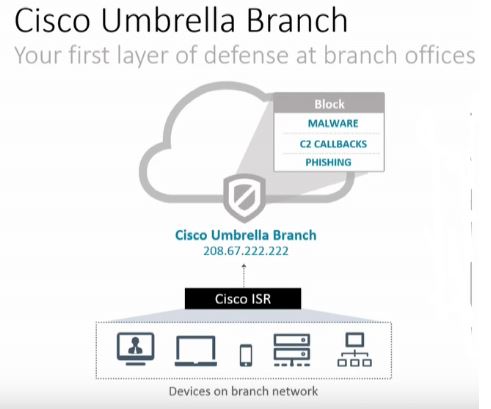
As traffic moves from branch to branch around your environment, we have a few challenges. This traffic may not traverse firewalls and IPS devices, malware protection is common at the edge but not at the branch. Branch offices also sometimes have limited security features, perhaps they only have a small ISR.
Cisco is using a recent acquisition of OpenDNS to help block 90% + of malware. The architecture is called “Cisco Umbrella Branch”.
“What if I am using direct to IP?” – At this point, not yet, but this is a new technology they are working on. DNS powers most malware, so when you add in OpenDNS protection, we can short circuit a significant amount (Cisco says 90%) of malware. A good security protection strategy includes multiple methodologies – this is one more which is quick, short circuits a lot of malware with limited programming and low cost.
With direct internet access becoming less expensive, and customers moving more to VPN technologies as high speed internet becomes significantly less costly than WAN services, end users are accessing the internet directly from the branch.
Intelligence in the Cloud
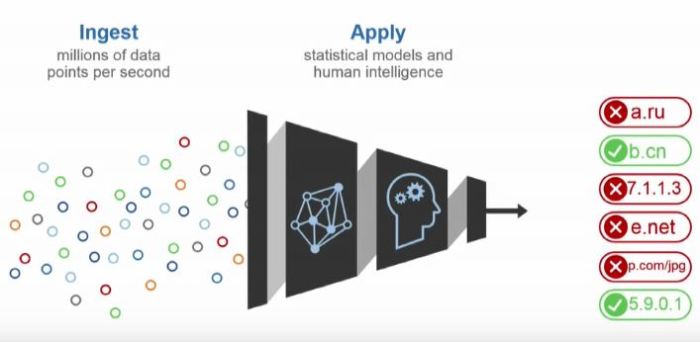
Cisco along with OpenDNS has created an intelligent cloud to manage all of this data, so using all of these data points they can validate the safety of these web sites in real time without having to update any kind of local database. As every query is sent, if a domain is found by the Cisco security cloud, it will be marked as bad very quickly in OpenDNS and you are protected.
How it works
On Cisco ISR 4000 devices, the ISR will register to the cloud, a secure tunnel is created and then it is ready for DNS queries to be filtered by the OpenDNS cloud via the Cisco Umbrella Branch Connector. The Stealthwatch Learning Network will also provide netflow based security analysis.
The intelligence is all in the OpenDNS cloud, and the verdict of the DNS lookups is forwarded to the ISR. All ISR configuration for DNS is managed by the connector once it is enabled.
Keep in mind this is in addition to the rest of the OpenDNS feature set that you will also receive like URL filtering.
All DNS entries are filtered and captured by the Cisco Umbrella Branch Connector – the users and servers do not have to use the ISR as the DNS server, you can have the users, or servers using internet DNS – the ISR will intercept it, tunnel the request to OpenDNS and return the response.
A great idea from @ghostinthenet – Jody Lemoine for a great future idea was that it would be cool if the ISR created a dynamic access list based on good verdicts to OpenDNS lookups so a positive response to a DNS lookup would be required before you would even be allowed out of the office.
The Demo
The team at Tech Field Day has a great demo video on the Cisco Umbrella Branch technology in technical detail.
I have deployed the Meraki MX series many times, along with the MR access points. One of the most popular articles I have written to date was Meraki Guest Access – The Better way an article about another way to deploy guest access in the network with fine grained policies across perhaps multiple networks.
One of my recent deployments I had a customer who wanted to tunnel all guest traffic back to an MX – similar to how his existing legacy wireless system does it, so that he could send that traffic back to a dedicated connection OUTSIDE the firewall. Basically the idea is that we want guest traffic to never get anywhere near the corporate network. We also had multiple sites in play across a L3 WAN, so simple VLAN segregation would not work. (yes yes, I know there are other ways to do it, but we are keeping it simple here)
Meraki MR has the ability to L3 or VPN tunnel traffic back to an MX – but be aware of the following warning and important design considerations.
This configuration is designed for use with an MX in passthrough/concentrator mode, tunneling to an MX in NAT mode is not supported.
This warning comes from the Meraki web site, right here where it discusses the various modes in the MR. The problem is – it will not stop you from trying, and even in NAT mode, the “Wireless Concentrator” options still show up in the MX config screens. It even tries to work if you configure it, and in some cases it actually functions – but – not supported.
Important MR L3 Tunnel Caviats
1) Only Pass through / Concentrator mode is supported
As mentioned above, even though it might appear to let you configure it – and while I have had it working at clients before, it is not supported. As a result there are many core MX features that are disabled, for this reason, I would not buy the advanced security license for a dedicated MR concentrator device. Those features do not really function in this mode if you are using it primarily as a concentrator (they do work if traffic is traversing through the device interface to interface)
2) Content Filtering is not supported in passthrough mode
While layer 7 filtering is a component of the wireless access point – web page content filtering by category is an MX function, and in pass through mode the traffic from the MR’s doesn’t really pass through the MX, so the content filter is skipped. Funny enough URL blacklists do still work, but the categories do not.
3) No DHCP
You don’t get a DHCP server in this mode, which means you need some kind of DHCP for your guest users. Whatever your edge device is or switch could handle this. DHCP requests are tunnelled back to the MX and broadcast at the MX – so you can have a remote DHCP for this.
4) Tunnels can only terminate on the “Internet” interface
If you are trying to do this in NAT mode (Which you shouldn’t be doing) this will trip you up. Either way understand that the way it works is that the MR contacts the Meraki Dashboard and reports the public IP it is on, so does the MX, and then the VPN tunnel is created between the two devices using those IP’s as a baseline. So this traffic is really designed to go to the internet. You can override this behaviour in case your MX is on the inside of the network (has a private IP on the INTERNET interface), if you go into the MX Wireless concentrator screen you can put an internal IP on the MX and make it take the “inside” route if you want. Your mileage may vary here. However if you try to use NAT mode, and force the AP’s to use the “inside” interface of the MX — forget it — that will not work, the VPN process in the MX isn’t listening on the inside interface – only on the outside – again NAT mode is not supported.
5) SSID’s with down Tunnels do not transmit
If your MR cannot open a tunnel to the MX – the SSID will NOT transmit. So keep this in mind, if you do not see the SSID broadcasting out of your access point – that is a real great indicator you have a tunnel problem.
You might need 2 MX Devices
So some might ask “Wait, in some designs I might need 2 x MX devices to acheive what I want to do then, one in pass through to terminate my tunnels, and one at the edge” — Yes that is correct. As the MX you use for the tunnel termination cannot do content filtering on that traffic – and it also can not provide DHCP, you will need another device to get involved in this case. Another MX would be the right solution. If you are smart the way you deploy the VLAN’s on the second MX, you could create different SSID’s with different security zones and it would be quite easy to manage it all as well.
Watch out for hair-pinning
You may run into some hair-pinning issues with this design, so be careful of your packet flows. It’s possible that you could end up going out your firewall, back in, and then back out again. Packet Capture is your friend here.
Use Packet Capture to Confirm
When troubleshooting the tunnel creation on the MR, take packet captures of the AP, while pressing the “test connectivity” button in the SSID configuration – you should see the MR attempting to bring up a tunnel with the MX – do the same on the MX interface as well to see if there are responses. Isn’t it great we can take “remote” PCAP’s on this platform.
I hope this provides everyone with some important rules when it comes to this design, and tips on architecture for your next project.
It has been a few weeks since the end of Cisco Live 2016. I was originally targeting my blog post to be right after the event – catch all of that post event excitement.
I wanted my post to be more of a retrospective, how I feel about the event – where the benefits are for ME.
Each Experience is Different
If you asked 25 people how Live was for them, what their plan was, you will get 25 different answers. I have a few goals at each Cisco Live event that I attend.
1. Network with colleagues and good friends
This one is HUGE for me. In life, business and technology there is no better resources than those you have around you. I have met some amazing people at Cisco Live. True technology visionaries – people who really do think differently, and people who thing abstractly.
On the surface it sounds like a kegger party or some kind of mass social event, but it is nothing like that, unless you were a fly on the wall to the conversations that we have with each other – it is simply impossible to comprehend. I swear that when this group is together, a high speed multi-gigabit (it would obviously be some kind of mGIG / NBase-T connection OBVIOUSLY 😉 ) connection is created and ideas, thoughts and challenges are transferred at high speed between individuals.
The biggest take away I get from this group is inspiration – a few years ago it inspired me to look within myself, and forge ahead with new ideas. Every year I get new perspectives on technology and my life.
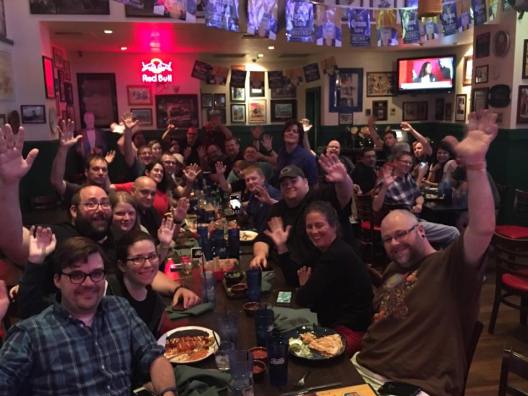
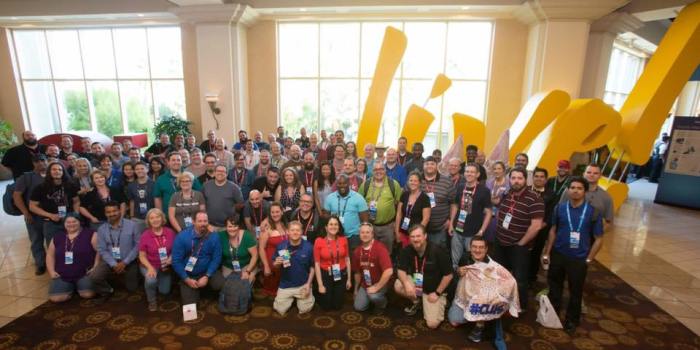
This is the large family of “Live Friends” but this year they really did graduate in my own personal mind from Live Friends to Live Family.
2. Get the update
What is the focus for 2016/2017. What is the new technological focus – yes from a Cisco perspective (see my Cisco DNA series) but more important, what is hot. I mean really hot. Is it IoT technology (slow uptake, but this is starting to actually grab hold), new wireless technologies (802.11AC Wave 2?), new management platforms?
What about SDN? Years ago at Live I remember watching demos on “OpenFlow” and thinking “That’s interesting, but no mass adoption yet”. The key is to see what is coming.
This is your chance to hit up some sessions and get up to date on — whatever it is you need updating on. Don’t leave before Q&A – that could be your chance to spark up an amazing conversation with someone really smart.
3. Find a path for this year
So this really is my secret, #CLUS helps you find your competitive edge. If you want to stay competitive in the marketplace, be the “go to guy/gal”, and keep life interesting – you need to stay ahead. Cisco Live unlike any other event shows you what is coming down the tubes, and in great detail.
Perhaps this year you are planning a big data centre migration and want to design a new state of the art architecture. Maybe you want to build a business plan to revolutionize the way your company uses wireless to drive revenue.
Whatever you are planning for the next 12 months – start planning it at Cisco Live, simply because the resources available to you are outstanding.
3. Geek-Out
If you are passionate about new and cool technology, this place is pretty awesome for eye candy. Virtual reality switch configuration, and big transport trucks full of radio gear, model trains connected to IoT devices. Let’s be honest for just a second – take some time to yourself and go play. It will be the best release your brain has had in awhile – and this type of release is inspiring, it will help you release the kid that is stuck inside of all of us.
My 2016 Cisco Live Take Away
Ok, my intention wasn’t to write another “here is some tips” post – the event is past, but those are the things that I focus on.
For 2016, my goals are exactly what I mentioned above. That being said, the event was 2 days too short for me to get everything I wanted – but there is no way my body could have handled 2 more days in Las Vegas.
Most sessions will be up on http://www.ciscolive365.com in coming weeks, so if you missed a session don’t fret, it will be there.
For this year, it is time to understand Cisco DNA (that is why I am writing my Cisco DNA series) as customers will come looking for it, and Cisco is pushing significant marketing dollars down the pipe on it.
Apple integration is going to be big for collab in the next year, even on the wireless front I can see this being a big deal as well. This “Apple thing” is going to be big for Cisco. Keep your eye on it. Spark + Apple + Video + Wireless = something innovative, I can just feel that.
The second place I go, is the World of Solutions – but this year it was massive – I mean – massive. I could have spent my entire day just in that room, each day and still not spent the time I wanted to. This goes back to value, it is almost impossible not to get good value out of going to Cisco Live – even on just a social / explorer pass.
Now we forge into the last half of 2016, with a new focus, feeling pumped and ready for what is ahead. See you in 2017.
This is a game changer, and this will be a long blog post. Cisco is flipping the script on QoS. Quality of Service – will now become Quality of Experience. This isn’t a marketing term either. Come along for a ride as I explain.
First some references, the amazing team at Tech Field Day – www.techfieldday.com and the Cisco Team who presented at Tech Field Day Xtra at Cisco Live this year provided so much insight. As I talk about this, I will provide some links to videos, or specific parts in that presentation. Some of my graphics have been pulled from that content. Tim Szigeti is an amazing knowledgeable professional a true leader in the field, and Ramit Kanda provides an amazing demo on this great new technology.
A history lesson…
QoS… Since the day I took the Cisco CVOICE course, I was learning about protocols and methods of qualities of service. The construct is simple – we need important stuff to be first. Quickly this became a topic even the top network professionals – CCIE’s couldn’t handle.
Cisco Enterprise has a Vision.. “Transform our customers’ businesses through powerful yet simple networks” — powerful.. yes.. simple.. no so far…
As networks became constricted in bandwidth (mostly in the WAN) we needed a way to constrain less important traffic. The start of QoS was in the VoIP world – as people like me (hard core telephony guys from the TDM days) started to work on VoIP, we wanted circuit switched performance over packet switched networks. Zero packet drops, little jitter and delay.
We started with ToS (Type of Service) – a small field in the IPV4 header that gave us some bits we could set. 3 bits should be enough for anyone — yeah right, just like “640KB should be enough for anyone”. For most enterprises 8 classes is enough – but for service providers, not so much.
Then there was vendors who treated TOS and DSCP bits differently, or put them into different queues and treated them differently
QoS is second only to routing in the network when it comes to adoption – but how many customers are deploying it properly. Stay with me – we have new tools for you.
“It takes [us] 4 months and $1M to push a QoS Change… ” says a Wall Street Financial company.
“It took us 3 months to deploy a 2 line ACL change across 10K devices, which slowed down onboarding of our Jabber application” – says a Cisco Network Architect
QoS is Too Hard
“With QOS – the #1 TAC case report – is missing or incorrect classification and marking” – says Tim Szigeti – Cisco Systems
In a recent group of CCIE’s, and some others who I also respect greatly for their knowledge they all agreed “QoS is too difficult” – just get more bandwidth. Let me provide some illustration. This is the way a 2P6Q3T router would classify these categories into queues.
As I go across my network – each device I have has a different QoS architecture
Let me save you – don’t bother reading the below graphic – you get the point. Can you, as a professional, trap and trace a packet as it flows across the network to ensure it is getting the treatment you want? Can you design how to deploy a new application into this many different queuing mechanisms? Do you even want to?
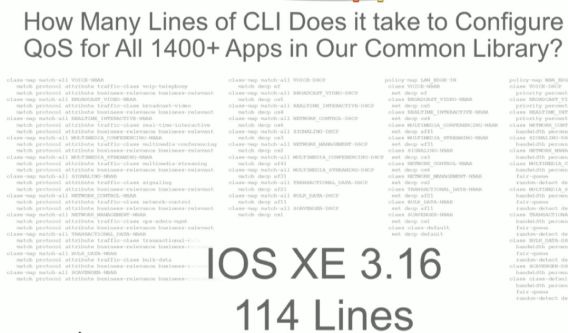
What if I wanted to provide QoS for all 1400 applications that a network device supported?
Here is a hint you don’t want to do that.
“We have done more to advance QoS technology in the last year, than in the last 10” says Tim Szigeti from Cisco Systems.
So Cisco made it better, — but this is still too much
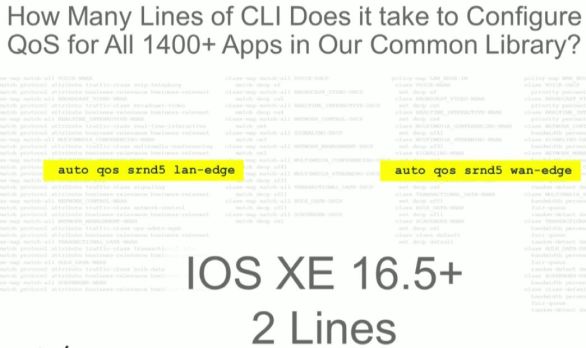
Cisco Validated of Design – Classification, Marking, and best practices – 2 lines of code. This is a huge day for QoS design. This will be consistent across ROUTERS AND SWITCHES – all products, all lines. So even if you are doing this in the CLI this is good news. Cisco is moving to a single design in hardware as well in the future. 5 Queuing structures will be the future – but still only a single reference design. Why can they not create a single structure? Cost. However now it has a reference design.
More Bandwidth Does Not Solve It!
HOLD THAT THOUGHT – No, more bandwidth does not solve QoS problems. It might sound like it does on the surface – lets dig down a bit
“Bandwidth and Utilization is not an accurate way of assessing if there is a QoS Problem” – says Tim Szigeti of Cisco Systems
Security – As a construct, QoS has a place, we can limit risky traffic, questionable traffic or scavenger traffic so that it cannot overwhelm our network and shut us down, and stop the speed of attacks
Cost – You cannot simply add bandwidth forever – your costs would simply continue to go up and up. On that note, until now, it has been cheaper to deploy more bandwidth than configure QoS – in some situations, but that does not address the security concern or….
Buffers – That’s right, buffers. Micro bursts – even with the highest performance switching ASIC – at 1% port utilization, with a micro burst we could see traffic being dropped.
Cisco DNA – Automation
If you recall in my recent article we talked about automation being at the heart of DNA. If we want to make things simpler, automation is the only answer.
Wait a second – isn’t this SDN? No this is automation! Most SDN solutions – including Cisco’s own ACI – include forklift.
Cisco APIC-EM for QoS works with existing networks (brownfield!) – You can even abort the installation APIC-EM EasyQOS at anytime. So if you deploy EasyQOS as I am about to show you – but decide after you do not like it – you can remove it – even if you made other network changes later, it tracks every single change and will set back exactly what it changed to QOS and QOS only.
“People that are really serious about software should build their own hardware” (Alan Kay – 1982) that is why Cisco developed the UADP (Unified Access Data Plane – Code Name Doppler) and the QFP (QuantumFlow Processor – Code Name Yoda)
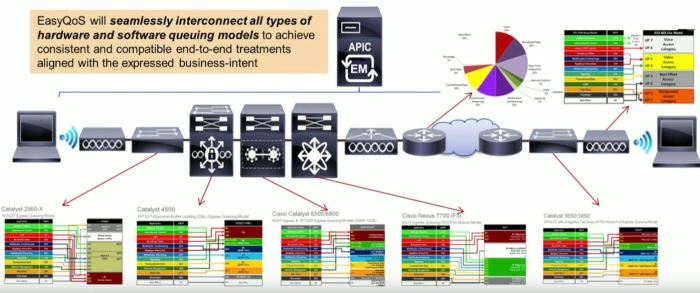
This is all about controlling and automating that high performance hardware and pushing that configuration in a consistent way down to the network
Wait a second ago did you not say many of the queue architectures are different? How do you address that?
EasyQOS – The APIC-EM Secret Weapon for Quality of Experience
Why is this important – the idea is simply this. EasyQoS will allow you to program BUSINESS INTENT in your network. You tell the EasyQoS application in APIC-EM how you want traffic to be treated, classified and prioritized. The APIC will figure out how to apply that business intent – against all of the various QoS architectures in the routing and switching platforms that you have.
QoE via EasyQOS – How It Works
It goes without saying – this is an APIC-EM app. So – go and get APIC-EM installed, and then come back.
The key architectural thing you need to understand is – 3 policy constructs are used here, to abstract 12 classes. You will see that in a minute.
Step 1: Create a scope
For your devices, create a scope in the APIC-EM for your devices, and then add the appropriate devices to the scope.
Step 2: Define Applications
Within EasyQOS there is 1300+ applications that are pre-defined, plus you can define your own applications based on a variety of factors.
Each application there is a traffic class.
You really want to create “Favourites” here, within the interface you can “star” and mark your applications as favourites, this is a good way to track which apps you are actually creating policies for.
Step 3: Define Policy
We need to apply these applications to a policy, within the policy we have classes of traffic – but think of this as business intent – not QoS.
There are three basic classes. You simply drag and drop each application into each policy.
Business Relevant – This has 10 classes within it based on the application, but do not worry, the APIC will automatically define the business relevant apps to an appropriate class. This is all under the covers
Default – Traffic you don’t really care about, this is your Best Effort class
Business Irrelevant – This is your scavenger class
Step 3: Apply Policy
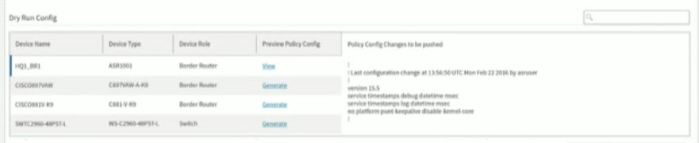
The policy uses various types of connections, today it uses SSH – and YES you can validate the commands before they are sent.
Any interface changes are detected by SNMP, or through polling every 30 minutes in case you change things by hand. The changes are sent out immediately.
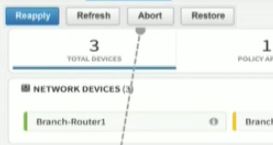
If during the provisioning you realise something is wrong, or something fails – the APIC tracks every transaction on every device. You can abort a provisioning half way through – and it will back out each individual change.
Operational Features
Now we have this running. We have some other cool tools that make our life easier.
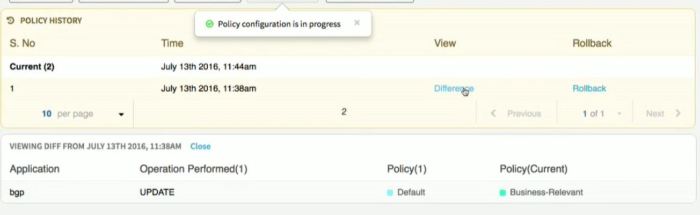
History
The first is a history engine, any changes will be tracked so you can see the changes in the policy over time – so if you make changes, then realise you had an adverse affect, a simple fix is to hit “Rollback” — keep in mind, this could be 500 devices on the network. The old way you spend a month making QOS changes – only to realise those changes are detrimental – you spend a month removing them. In APIC you can make, and rollback these types of changes in literally minutes. Huge cost and time savings here.
Dynamic QoS
This one is pretty crazy sounding, but for VoIP and Video, we cannot always track these by application, they are encrypted or dynamic.
So the way this works is – Jabber or Lync sends a call setup – the APIC is informed of this call, and the APIC sends a NEW QoS policy — for just that call — to all the network devices in the path.
If you are reading this and thinking “So you are telling me my QoS Config is going to be modified every time someone makes a call” — Yes that is exactly what I am saying. I am not sure I am on board with this idea – that is a lot of dynamic network changes. Cisco says “it works!”
Show Me The Money – Path Flow Analysis
This is the most compelling part of APIC-EM EasyQOS. Bar None – Hands Down – Mic Drop.
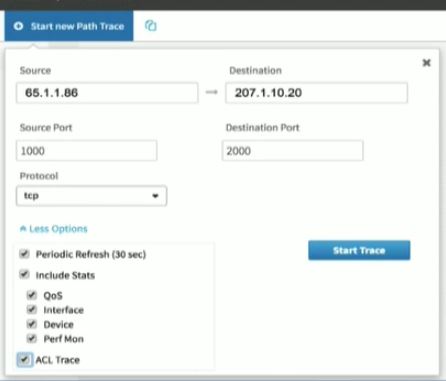
You can perform Path Flow Analysis, on every device – instantly.
Including interface stats
QOS Stats
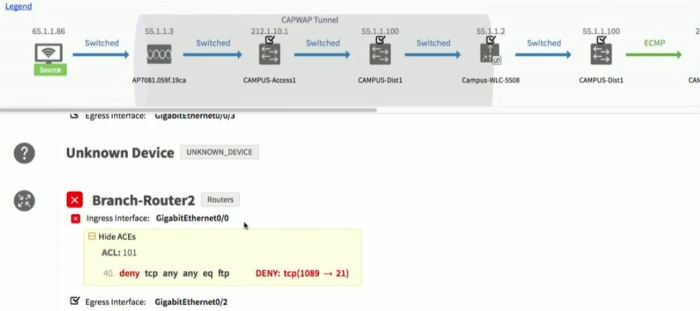
ACL Rules blocking traffic
Interface Stats
Step 1: Input the path trace data
Step 2: Flow Visibility
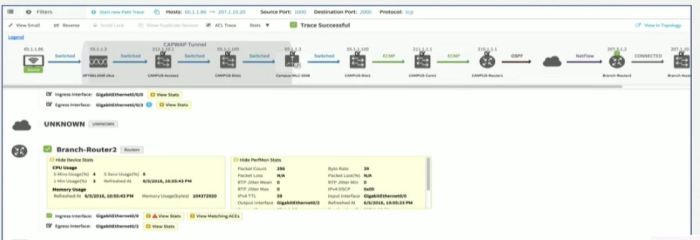
Prepare to be blown away. Here is the application flow. It even looks inside CAPWAP tunnels. If you had to do this by hand you have to do this per flow, in every single device. To set this up alone would take you hours, then analyze the data, then remove that config.
The APIC-EM does all of this for you – in seconds.
Device Health, performance stats, packet loss, DSCP values, Jitter, even routing protocol information. Router CPU level, Memory use. If you are troubleshooting a network – this is literally gold. “All hail the packet – for it runs on the network” did Denise Fishburne herself call someone up and help them build this? They should call this the APIC-EM Network Detective!
Here is a great example of an ACL block – imagine if you had 200-300 ACL’s on this device, finding the one that is causing problems would take you forever.
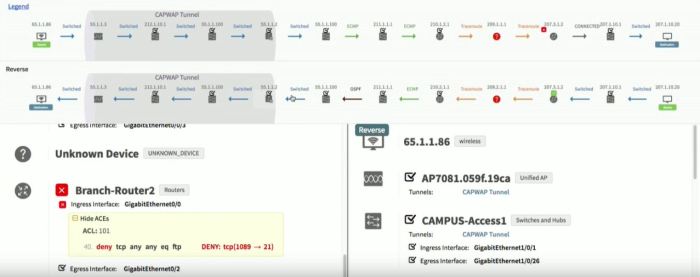
Even Asymmetric Flows. Every device, every hop. Even if you didn’t use EasyQOS this is worth the time to deploy APIC-EM.
Watch the last few minutes of our video from Tech Field Day and be BLOWN AWAY. A room of CCIE’s clapping tells you how amazing this is.
Prove it – with Validation of Experience VoE
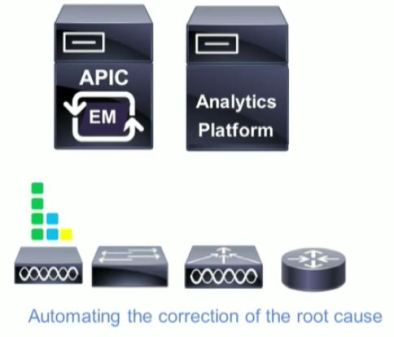
The functional architecture of the validation of experience is an analytics engine. I would like to put a caveat on this discussion – this is still a bit of a proof of concept discussion. There is limited actual capability that you can deploy at this moment – but this is the functional way this will work.
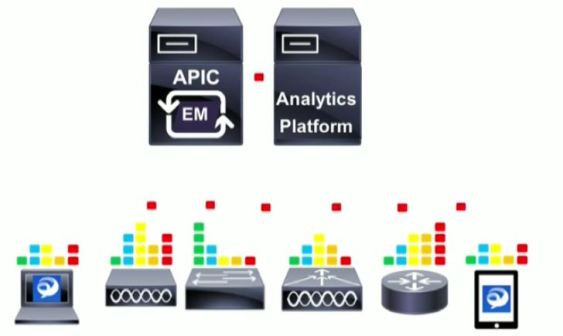
Functional Layer 1 – Instrumentation
Collect all the right things, no silent drops in hardware – collect all the relevant metrics. Right down to the application layer if we can, as an example – Jabber. This means not just network information, but application level metrics like video or audio frame drops. If we want to monitor experience – we need to go all the way to layer 7
Functional Layer 2 – On-Device Analytics
We may not need to collect and return everything, but some of these are critical. So we need to analyse them on the device, decide what is critical and then return that.
Functional Layer 3 – Telemetry
Get the critcal information off the device – we don’t want that data sitting there, we need to collect it to the analytics platform. (Cisco is still working on the analytics platform). SNMP/MIB is simply not enough.
Functional Layer 4 – Real-Time Monitoring
We need to get alerts. Real-Time, not in an hour. If we make a change, and we cause a negative affect to the network, we need to know now. Real-time monitoring of application experience and performance.
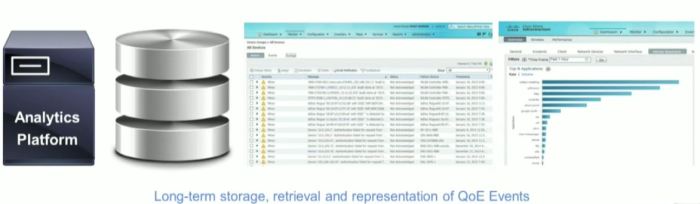
Functional Layer 5 – Scalable Storage and Efficient Retrieval
Store these analytics somewhere, with an interface to access this data. Scaleable storage – even in the cloud. All the information from all of the devices in the same location. This is key, without a complete picture, from all devices and applications in the network – we cannot validate or analyze the true experience of the user.
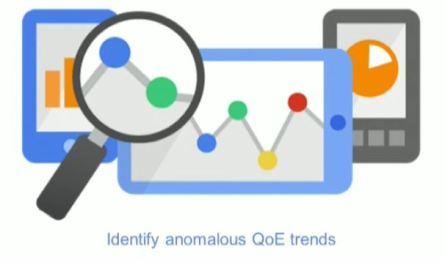
Functional Layer 6 – Analytics
Correlation of data now results in information about network quality. We can identify where problems are in the network or applications.
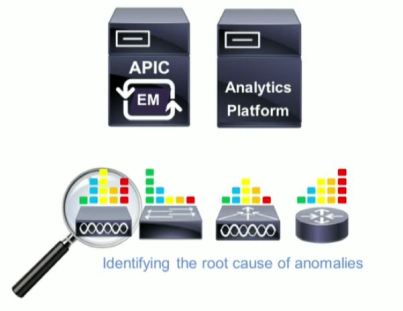
Functional Layer 7 – Troubleshooting
Now can identify the root cause of problems with the network. Remember the quote from earlier – the #1 QOS TAC ticket is incorrect classifcation and marking.
The holy grail – find the root cause – and fix it.
Summary – Justin’s Opinion
So, after all of that – what do I think about this. Game changer. The troubleshooting tools save hours and hours of time, one of my colleagues mentioned “Mean Time to Innocence” MTTI – how long it takes to prove, it wasn’t the network at fault. With path flow analysis like this, we can prove the network out in seconds.
The ability for us to take BUSINESS INTENT and map it to technology in an intelligent way that is automated is how this will program the network to “Intrinsically know what the business needs, and then just does it” — that is delivering on the promise of the marchitecture.
QoS has been way too difficult for way too long, we NEED this type of tool, the cool part is that REST-API’s are all published, so other vendors are already starting to take advantage of EasyQOS in their own applications. I cannot wait to see what comes out of Cisco DevNET. Just imagine the packet analysis and tracing tools that could use the troubleshooting engine in interesting ways.
We are not fully there, or fully baked yet. VoE is still a bit conceptual. What is the holy grail for me would be the following
Program Business Intent via EasyQOS – Quality of Experience
Monitor my network for experience, provide validation of experience alerts.
When problems occur either automatically fix them – or recommend changes.
We are not far from this – the team at Cisco says “it’s in the pipeline”
My recommendation – if you are not up to speed with APIC-EM – you better start, because networks have finally burst the bounds of our brains when it comes to understanding everything that is going on – so you need this automation in order to tackle these complex network and application needs.
References
Tech Field Day Extra – 2016 – Cisco APIC-EM Controller Discussion
Tech Field Day Extra – 2016 – Cisco Validation of Experience with Tim Szigeti
Tech Field Day Extra – 2016 – APIC-EM EasyQoS Demo
Meraki has been in the limelight for some time, however when Cisco started to really put money into the organisation, and let them use some of their IP, the R&D really took off. In the past year and a bit we have seen amazing things come out of the Meraki camp, and the new MC74 telephone is just one of those very interesting developments.
Many call me a “fan boy” but really I am just a “get things done” person – and when it comes to the needs of a large majority of my clients, I can get things done, faster and better much of the time with Meraki.
I really see Meraki as ahead of its time, if you look at disruptive technologies like the Apple Newton or Google Glass – these were all technologies that simply came out too early. This is why I feel many people do not understand the real benefits of something like Meraki.
Why am I calling it “Meraki” – why not talk about switches, routers, firewalls and features. That’s because just like Meraki’s own marketing campaign “Full Stack” I like to call the entire suite “Meraki” – as a single entity.
Automation At Heart
There is two camps out there right now, the SDN camp which is really focused at those doing difficult things many times – and then there is the automation camp which is really more related to doing difficult things easier.
For those in the super huge enterprise, or service provider space, they need to automate difficult things because it takes a long time. For those in Medium business space, we need to automate because it makes what we do easier, Cisco is leading the way with features like iWAN App and EasyQOS are leading the charge when it comes to enterprise automation.
However just like these products are new, and somewhat mis-understood, I think the real value of Meraki is baked right in, it is the ability to automate the difficult tasks that provides value.
If you are an organisation of 100-250 people, your IT budget is not getting big enough fast enough, and your team is not doubling as your workload is – so making things easier to manage through automation and simplification must be a focus.
Time to Value
I keep saying that I want to have a race, pick IT equipment vendor #1, and have the best expert you have build X/Y/Z network while someone does the same on Meraki. Anyone who has worked on the stack KNOWS that the Meraki will be faster.
It’s about workflow and tools. In today’s complicated world of inter-networking technologies, in order to deliver true value I need a management stack, that means products like Cisco Prime, or Wireless Engine, or APIC – any number of tools are needed to provide next-gen network management visibility and manageability. Meraki starts with all of that — done for you — it is running already. This is a HUGE time to value.
What this means is that automated, managed, monitored (all the way to Layer 7) and well operated networks are automatic with Meraki. The deployment tools, management and monitoring are where you start – not what you do when you are finished. This translates to extremely rapid time to value for customers. Add in the template capability and the fact devices are all self provisioning and you can do something that no other vendor will let you do. Program, build and deploy network equipment that is still in transit. Yes, that’s right, normally my clients networks are already configured before the hardware even hits the dock.
New Features – Free
When most clients purchased Meraki products last year, they didn’t get many of the features you have today, Advanced Malware Protection (AMP), iWAN, Port Isolation, templates, NetFlow, these are not small features – these are huge – and with most vendors you would be forced into a costly upgrade – upgrade, click enable on feature – done. That is one hell of a way to deliver value.
Disruptive Marketing
Why did Meraki get as popular as it did, and as a result catch Cisco’s eye? Geeks. Meraki figured out that if they can win over the geek community, they can win over the customers, after all the geeks make the product recommendations. We all knew how they did that — Free Gear — who doesn’t want some free gear to play with at home – Meraki figured out how to get geeks to try their product – fall in love with it, then buy more.
They have also started running “free switch” offers as well if you want to try those out — oh and you keep them when you are done.
This continued with their partner community. You will see partner SE’s labelled as “CMNA” Cisco Meraki Network Associate – of which yes, I am. Once you pass a test, and take training you receive this certification. Why are these classes full of students, over and over and over? — Free Lab Gear — Meraki provides a switch, firewall and AP to each person that passes the course. This also means each and every certified CMNA has their own lab to test, learn, troubleshoot and solve problems with. I have re-deployed my trial firewall at more customers as a temporary trial than I can count, every single one, ended up purchasing a Meraki MX.
Easy to Learn
The interface is just so darn intuitive. Honestly everyone I show the interface to says things like “Wow I don’t need training for this, it is all very obvious” — and it is.
To give you an idea how obvious it is, the Meraki CMNA certification course is a single day. That is right, routing, switching and wireless – in a single day. We are not talking about expert un-boxers either, 802.1X, troubleshooting, routing protocols, firewalling, it is all covered in that single day. Caviet – they do require you to have existing skill-set, CCNA recommended.
Their training is also out of the ordinary, instead of providing you with a long list of screenshots, they identify outcomes as you build your training lab – you are not walked through how to do things – they say things like “Go to the firewall, and create a new vlan” – expecting you to figure it out. Studies have shown 80% better retention in students that figure things out vs those who are walked through something.
Subscription Fears
This is the single biggest argument I hear against Meraki. However when was the last time you purchased switches and routers from any other vendor and didn’t buy their support. Yes, I will admit there are some clients who buy switches without support and then carry spares, but that doesn’t provide you with software support, or a 24×7 helpdesk, when Meraki delivers on value, the support system really does work – with an integrated help system built right into the portal, and no fumbling around to get the vendor access to gear to help you, I swear I save at least an hour per help incident.
With security becoming a huge focus for many organisations, subscriptions can be seen everywhere these days. Luckily you get a huge amount of value from Meraki, integrated AMP and SourceFire built right in to the firewall. Customers who had purchased 3 year subscriptions, 3 years ago didn’t even have SourceFire, or AMP – but they do now. That right there is worth the cost of admission.
Summary
Cisco has left Meraki alone – and that is a good thing, the same thing happened with Linksys as well. The reality of this means the Meraki team can continue to operate as a skunk works building amazing disruptive new technologies. That does not mean that technology has not trickled down from the mothership, SourceFire, PoE power supplies, AMP and many Cisco technologies have found their way into the Meraki line up.
For clients 0-500, Meraki is a natural fit for 90% of them, but just like any product it has to be qualified, and when properly qualified for a client – no product delivers the ease of use, time to value, and overall manageability of a Meraki full stack.
I cannot wait to see what they do with that phone.
Breakfast at Cisco Live! has been a controversial topic, and while @networkingnerd is busy taking care of important topics like fixing the CCIE, I’m going to battle one closer to my stomach.
Breakfast.
We have had quite the debacle when it comes to breakfast, the hot food story back in San Diego was interesting, but this year what we got was continental. Muffins, doughnuts, sugar filled pastry, and mini boxed cereal – and coffee. Let me be very clear, the coffee station was awesome, and appreciated.
This isn’t a typical tweet/blog about how I wasn’t happy with the food – this is about academics, learning and science.
“Food is like a pharmaceutical compound that affects the brain,” – ULCA Professor of Neurosurgery and Physiological Science Fernando Gómez-Pinilla.
These are deep technical topics, there are sessions on BGP architecture – at 8AM. Many people were out until after midnight (yes go to bed earlier if you have an early session – but many do not) . Everyone is sleep deprived going at 200mph at Cisco Live – we need a good breakfast. Even if you were not out until 2AM – breakfast is still important.
This year I resigned to paying out of pocket $25-30 – per day – to get a decent breakfast because the provided breakfast was not acceptable. We pay $1800+ to attend – sorry but continental isn’t good enough. Most employers will not reimburse a food expense because it is covered by the event, and real breakfast is off site, which is a pain with 8AM sessions.
A recent study on breakfast consumption at Tufts University showed that “results indicated that breakfast consumption and breakfast type affected cognitive performance, particularly spatial memory, short-term memory, visual perception, and auditory vigilance.”
The key here is BREAKFAST TYPE – they compared basic dry cereal with something more hearty – oatmeal – and they found that they “performed better on a short term memory task after consuming the oatmeal breakfast compared to when they consumed the ready-to eat cereal or no breakfast”
These are long sessions we are in – and we are listening – and the same study identified that the oatmeal over regular dry cereal caused the test subjects to ” perform(ed) better on a short term memory task and an auditory attention task than when they had the ready-to-eat cereal.”
Now talk about the rest of the food, I do not want this to be just an attack on dry cereal – lets talk about the pastry. Very high in refined sugars. This causes a sharp rise and fall in blood glucose which causes a very quick crash as opposed to the slow sustained glucose release.
The oatmeal in this study provided the same carbohydrates and fat as the ready-to-eat cereals, but it contained fibre and PROTEIN. You leave feeling full, with a slow steady energy release and less crash with a full breakfast instead of ready-eat-cereals and high sugar pastries.
The Last Word
The final word is this. I hope @CiscoLive is listening – and if you read this article, please re-tweet this article and tag @CiscoLive . This event is about learning, it is about the pursuit of knowledge. That pursuit begins with a proper and hearty breakfast, and due to scheduling, going off site for breakfast simply isn’t reasonable. We need the event to provide us with the physiological needs to learn the best we can at this event.
Remark: After posting, I actually had additional thoughts – so I have added them in here. That’s right, I edit after publishing.
At Cisco Live! 2016, “DNA” was everywhere. The Digital Network Architecture. Clearly a focus by Cisco Systems. As someone who received multiple briefings before the big event I kept fighting to get past the marketing. Even the day of, and throughout Cisco Live, I still struggled to understand what was under the actual hood of DNA. Finally a light bulb went on.
I want you to stay with me here – Cisco DNA is like OSI – it is a MODEL. Most customers will not deploy ALL of the DNA features or architectures. Some might use one, two or all of them. You don’t need to use API’s and programming languages to accomplish this, and it isn’t about automating things you don’t need automated.
I am inherently a technical person. However as you move forward in your career, it is about looking further out, and looking at the 50,000 FT view. You really do need to look at the bigger picture.
So let me express my dis-content with marchitecture.
“The Network Intrinsically Understands What Needs To Be Done” — Ok this is what I have a problem with. You are making this seem WAY easier than it is. This is a dis-service to the entire IT Industry when you make things sound that easy to CEO’s who fund our IT departments and teams. They expect autonomic networks that create software, fancy mobile apps and automatically nuclear bomb hackers that attempt to get into my software. It is not that simple. This also takes away from the very smart CCIE and other professionals who take YOUR business requirements and transform those into a functioning network. No network “Intrinsically understands” unless someone tells it how to. That’s way too Sky Net.
“It’s like turning proverbial lead into gold” — Really? Come on.
“It is your very own blueprint to success”
This isn’t a 50,000 ft level – this is looking down on Earth from Mars. If our intention is to create some kind of over arching architecture (say that 5 times fast) that actually functions like Sky Net, then we really do need to go that far back. The business and “C” level types are going to love this – it sounds amazing. However the technical people really do see the marchitecture. So let me the technical people start to drill down.
It starts with the blueprint – that you see above. For the “C” level types, Cisco is claiming 85% faster network provisioning, 79% reduction in network install costs, 2X software value, 100X faster threat detection and 80% more energy savings and reduced maintenance costs.
IT departments see “Great, so my budget is getting cut, and i’m going to be forced to do more – with less” Well, yes, but that’s assuming you are RUNNING the Cisco DNA architecture. This could actually be a way to modernise your infrastructure with promises like that – but be careful, promising 79% reductions in installation costs for hardware might be a bit hasty. Once you spend the money and don’t return the future savings you could find yourself on LinkedIN Jobs. Read the fine print (and trust me, Cisco is careful about putting little superscript numbers over every one of those claims)
Even Cisco’s own content on the model is more whiteboard and less hands on.
The DNA architecture and model is more about outcomes, than technologies and products – but somehow we need to get from the promise to production
It really is all about APIC-EM
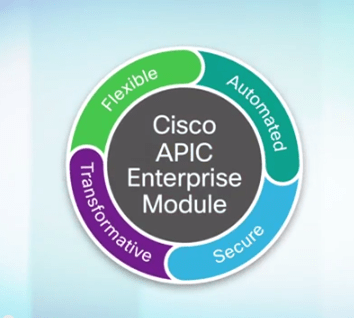
It is amazing how APIC-EM started as a little platform to do some automation and now an entire architecture has almost been built upon it.
APIC-EM is the automation platform surrounding Cisco DNA. New services are being developed for this right now.
Not everyone is an SDN believer, infact some think SDN is still an unproven, non standarized technology. Many are betting on automation and not software definition – some bet on both. If you are a network professional without coding skills (like me), APIC-EM will seem a little more intuitive.
Cisco Plug and Play, EasyQOS and iWAN App are the big key points in the DNA portfolio we get from APIC-EM. Coming soon will be my article on EasyQOS, all I can say is – it will change how you think about QOS, a technology many simply gave up on and said “just get more bandwidth, it’s easier”
More on EasyQOS in my next blog post… However the key message is that Cisco is moving from QoS to QoE – it is about Quality of Experience – that’s not a marketing term either, in DNA, we tell the system what quality we want for various applications – and QoS is automatically configured for that. More on that later.
NFV – Not Just For Service Providers
Enterprise “NFV” aims to take out physical Routers, Firewalls, Accelerators and Wireless LAN Controllers in the branch. The idea is centralised management and deployment with everything virtual in the branch. This can be run either on a UCS C220 server, or on top of a ISR4000 with UCS-E blade.
Most of the content you will see online from Cisco — is like the above, very abstract. However we can get more into the meat and potatoes of Enterprise NFV from our friends at TechFieldDay. Here is an actual demo of NFV deployment with some good questions from the delegates
Security at Heart
TrustSec, StealthWatch and ISE are all the key security products at play in DNA, I know entire customers who went down the ISE path – and cancelled projects from complexity, so while high security, flexibility and reduced operating costs might be the end result of DNA – security isn’t cheap, and getting there will not be either. These products can have a long installation cycle / process.
Getting from Promise to Production with DNA Readiness Model
This is where we have an issue, before we can have an elastic multi domain secure flexible network – we need to deploy the tools for DNA. As Rod Soderbery of Cisco says “Adopting Cisco DNA is a Journey” – that is for sure, this will not be an overnight change for any organization.
They call it a journey, start with base automation, move to policy based services on APIC like iWAN and EasyQOS, and then add your more advanced security, think ISE, more software control and then Digital Services. Each is a step in the journey to DNA. I don’t know many organisations that are even close.
Marketing The End State To Start Conversations
This is the problem for IT organisations – “Digital Services” – see that end green bubble, that’s how this is being sold to the “C” level types – they don’t understand the blue bubbles but we all know a lot of work has to be done to reach those trans-formative “Digital Services”
The good news at least for Cisco is that on all the news of DNA and the hype, the stock hit an all time high. If this does nothing more than start the conversations about next generation infrastructure, next generation firewalls and security products, or maybe the entire DNA architecture then this will be good for Cisco.
I am pleased to be selected as a delegate for Networking Field Day 12. For those who are not familiar with the team at www.techfieldday.com and their amazing online content. Steve / Tom and the team work very hard to bring you top notch technical content.
Think Cisco Live type presentations, in a significantly smaller environment. The best part is that you get to watch online and submit Q&A. So make sure you book some time August 10-12 for presentations from all of the vendors listed
I will post a link to the live feed the day we go live at Network Field Day 12!
In the meantime – here is the schedule for the event.
As a delegate for Tech Field Day Xtra at Cisco Live this year I was pleased to sit in on a presentation from Veeam about their new Cloud Connect product.
Previously only available to large enterprise, rapid DR response times, DR data centre space and IP mobility were things that smaller organizations could only dream of doing. Veeam is responding to that need.
First, let’s remember the rule as a reminder
3 – Copies
2 – Different Media
1 – Off Site
We have a few challenges to getting this data “Off-Site”. Many are still using tape, but more and more people want to get this data off-site automatically, and more often.
Many organizations are trying to reduce RTO – Recovery Time Objective. How fast can we get back online after a serious problem?
Here is a quick intro into Veeam Cloud Connect by Clint Wyckoff @clintwyckoff –
The RTO Challenges
“15 Minutes” is a common theme these days. With current technology this is pretty easy to do — On Site. Once we decide that for whatever reason we want to recover off site we have a few challenges.
Backup Copies – that data has to be off site, we have to get it there
Data Availability – That data has to be AVAILABLE. No tapes stored in a vault or a box, and nothing that we have to “restore” in order to bring it online
Connectivity
I want to discuss a few options we have for #3….
Assuming you have data centre space, either yours, or rented.
1) Over the WAN – Different IP – This has all sorts of challenges, application issues, hostname resolution, firewall considerations, NAT if it is published. There are some tools out there that help you with this, but it always has been a bit of a dogs breakfast.
2) Over the WAN – Same IP – This gets complicated fast, your choices are move the entire subnet, use a protocol like OTV (expensive on the hardware side) or some other method.
Option 1 is what we have been doing for years, various tools have tried to make it easier (Think DoubleTake) but it was very hard to get working, and you need infrastructure – real infrastructure on the far end.
Options 2 is expensive, and complex, not something many customers want to invest both time, money and resources in.
Veeam NEA
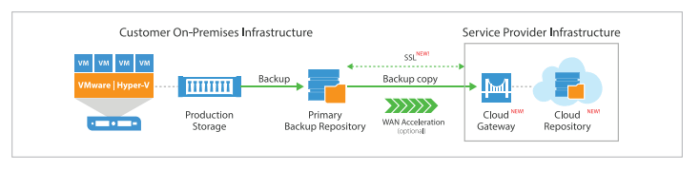
Without any “geekery”, without OTV, or VPN links, Cloud Connect with NEA – Network Extension Appliance allows your virtual machines to power back up at the DR data centre with zero effort by the customer. The IP does not change – the application comes up, and the Network Extension Appliance simply transports the traffic destined to and from that VM back to the customer site. They operate as a proxy-arp on site for the IP and MAC of the server.
The reverse replication can happen, and then when ready you can fail back.
This is bringing the benefits of very large scale enterprise level availability – to the SMB sized customers. With a personal level of control.
You don’t need any special network gear, storage or servers. You don’t even need to own data centre space. You purchase resources from a Veeam Cloud Connect provider, and your service is up and running in shared infrastructure.
Reduced Operating Costs
This means reduced operating costs, you are not paying for dedicated DR infrastructure at your provider, your machines are not running consuming resources, and the product is designed for “Pay as you grow” so you can start small and grow without significnat capital outlay
Wrap
This is a great idea – the complexities of the network connectivity alone associated with the traditional method make many shy away, and when you add in the Veeam backup product which is already well respected in the industry and now provide off-site recovery with the click of a mouse, in my opinion, Veeam has a winner here.
DEMO
Watch below as Veeam provides a great demo of the product while the Tech Field Day team asks the hard questions
I flew back from Las Vegas on Friday from Cisco Live 2016, after a horrible day of flying, and getting home, and a day of jet lag recovery – plus a day out at http://www.racelab.co another thing that I have now committed my personal time to – I find myself back at my regular day job.
It is not without complete and utter amazement that I return to “real life” completely overwhelmed by Cisco Live 2016 this year. I felt every waking moment, I was feeling the beat of the event in ways I have never experienced before.
Honestly the event could have gone an extra 3 days for me to get everything I wanted out of it – but I don’t think my body would have held up. Each day I walked in excess of 20,000 steps (The American Heart Association recommends 10,000 as a “goal”). This is no picnic vacation, waking at 6AM every day, to be in sessions for 8AM, and then not getting to bed until midnight (or later for some)
I was overwhelmed – more than ever with what was happening at Cisco Live – and in the coming days I am expecting to pen BLOG articles on the following topics.
Cisco Live – 2016 Wrap Up
Cisco Live – Social Pass Benefits
OpenGear
VEEAM
Cisco Cloud Connected ISR Security
APIC-EM / EasyDNS
Cisco Digital Network Architecture
Coming from an event where I was asked to be a speaker, I will also talk about my experiences as a speaker, and what I got out of that.
I had an amazing technical experience, learned a ton of information thanks to Tech Field Day (More on that later), and those mentors and amazing technical people I was hanging with. I mean at one point I was having a few drinks with two product designers listening to them wax and wane over design. Is this where innovation happens? I think so.
Add to that the best Pink Floyd rendition for a friends birthday in the end and you cap off an amazing week of learning from both the event and friends alike.
Like I said in my own session – content is king, and at least I have a fair bit to work with for the next while.




















 cantechit - Technology and IT BLOG