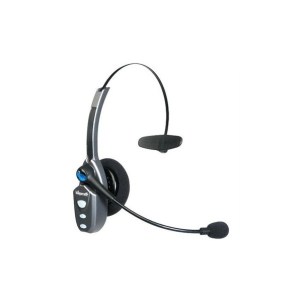
A bunch of years ago I googled this “Best Bluetooth Headset Truck Driver” – I was on the hunt for a really good headset, and I did not want your typical “in the ear” design. This is what I ended up with, the B250-XT from BlueParrott, now they have a new model and I will show you why these things are second to none.
I found a bunch of truck forums, all talking about one particular headset, the “BlueParrott B250-XT” – it claimed to be the best headset of all time, so I went to find one. The local truck stop had one, and I put down my $150 (Canadian) for it, which seemed like a pretty good deal considering the price of other headsets
The battery life is ridiculous – they claim 16 hours of TALK time, never mind the days of “oh no I left it on” standby.
The noise cancelling was like nothing I had ever seen, I could drive with the windows open on the phone without problems. Constantly people were asking if I was in the office.
The only fault I could ever find with this particular model was the charge port, it was a barrel connector, so you had to use their specific charge cord/plug.
No surprise that VXi has recently been acquired by Jabra / GN
In full disclosure, they did have a B250-XT+, and a 350 model – but I didn’t review those models, the new 450 is really worth looking at.
The big feature is the noise cancelling, so here is a video I created recently testing the noise cancelling of a few different headsets, including the previous B250-XT, a Plantronics Voyager Edge, and the B450-XT.
The new headset is exactly twice the weight of the old one, weighing in at 149gr (450) vs 73gr (250)
The ear pads are great, you can select what works better for you. The leather pad has significantly more acoustic noise cancelling (room / vehicle noise blocking) than the previous 250 model but your ear does get warm with limited air flow and you do get that “plugged ear” feeling. The foam pad offers less ear blocking and a more open feel with less “plugged head” feeling – I prefer the foam pad as I can still hear out of my ear.
The only real complaint I have is the volume doesn’t go high enough for quiet calls and once you high max volume there is a beep sound that plays to tell you the volume is at MAX, and it is REALLY loud. Previous models have also had concerns about audio feedback volume. Considering we now have the VXi App we can adjust some headset functions with, please VXi give us the ability to either adjust or silence these tones and voice feedback announcements.
The previous B250-XT model was a little more “pocketable”, it was lighter and thinner and I could toss it in a laptop bag – not so much with the B450-XT, it does need a home, maybe a soft or semi soft case offering would be useful.
Here is the basic feature set of the new B450-XT
Final Thoughts
This thing is a total buy, sadly I have to ship back this unit as it was provided to me as a review unit – I tried to buy it from VXi, but apparently they are limited in supply so this one goes back.
Yeah, you look like an aircraft controller – but it is so worth it, besides you are in the car anyway, or sitting at a desk – 24 hours of talk, killer noise reduction, great comfort. All worth it.
These are the highlights for me…
Noise cancelling is better than the previous model, which was already better than any headset I have ever used.
Double the weight at 149gr is still pretty light weight, I didn’t find it weighing down on my head.
The new 450 claims 24+ hours of talk time over the 16 hours of the previous model, the new model has noticeably more battery life over the 250 model – which by the way was already great.
Two different choices for ear pad give you different options for feel and noise isolation
USB Charging is a welcome addition over the old barrel style connector
Well if you are a car nut, it is all over the forums, at least Ford has made good on their current promise. While the dealers do not have all the info yet, it would appear the software itself is floating around.
The upgraded USB hub is almost impossible to get, but it looks like they are trickling in, some of us (me included!) found out what the part number was and ordered it a few months ago to avoid the out of stock issues with the part.
So at least I have the part, and I know the release is here, just working with my dealer on when I can get the software installed in my truck. Finally my 2016 F-150 is getting CarPlay and Android Auto – the question is – when will we get WAZE on these platforms? I am still confused why that hasn’t happened yet!
This is pretty big. Wait others have been doing this for some time!
Ok, except the problem with having a ton of AP’s is management, the bigger problem having tons of AP’s at remote locations – is also management.
Stop me if you have heard it before – simple management – plug it in and you are off to the races, templated configuration. All of what is great about Meraki starts to make a lot of sense when you think about having 100+ little AP’s all over the place.
Why would you want this? I can give you a very good reason why the new Meraki MR30H is a great product.
It stands with their ideal use case – In-Room Hotel / Dormitory use.
The Science – 5GHZ
Let’s talk science for a second… We have all been using 802.11B/G/N for some time on the 2.4GHZ band, that is an ISM band, ISM stands for industrial, scientific, and medical – basically anyone can build stuff on 2.4, and run it – oh and don’t forget your microwave which will wipe out half the band each time you turn it on. The bottom line is 2.4ghz is dead for most people, the band is so noisy, nobody is really designing networks for it anymore.
So now we move to 5GHZ, 802.11a/n/ac – but wait – most people do not seem to realize the coverage for 5GHZ at the same power as 2.4ghz is not the same. In 2002 Magis Networks a semi conductor company did testing on various materials for loss metrics on 2.4GHZ and 5GHZ frequencies.
I’m going to try and explain this – hit me in the comments if I made a math error – but thanks to my good friend and colleague Jason Miles @photomediaguy for helping me check my thought process on this (If you need some amazing photo work, check out his website www.jasonmilesphotography.com)
Concrete is the enemy!
Dry concrete block has about 6.7DB of loss on 2.4ghz, while 5GHZ is has 10.3DB of loss – now that is 3.6DB of loss MORE – but before you think “Well that’s not much” – DB is logarithmic.
A loss of 6.7DB is about 70% signal LOSS and 10.3DB is about 90% Signal Loss.
If I had an access point right on the other side of concrete, and it was running 50mw – if I was on 2.4GHZ, I would get about 10.7mw on the other side, or barely enough to even operate. on 5.0GHZ – I’m looking at 4.6mw – or useless.
I think I am making my point – 5.0ghz is significantly more lossy through the same material than 2.4ghz, and while 2.4ghz was really difficult through concrete – 5.0ghz is pointless.
Even drywall is 37% more lossy on 5GHZ – through a typical office wall you are looking at 1DB per wall.
In Modern WiFi design, we actually design more for performance and density and less about coverage, it is more about low power AP’s, and many of them in order to deliver high-density high performance. The days of running 100MW on AP’s to give us wide coverage with a single AP are long gone. We worry about battery life, and co-channel interference – we don’t want to run high power. So as we build this new world of many low powered APs in more places.
MR30H – Details
So we have talked about Wifi Design, a little about 5GHZ and Loss – now we can talk about the MR30H. This is a pretty good retro fit solution for many clients especially hospitality, education, utility and government where installs are a problem and if could simply replace an existing jack, with an AP, we could easily provide spot wifi, and maintain 802.3af power to hang a phone off it with ease of install and no ladder.
Technical Details
3 Radios – 2.4, 5GHZ and WIPS
Bluetooth BLE
802.3AF Compatible – but 802.3at means you get 802.3AF Power Output
It turns out the Drone market isn’t quite as easy to get into as some companies think – even the big guys like GoPro. Turns out GoPro is saying about 2,500 Karma’s simply lost power while in flight.
GoPro has had a tough go as of late, trying to stay relevant, lauching a TON of products this year – and their stock jumped as high as 16.79 earlier this year and has now dumped it’s way down to 10.14 in after hours trading last night on the new of the Karma problems. A stock price we have not seen since June.
The bottom line – take it back where you got it – all of it, GoPro and Grip as well even though those are not a problem – you got a bundle so it all has to go back.
There is no replacement – it is a full on recall with refund – if/when they fix it, they will just start selling it again.
I’ll admit, I purchased a GoPro Hero 3 Black a few years ago, and while the video performance is stellar, the batteries have been total garbage, and some tell me “Oh the 4 they fixed it” but I still hear of issues on the GoPro 4.
Part of why I have not purchased another GoPro is because of the problems I have had – I even considered a Karma because I wanted the new GoPro, plus I wanted the Grip. That being said DJI Osmo Mobile is probably in my future.
Prediction
If DJI comes out with an action cam – GoPro is finished.
Cisco has recently released a new video around the anatomy of a hack. Most people think hackers are script kiddies sitting in their basement (or their grandmothers basement) wearing a hoodie writing “scripts” and damaging infrastructure.
There is no question the script kids are out there – but organized crime and foreign governments have become the real bad actors.
This video is actually pretty realistic, and many of my friends and colleagues have gone through these exact scenarios at work, or at their clients.
So for the previous blog entries where I was critical of some of Cisco’s marketing videos – this one is bang on.
I have updated info with how to actually FIX this yourself at this link
https://cantechit.com/2017/04/22/ford-still-not-delivering-carplay-to-2016-vehicles/
When Ford announced CarPlay in the 2016 F-150 – it wasn’t quite ready for prime time, but they sure spent alot of time talking about it, and marketing the idea to get customers to purchase trucks from them. For the record – I am one of those people, so this might come off a little ranty.
Demos hit YouTube as early as Jan of 2016 with a demo of how Sync 3 with Apple Car Play would work.
The statement from Ford was clear – announced on the show floor at CES 2016 in January 2016. Ford even demonstreated Apple Car Play and Android Auto.
In Ford’s own marketing document they state “future, over-the-air updates via Wi-Fi will help ensure it keeps up with the latest technology” – but to date there has only been a single update from 1.0 to 1.01 – and that required a dealer visit. The 2.0 update which is purported to provide Apple Car Play and Android Auto support – will again require a dealer visit we are told. More broken promises.
“In North America, Ford is making Apple CarPlay and Android Auto available on all 2017 vehicles equipped with SYNC 3, starting with the all-new Ford Escape. Owners of 2016 vehicles equipped with SYNC 3 will have an opportunity to upgrade later in the year” – A statement that was actually revised.
Sales people – including the ones that sold me my Ford F-150 promised the upgrade by “end of summer” Ford is now shipping 2016 F-150’s (same model year as mine) with Ford Sync 3 Version 2.0 – with Apple Car Play and Android Auto enabled. So they seem to be more interested in delivering new cars to new customers – and forgetting about the promises they have already made to customers. All of that text related to “end of summer” has now been changed to “end of year”
Sources also tell us that a hardware upgrade with a cost of $50-$300 (unsure of cost of the part, and labor) will also be required, it seems the USB Hub unit in the vehicle doesn’t work with Car Play and will require replacement (Android Auto users are fine) – a cost that sales people did not disclose to buyers.
Social media marketing teams from Ford operate accounts on various forums – including f150forum.com under the name “FordIVTeam” “Ford In Vehicle Technology Team” but have since clammed up on the issue, with many owners mad they were sold promises that Ford did not deliver. That social media account continues to point people to a website that basically teases the consumer about all the features they are not getting – but paid for.
It would seem Ford used the flashy lasso of cool technology to rope in a lot of buyers – unfortunately the failure to deliver may result in unhappy consumers – but I guess they already got our money.
For those who think “Who the hell is VXi” – no kidding. They are not very well known, and 2 years ago at #CLUS I ran into their tiny little booth. I was actually a big fan of one of their products – I was actually disappointed to see such a small both – this company really needed some marketing muscle!
First, these guys make the best headset – I have ever owned. This little baby is the BlueParrott (by VXi) B250-XT – a bluetooth headset that has insane battery life and the best darn noise cancelling on the market today – PERIOD.
I am not kidding when I say high performance – I drive in a Jeep TJ, no top and no doors – and I can actually take phone calls. How about a modified Subaru STi with a loud exhaust – no problem, have a business call, everyone thinks I am in the office.
The only complaint? You look like an air traffic controller wearing it – but I will be honest, for the performance – bring it on!
Everyone I tell about this wants one – everyone loves them. The biggest problem – no marketing!
Last year they launched the revamped B350 version of the product, but now big news from the VXi camp.
VXi Aquired By Jabra / GN
Jabra has acquired VXi Corporation, inclusive of the VXi and BlueParrott brands. The idea is that they will share channel, and gain portfolio. Personally this has got to be about VXi’s IP – because no headset works like the BlueParrott – nothing. From the news relase “It also gives GN Audio the opportunity to leverage VXi’s best-in-class expertise within “high noise”communication environments”
This is also about marketing and channel space – Quote ““We are delighted to have reached an agreement with VXi. The acquisition further strengthens our position on the North American market, where we have shown strong progress in recent years. We will build on VXi’s strong presence and reputation in the US and combine it with the international reach and professionalism of GN Audio and the Jabra team,” said Paul Hamnett, President for GN Audio in North America.”
This is great news – someone like VXi with great products needs the power and marketing arm of someone like GN/Jabra. My only hope is that what made VXi great – is not lost at GN.
VXi Launches B450 Flagship Bluetooth Headset
A few new features on this B450 BlueParrott next gen headset, first the charging cord, the old B250 had a barrel connector, which was a pain – because i had to use THAT charge cord – now they have changed it to Micro-USB which means all my existing charge points can be used and commodity charge cables. More buttons which can also be programmed for functions I want. The close mic noise suppression design is still there. They have added VoiceControl to the headset itself – I have this feature on one of my other headsets and never use it – I will be honest, I just use SiRi on the iPhone, or on Android I use the speech rec on there – I’m not sure this feature is really required but as a check box against the competition – it is there.
The ear pad is WAY more comfortable than the B250, yes the unit is larger, but more comfortable – hey you already looked like an ATC operator with the B250 – nothing is changing and now it is more comfortable. My only concern with the extra size is portability, before I could kinda fold it up and it it in my bag, not sure this will be as portable.
As of this print – I have not had a chance to try the B450, and I only had a chance to try wearing a B350 – right now no B450’s exist here in Canada – I am trying to get my hands on one and when I do – I will get you a review side by side right here on the blog.
Update: After posting additional details and clarification were provided and as a result edits were made to make things a little more correct.
This came out of the blue for me today – clearly I am off my game but today Meraki is launching “Meraki Vision”
Not a Traditional Offering
Analog days we had coax cameras to capture cards, and now IP cameras that send H.264 and JPEG streams to “NVR” or Network Video Recorders. Even companies like QNAP and Synology offer up NAS devices that will record from a myriad of cameras both expensive and cheap.
Difficult Technology
There is no question existing technologies are difficult, and everyone has their own proprietary way of dealing with it. Even Ubiquity who were selling a very successful series of standards based cameras took heat when they installed proprietary software on them in order to force people to use their NVR platform – a few years later they reversed that decision.
Different codecs, different stream types, different camera features and a mixture of protocols have made this difficult to deploy. With today’s announcement Meraki has decided to disrupt this normal way of doing this – and eliminate the traditional NVR (storage) and VMS (management) platforms as they typically exist today
The goal at Meraki is to expand beyond networking, first with the MC74 line I previously wrote about and now in the security camera world. With solid state storage becoming cheaper and an existing extensible management platform at Meraki they are able to provide a cloud managed security product line.
High End Specifications
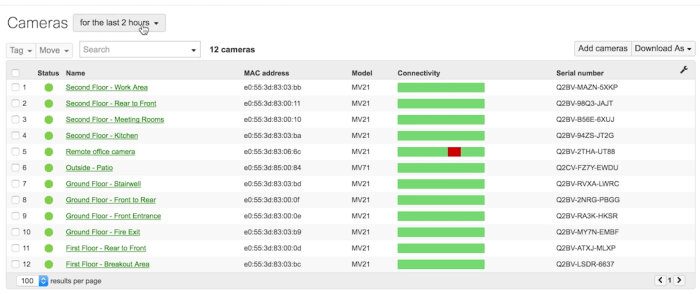
Two cameras will be offered at launch, MV21 Indoor Model will be $1,299 (List USD) (works with 802.1AF Power) and MV71 will be $1,499 (List USD) for an outdoor (802.3AT POE+ required). The outdoor will have a heated chassis.
Both will feature a 5 megapixel camera and 720P HD recordings. 3-10mm Vari-Focal lens for a flexible field of view and a wide angle where appropriate or zoomed in for long shots.
Cameras do support IR illumination up to 100 feet and have good low light performance.
Wall Mount, Pole Mount and Bracketed mounts will be available at launch
Cloud Licenses which include all hardware support will run $300/YR/Camera with options for up to 10 years with significant discounts.
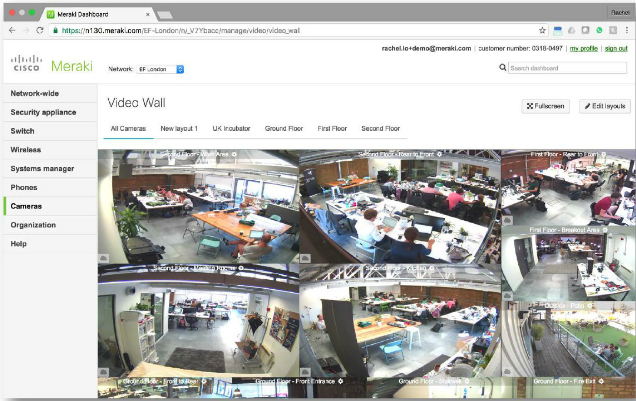
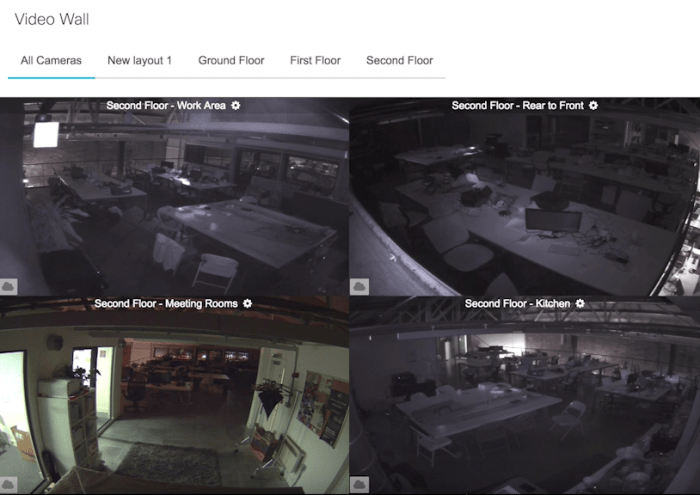
Video Wall, Motion Search, Granular User Access
No NVR Required – Dashboard!
Meraki’s MV line will not require any NVR on site, and no Video Management Software (VMS) that will all exist in the Meraki Dashboard. They have no interest in following the old way.
Each camera will have 128GB of on board storage, or in Meraki’s estimation about 20 days of footage. To eliminate the need for centralized storage the camera will perform motion indexing and thumbnail storage in the camera. For Meta data, it will use 50kbps of bandwidth, when viewing BW it depends on how many cameras you are viewing, and a few other factors. Camera’s will allow local access (Question is, will it be a standardized stream you could send to another NVR or another monitoring app..)
You can create different layouts right on the Meraki Dashboard and provide multi user access to give individual users access to only their cameras.
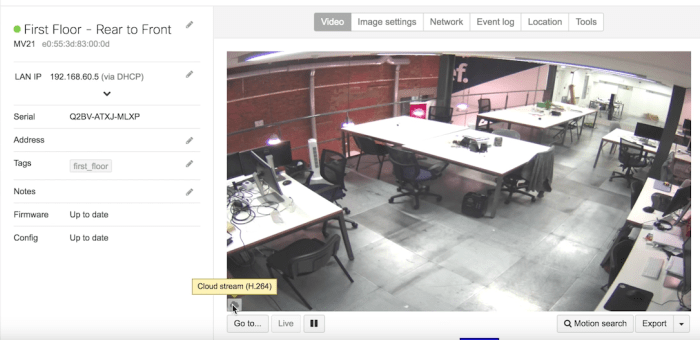
One of the best features of the Dashboard – and to be honest my first concern was – streaming all these cameras to the cloud – the cameras do their own storage, and for live view, the dashboard figures out if you are local to the camera, and if you are the streams are delivered directly from the camera, to your workstation. If you are not local, the streams are proxied via the dashboard.
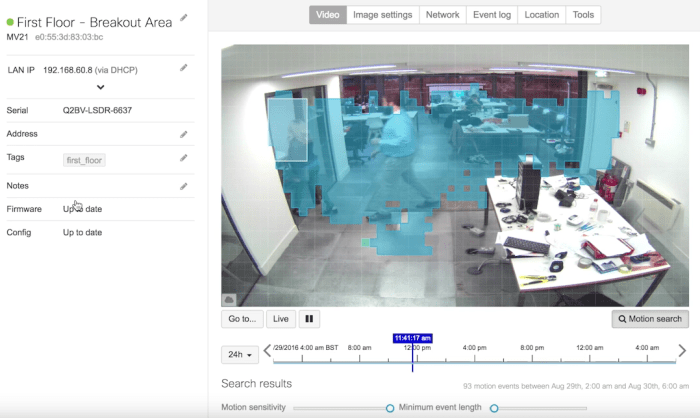
Individual Cameras can have motion search capability to look for motion.
Justin’s Take
This would appear to be a very complete offering for a first launch. As someone who has actually built camera systems in the past it is missing only a single thing – a PZT camera offering. We need cameras that can do patrols, and cameras that auto-zoom and long lenses for outdoor surveillance. The platform is a very good start, I do hope that Meraki has even more offerings coming down the pipe for this line.
The few customers I have spoken to regarding this today all said they want the ability to record the video somewhere else. If someone smashes the camera, you would normally get the video of the smash – and then black – in this case you get nothing with all content on the camera.
This isn’t it. If we are doing security cameras and phones now – I am willing to bet card access, building security, and other IOT plans are in the works over there. It would make the most sense to have a single platform to manage all of these things. How about a Meraki NAS with cloud backup? Desktop Meraki Backup services? The ideas for things cloud managed are endless.
The question is – how big are they going to get ? How far will Meraki take this?
Some time ago I was talking about Meraki maybe being re-banded – I could see it already “Cisco Cloud Networking” or “Prime Networking” – it wasn’t something I was looking forward to, I would rather Meraki is left to their own devices (pun intended). This little green skunk works in California is quickly turning into the one stop networking shop.
I want to get my hands on one of these things as quickly as possible – when I do, I will bring it to you live.
iOS 10 will be available on September 13th – This means that on that day your network is going to get hammered. 100 employees, even on a 1GB internet link could reek havoc into your network when they all start downloading the iOS 10 update at work.
Why at work? Limited download speeds at home, limited bandwidth at home, bored at work – whatever it is, each time a huge iOS update is announced, I get calls about slow networks. This is especially important for Guest and Public Access internet services – stadiums, ice rinks, recreation centres – or as many think of it ‘That spot I go to download!’
Protect Quality of Experience With Meraki
The last thing we need is this new Apple download getting in the way of the quality of the experience for your business apps and real users.
Meraki offers a few options for helping with this, and it is as easy as a few dashboard changes. If you are using a mixed MX/MR environment, I recommend doing this both at the wireless and at the edge, especially because desktops can pull the update as well.
Remember – Layer 3 rules are always processed before layer 7 rules so this is only a tip, you might be adding this to your existing rule set so take care. You may need to add this to group policy if you have deployed individual group policies based on VLAN or AD Group.
Capture The Right Traffic!
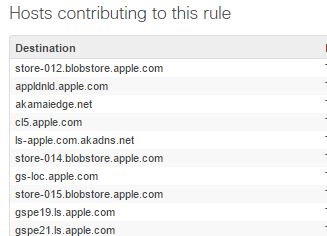
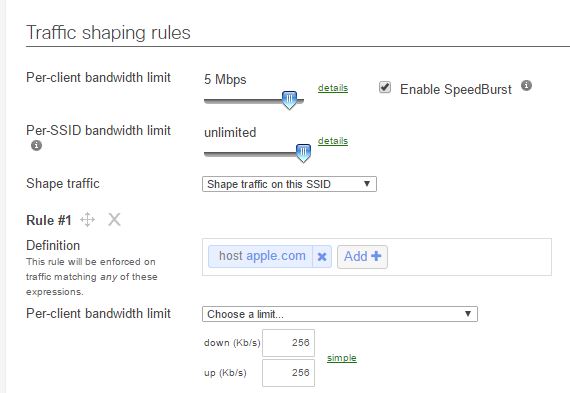
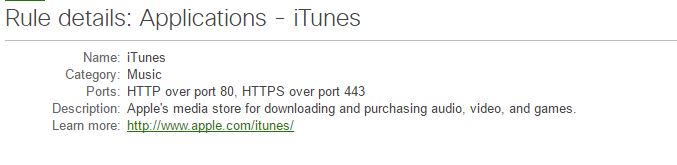
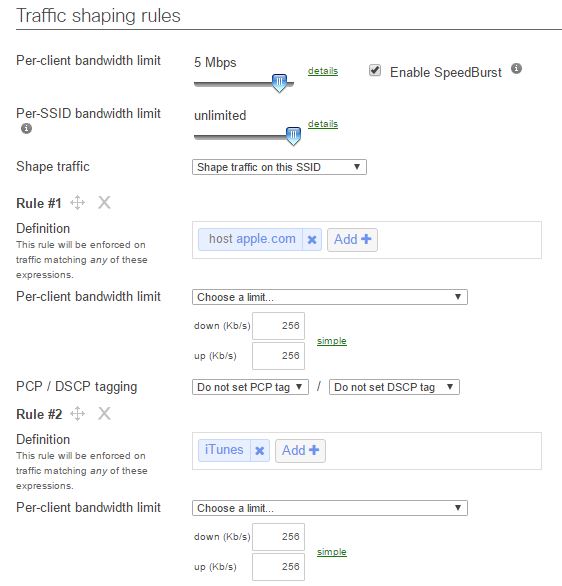
Meraki categories iTunes updates as “Music” so to throttle this properly we actually need to use the Music category, but many Apple updates also come down using an application that identifies simply as Apple.COM. So to ensure we catch this, we should create two rules to ensure that we are catching ALL of the traffic types. Technically Apple could use different methods to distribute the new update, and we do not know what they will use or how it will be categorised.
Users also have the option of downloading the update to their PC – which might technically be iTunes Traffic. We cannot look into the future, so I plan to be sure to catch this traffic by creating a few rules
An intelligent way to do this could be to look at how many users you think you have and then throttle based on a calculated amount, if you have 100 meg internet, and 200 apple devices and want to use 50MB max, you could give 256K / user. Remember traffic shaping is per session.
These rules should be added to both the traffic shaping for your wireless, and for the MX device if you have both.
Throttle apple.com
This traffic identifies as “Application: Apple.com” so we need to create the appropriate rule.
In this case I am going to limit each user to 256K, I don’t want to totally prevent it from working – but I don’t want 100 people eating my network – 200 x 256K is 51Mb!
Throttle “Music”
Sometimes iTunes traffic identifies as Music.
So we need to ensure we capture that traffic as well, the nature of Apple’s environment makes it difficult to figure out how they will distribute this. Once again as above, we will limit it to 256Kb
That is it! You are protected against the onslaught of Apple Update madness.
The entire point of micro segmentation is to segregate individual network applications and provide them with separation from each other, and the rest of the network.
In the olden days, we had firewalls – ok we still have those – and many customers had outside/inside/DMZ – sadly there are still organizations who run Outside/Inside firewalls and are using outside IP to inside IP’s using NAT and think they have a firewall.
As things got better people started realizing we need to protect the inside of the network, from a box that might get attacked, so we put those in DMZ’s (It drives me nuts how DMZ is mis-used, it is really just poor education).
BYOD, Laptops, and users that do not know any better, result in nastiness being brought in to your network via the “Walk Net”, or users managing to download some kind of malware or virus – bottom line is that the biggest security threat on your network is probably on the inside.
There are many different security standards that are imposed on different industries, PCI for payment card, NERC/CIP for electrical utilities, NIST and a barrage of ISO standards. These standards know something many do not – like I said, the biggest security threat is on the inside.
So we need to start protecting the network from itself. Many clients started putting firewalls and IDS between users and servers, and that was difficult and expensive. A router that routes line rate at layer 3, is significantly less costly than a firewall at the same performance.
What about protecting servers from servers?
SDN, Micro Segmentation, ACI, VXLAN, NSX, OpenFlow – all different terms, some vendor specific, but all talk about the same basic concept — Software Defining The Network. Giving us better granular control of packet flows from device to device or object to object in our environment.
Micro-Segmentation – The Simple Explanation
There is a very easy concept to understanding Micro Segmentation. Your network started as “Allow all Packets” and now is “Deny all Packets” — that is it, nothing more complicated
“Wait doesn’t that mean I need rules for EVERYTHING now?” — Yes you do.
“That’s a lot of work!” — Yes it is, but once you do it once, you are good.
Why am I writing this? Well there are some new ideas… Read on.
I am no expert.
First, I am no expert on this topic – so I am writing simply what I have learned so far, and really this is an emerging market. The other important point I want to make is – I am not writing about every possible option, there are tons of dev heavy SDN and/or micro segmentation options out there, and I am no developer. OpenStack type concepts really scare me, and it scares a lot of professionals (many are afraid to admit it).
This is my opinion after years in telecommunications and information technology, feel free not to agree with me and sound off in the comments.
Do I need this?
I don’t know — do you? Really, ask yourself. I feel ACI/SDN/NSX/NVGRE – pick your term – is a solution for a problem not many clients actually face today. In the service provider market this is a big deal for customer segregation and network automation and orchestration but I don’t think even large enterprises will run out and deploy these solutions any time soon. Why spend $1 million on something that costs me $50K a year to do by hand. On the other hand, if you are in a regulated environment, this might solve a lot of security problems for you, or perhaps you want a network that has the highest levels of security. Either way some of these more mainstream solutions are big and expensive to deploy and will not be done quickly.
The use cases for SDN type technologies in my opinion are still evolving at this time. I know one thing, the barrier to entry is cost, time and complexity. Even if you wanted to deploy micro-segmentation to only a single app – it has traditionally been very expensive to do – until now.
The Need For a Gateway
Most if not all SDN or Micro Segmentation systems use some kind of encapsulation, VXLAN for VMware’s NSX and Cisco ACI, NVGRE for Hyper-V.
The problem is – once we want to leave our virtualized / SDN / micro-segmented network – we need to talk standardized methods to client devices, routers and other devices that are not within the scope of our micro-segmented system.
Some solutions have the de-encapsulation features built right into the fabric (Cisco) and some like Illumio, well that is a totally different story because they do not use encapsulation. For some like NSX and NVGRE this means some kind of gateway – that gateway can be a single point of failure depending on your design. Some of these gateways are hardware, and some are software.
Cisco ACI
Watching for some time, Cisco has realized one thing – SDN is a bit of a mess. It is a little like me handing you a box full of mechanic tools and asking you to build a car with no automotive knowledge.
The solution from Cisco is ACI – Application Centric Infrastructure – which is a fancy name (in this writers opinion) for “Managed SDN” – you program business intent, and it tells the network how to achieve that. The basis of Cisco’s new DNA architecture is the whole “program intent” instead of the traditional “program behavior”. The idea is called contracts – or basically “I have a contract that says I can speak to you in a certain way” – no contract – no talkie.
ACI uses a segregated control plane inside a cluster of boxes called the APIC – The Application Policy Infrastructure Controller for the command and control of ACI – but it isn’t in the data path. You can actually shut down the APIC and the network will still mostly function.
The Cisco ACI solution in my OPINION the best way to do it for big data centres that are greenfielding it – virtualize the network using network hardware – at the network – in silicon to ensure performance. It also does not rely on any kind of gateway to talk to the rest of the non ACI world – that capability in inherent in the system, eliminating this nasty single point of failure.
The downfall is that your have to have all Nexus 9000 series switches to run Cisco ACI, and you must move to spine leaf architecture – and it is not exactly a plug and play solution. Brownfield deployment of ACI is no small task, and can only reasonably be accomplished by installing ACI and then gouging massive security holes inside it to make applications work while you slowly lock it down (kinda the inverse of the point). Not to mention the investment – is huge. If you have multiple data centres – your problems just got even more complex.
VMWare NSX and Hyper-V NVGRE
These systems rely heavily on software based platforms to make them function, and while they do integrate directly with their hyper-visor platforms they rely on software (or some hardware vendors) to handle the movement of data between the virtualized network and the rest of the world.
The NSX World calls this an “NSX Edge” in Hyper-V they call it a network virtualization gateway. Either way if you lose this device – you are in trouble.
There are many management VM’s associated with both NSX and Hyper-V, losing some of them will cause massive network problems.
Not a big fan of this way of doing things – it brings a lot of complexity, so you better have some kind of offsetting benefit you are getting for all this hard work and in my opinion, risk. Let the network handle the network.
At a recent Networking Field Day 12 event, we had a great talk from Illumio, and these guys are really thinking different. Every single operating system has really good security capabilities baked right in, so instead of re-inventing the network wheel, why not orchestrate the tools what we have
The architecture is called the Adaptive Security Platform and is made up of two components.
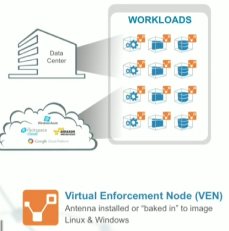
VEN – Virtual Enforcement Node – software running on each host or virtual machine, it understands all communications on that host and is used to build the application dependency map. It also completes tasks on the platform itself, tracks data about who is talking to who and enforces the policies on that specific host/VM. This of this as your data plane.
PCE – Policy Compute Engine – An on premise or cloud box that takes all of the information from the individual nodes to create the relationship graphs, and then push down policies to the VEN from the PCE. This is the control plane of illumio.
There are three things Illumio does…
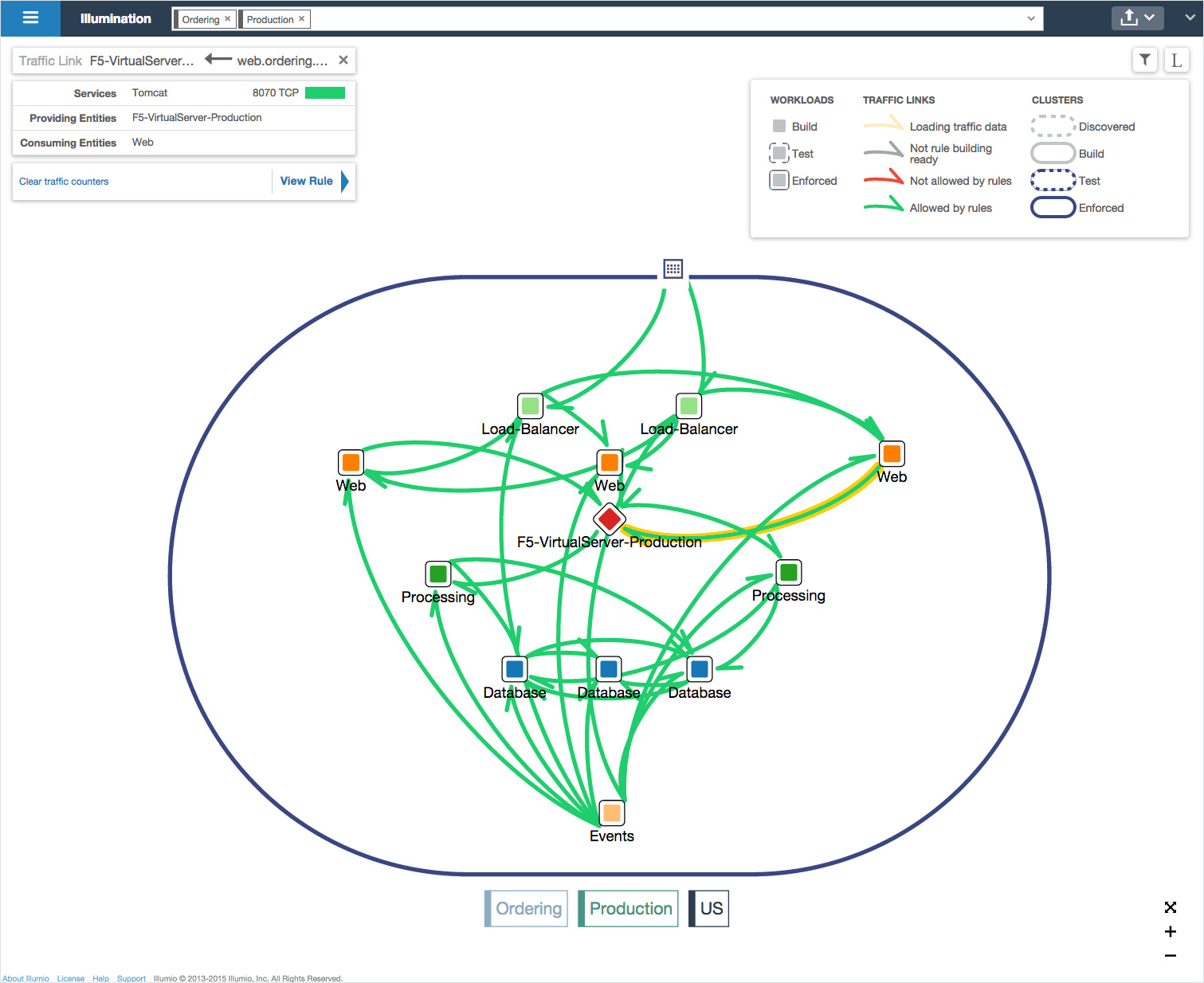
Illumination
Understanding the relationships between applications and hosts and other applications is something no IT department knows – ok that is a rash generalization – 99.999% of them. Every time I get into a micro segmentation or even VLAN segregation discussion where firewalls are involved “Ok tell us all your flows so I can program the new firewall” — yeah right forget it. Even Cisco’s ACI platform cannot really help you with that. One of the great features of Illumio is the ability to see what is talking to what. This feature alone could be used for many different applications – including helping you map out application dependencies or graphs for the deployment of traditional SDN or ACI solutions. This will help you then build your policies for your network.
They do this by generating a communications graph
Enforcement
Enforce policy on all devices by orchestrating the enforcement mechanisms already built into each operating system. Build policy to match business intent.
“Segmentation in our vernacular is the enforcement of policy at the host, it is not a network construct” says Matthew Glenn of Illumio
Install the PCE engine, and start building the policy based on your illumination data. Once that policy is created the PCE will extrapolate the required rule sets for each host and start pushing it out. You can diff your changes, and roll back quickly if you run into problems.
Tamper detection will alert you if someone tries to shut down the VEN or if someone tries to modify the ip tables or filtering component. The system operates in a double trust model, they have rules for traffic both in, AND out. Even if a single application is attacked or the VEN is disabled – that only allows that box to get out – other boxes still wouldn’t allow traffic – and with shun features, it can even realize there is a problem with that host, and push out rules to block that box that was shunned.
Road mapped features include features to alert on rules that are not being used anymore, and help you keep your policies from getting bloated with old polices.
Deploying additional hosts of an application is simple, build the new host, and push out the pre-made policy for that application. You can even test and monitor policies before deployment to make sure you do not cause any adverse problems.
SecureConnect
Encrypt data between workloads easily using a single click. You simply tell workloads you want to encrypt data between machines, and Illumio handles all the hard work of dealing with all the encryption and authentication issues. I won’t spend a ton of time on this – it is a cool feature, but for me it is just a “nice to have”. This basically eliminates the manual efforts of setting up these IPSec connections.
Illumio Extends Beyond the Physical Data Centre
The other use cases for Illumio are enormous It can simply do things that normal SDN/ACI/NSX solutions can not do.
Secure services in branch locations
Protect devices across physical locations
Get a holistic view of apps and their security and relationship regardless of geography, and then create policies to protect them
Deploy into cloud services like Amazon AWS, Microsoft Azure or Long View OnDemand
Go Brownfield
This doesn’t involve changing any networking – in fact – this doesn’t even need the network team, an application or server team could deploy Illumio without even talking to the network department. Obviously this is not something I would recommend, but this does mean you could use it for single application needs too. Perhaps you have a single application or environment that needs heavy security but you do not want to move it to a new VLAN, or you need security between boxes across a WAN. Perhaps you have a new application you are deploying and you want to micro segment it on the network – now – without having to go through the trouble of deploying micro-segmentation to the entire network. New regulatory requirements require you to beef up security in a short amount of time with additional box to box encryption or policy support.
My Final Thoughts
These guys at Illumio are thinking different. I really get the idea that everyone else in the SDN world seems to think people will just thrown down their infrastructures and rebuild in this new fancy SDN/ACI/NSX – whatever – world, like we all have time for that. I know many organizations that may never have the time/energy/money to do that – but they all need security. I like companies that think differently and push the edge, and this is something that if marketed to the right audience, and if Illumio can get their message to the right customers – may actually help to provide a wide range of customers with great security without tearing out everything they have. Fan boy? Yeah, I think so. What about running this down to the desktop even? They apparently have done that. What is next for Illumio? Not sure – but I would keep an eye on them.


 I am not kidding when I say high performance – I drive in a Jeep TJ, no top and no doors – and I can actually take phone calls. How about a modified Subaru STi with a loud exhaust – no problem, have a business call, everyone thinks I am in the office.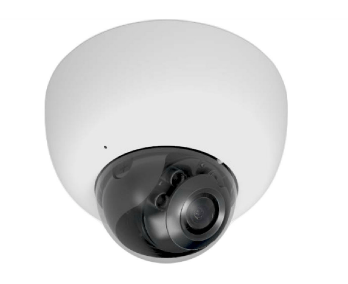
 cantechit - Technology and IT BLOG