Cisco Spark Board – Innovation in Collaboration

This is an “iPhone” moment

If you look back at some of the big changes in our industry – the big challengers and innovators have continually challenged the status quo in how we use technology.

A perfect example of this is the iPhone.  Until then we all thought keyboards, roller balls and scroll wheels were the answer.   Smart PDA devices counted on using a pen to be accurate, and you needed an owners guide the side of war and peace to understand how to get things done.

steve-jobs-first-iphone-launch-625x300

Then comes this guy – Steve Jobs, who intuitively understood user interfaces.  The guy just knew it.   The interface was so clean, so natural and so easy – 2 year olds were picking up iPhones and using them like a part of their natural life.   Scrolling feels very natural, and button presses are so precise even with big fingers.    This crazy attention to user interface detail is what pushed our industry to the next step of mobile computing with the iPhone.   Android existed – for some time but until Apple pushed the industry, the Android platform lacked continuous innovation, it was just another mobile OS.

Actually Collaborate

If you go back and read my previous blog about video phones, I talk about how video phones are on the way out – but telepresence is here to stay and without question this is one of the proof positive moments of that.

We need to get past the disgusting world of “conferencing” and actually collaborate.   Getting past the microphones sound horrible,  echo, robotic voice, poor quality video, difficult to share documents, poor white boarding and high cost of simply collaborating in a basic manner.

In 2012 an international conferencing study found that on a typical conference call – 10 minutes is taken up by distractions.  If you have 6 conference calls a day that is an hour wasted just trying to get work done.
oldboardroom

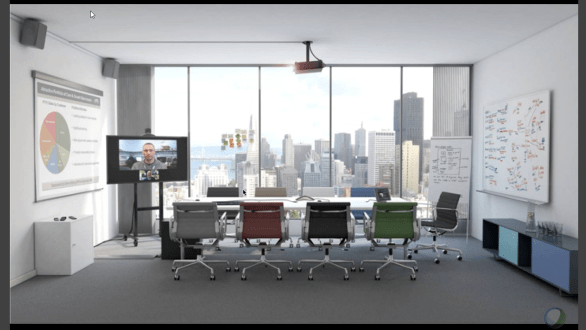
Typical meeting room of today – we have a projector connecting to someone’s laptop, maybe a video endpoint, a white board that nobody on the conference can see and some kind of flip chart because we want to keep some of that stuff for later.   Nothing talks to each other, and everything is disjointed.   The costs of all of this technology isn’t cheap either and most rooms they sit dormant because they are too complicated.

Video systems are impossible to use.  You literally need a techo-nerd in every meeting – many companies actually place an IT resource INSIDE the video room for executive calls to monitor the health of the system – that is CRAZY!    Many IT departments send IT people to the room 15 minutes before the meeting to check on the equipment, and then setup the call for the participants.      WHY DOES IT HAVE TO BE THIS HARD!?

Cisco Launches Spark Board

sparkboard

This is where difficult to use – is – OVER.       Introducing the “Spark Board” a 55″ or 70″ device that you mount to the wall and do everything with – I mean everything.   No more extra stuff, and everything works in a clean manner.     This is a “huge iPad” type device for meeting rooms – and it is as intuitive to use – as a typical mobile tablet.    No – it is easier than that.    White boarding, video conferencing, screen sharing, calling, collaborating, it is all here.  One device, simple design and dead simple interface.


High End Hardware Specifications
sphardware

Cisco has spent time to make this product of the utmost quality.   If you look at the MX series of end points, and the IX5000, Cisco was fanatic about design, everything was metal and glass and this is no different.

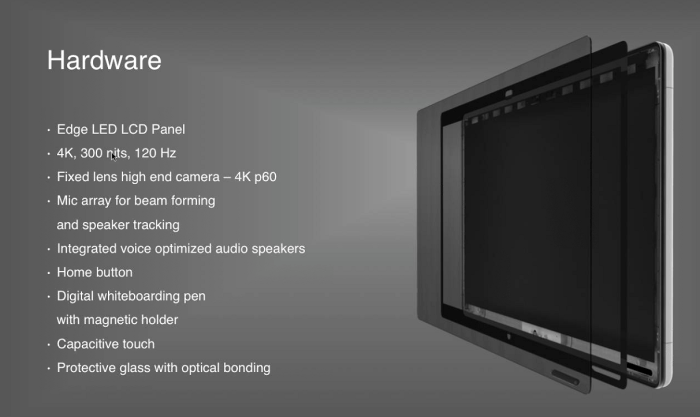
A 4K panel with 5.5ms response time and a VERY bright 300+ nits provides a bright picture even in well lit conference rooms.   4K video means quality presentations, video output and split screen capabilities.  An amazing MIC array that allows beam forming and software audio normalization and optimization – with the possibility for speaker tracking.

The microphone system is so good, you don’t need table microphones or ceiling microphone arrays.

tx1

According to FCC Filings the unit is powered by a NVIDIA Jetson TX1 – this means it has an NVIDIA Maxwell architecture with 256 cuda cores, and over 1 teraflop of performance.  64-Bit CPU’s, 4K Video encoders and a camera interface.    If this is a standard Jetson, that would be 4GB of LPDDR4 Memory, and 16GB of onboard flash (but they could have added more somewhere).  They are using the display and camera headers off the TX1 from what I can see.

The audio system is a 12-element microphone array with intelligent beam forming.   The audio is 20Khz wide and includes acoustic echo cancellation, auto gain control, automatic noise reduction and “active lip synchronization”

The panel has a HDMI input, a Home Button, a Whiteboading Pen (Passive) and a 3.5mm mini jack audio out, and 2 USB 3.0 ports.    The input resolution is 1920×1080 maximum.

The unit is capacitive touch using an optically bonded glass front, this means that touching the screen feels very natural, and the included white board pen simply sticks to the front of the unit using a magnet, and because of this optically bonded capacitive design, the pen is passive but maintains very high accuracy.

Network connectivity is an RJ-45 Gig Ethernet port,  Wifi 802.11 ABGN + AC (2.4 and 5ghz), it is “Bluetooth Ready”, but not sure what the means.

The 55″ Board is 50 x 32 x 1.9 in dimension, and weighs 87.7lbs.   Shipped it is 101lbs.

The Camera is 4K 60FPS – not because they want to send 4K video, but because this allows all sorts of future software processing, cropping, tracking.   If you look at the IX5000 series, they use 4K cameras and then software process the 1080P frame they want.  Same idea here.      The Camera Specs for those interested.

  •  Fixed Lens with Infinite Focus
  •  4K P60
  •  Horizontal Field of View: 86 Degrees
  •  Vertical Field of View: 55 Degrees
  •  Camera is mounted tilted at 25 degrees.

The video resolutions are everything from 352×288 CIF,all the way to 1920×1080 30 frames (HD1080P) and anything in between

You literally mount this on the wall like a TV – and start using it in minutes.   No need for external microphones or connections.
sparkstand

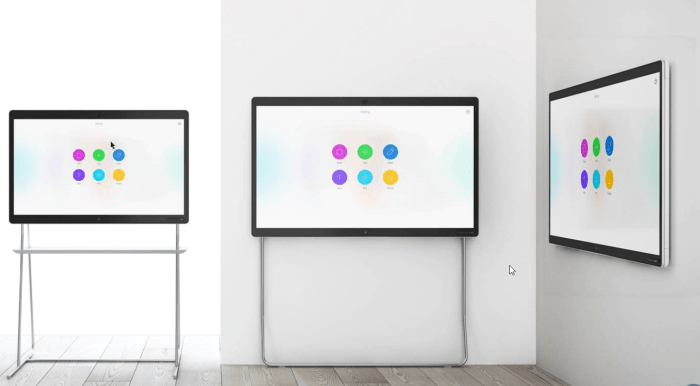
On the wall, on a stand, against the wall, many options exist for this platform to be placed anywhere.   No additional crazy wires, ethernet and power.  I can see organizations putting these on rolling carts in hospitals and educational facilities.

Good hardware has been around for awhile – but where this shines is in the software.

Changing The Way People Collaborate
board-innovations

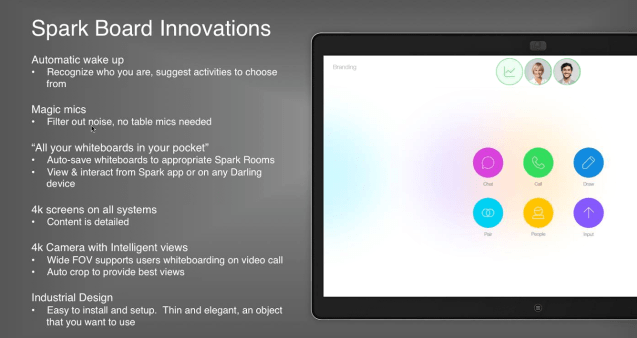
Spark is now adding whiteboards – and what is cool is that after you leave a Spark room, just like today, all the content continues to be available within that Spark room including documents that have been shared, and whiteboard content.

This is a pretty big moment for collaboration rooms, everything has been simplified.

Stay Secure

Cisco says “Trust us, but you don’t have to” – everything in Cisco Spark is encrypted, TLS and uses high end encryption – but – at your option you can even deploy your own key management server on your own site, and in that situation, Cisco doesn’t even hold the keys to your data.    Nobody, not even Cisco has the keys to your kingdom.

Simple Calling

How difficult does it need to be to simply make a call?  With Spark Board – you simply walk into the room, and control the device from your mobile phone, or walk up and press the call button and you are talking in second.

If you are running the Cisco Spark App on your laptop or mobile device, the app will use Proximity to recognize you are in the room and you can simply place a call using the app instructing it to use the board.

Simple Content Sharing

With Cisco Spark Board – you can use the power of proximity – using a very tiny application on your laptop the board recognizes when people are present in the room and allows you to cast your screen to the board, and the meeting participants.

The Cisco Spark App automatically connects with room devices, if you are already running the Spark application, your device recognizes your proximity to the board and controls appear on screen – nothing to connect, it all works over WiFi.     You can place calls directly from your laptop using the board or cast your screen.

No More Table Mess
tablemess

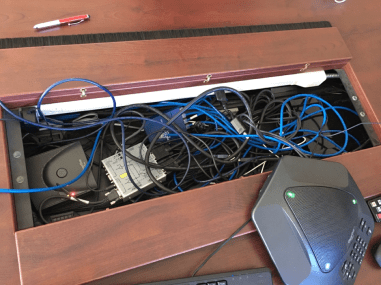
What table mess? Nothing goes on the table.   These days are over.

Powered In The Cloud

sparkcloud

No more rack full of servers sitting there, waiting for you to use them, no more 100K projects to deploy video services systems.   The Cisco Spark platform lives in the cloud, everything is there in redundant high availability data centers with high performance connections.   Unpack – and go.    This also means that organizations with 20 employees could use Spark and the Spark Board affordably.  No more extensive expensive back end infrastructure.

Extreme Affordability

This board is ridiculous value the 55″ at $4990 USD MSRP and $9990 USD for 70″ (Expect discounts) for the board, and $169 USD / month for the service the board is crazy accessible to almost every organization out there.   Previously solutions like this would cost $40K in hardware, $40K in back end systems, and then another $30-50K in professional services.    How Cisco has managed to reach this price point is beyond me.   Even if you consider 3 years of Spark service at $169/month the board still barely tips the scales at $10K all in.  (Spark user services are required)

Cisco Spark Interface Enhancements

The new interface launch is totally over shadowed by this new Spark Board launch – but the secret is in the software.  To power this amazing new hardware platform, Cisco is overhauling the interface and adding new client enhancements and features.    Go ahead and update your Spark app, and notice the changes.

spark-2-0

The new layout provides instant access to the things that you need and want.   Simple interfaces, with no user training necessary to get basic things done.

sparkmeeting

A new meeting layout that lets you focus on the meeting at hand and collaborate with those in the meeting.   Even if you are on a mobile device the experience is optimized.

multitask

Even while sharing content – video continues, but the meeting content is visible – on the Spark Board, on your laptop or on a mobile device – the experience is platform optimized.

Justin’s Take

If this really is an “iPhone” moment for Cisco Spark, this could trigger a huge change in the “Video Conferencing” industry.  I say that in quotes because nobody wants to “Video Conference” they want to work, they want to collaborate and they just want to get things done.    This thing is so easy to use, the entire platform is super intuitive – something these systems have never been.

I remain puzzled why this thing is so inexpensive – they could have launched the board for twice the price – and nobody would have batted an eye.    This is setting a new bar.   Perhaps the intent here is to flood the market and gain significant market share for Cisco Spark.     Cisco must be selling the board at close to or less than the cost to manufacture it.

Spark is sized for 20-2000+,  this makes this kind of technology accessible to every organization of every size and at an affordable cost, this will reduce barrier to entry for many organizations.

When you look at the MX/SX platform as well, this means you can have rooms with Spark Board, and rooms with MX/SX all collaborating together.    I question how many customers who have purchased SX10N or MX systems might have a little bit of buyers remorse.        I could see some cool possibilities in the future for Spark Board – Cisco tells me “It isn’t over yet” and there are some ideas on the roadmap that sound pretty cool.

The future is looking up for Spark and Cisco.   This will be one to watch.


Networking Field Day 14 Kicks Off

Networking Field Day 14 kicks off this week January 18-20, 2017 held in Silicon Valley.   At this event, we will see a ton of great content from Juniper, Anuta Networks, Barefoot Networks, Big Switch Networks, Kentik, Nyansa, Riverbed and Silver Peak

nfd14.jpg

CLICK HERE FOR LIVE STREAM

Here is the presentation calendar for this week’s event – as always join in on the conversation on twitter with the hashtag #NFD14 and head over to techfieldday.com to watch the live stream.

Watch as the team asks the hard questions, these are in-depth technical session with limited marketing content – if you want to catch up on these innovative technology companies, tune in to the live stream.

Wednesday, Jan 18 8:15 – 9:15 Anuta Networks Presents at Networking Field Day 14
Wednesday, Jan 18 13:00 – 15:00 Barefoot Networks Presents at Networking Field Day 14
Wednesday, Jan 18 16:00 – 18:00 Nyansa Presents at Networking Field Day 14
Thursday, Jan 19 11:00 – 13:00 Big Switch Networks Presents at Networking Field Day 14
Thursday, Jan 19 15:00 – 17:00 Riverbed Presents at Networking Field Day 14
Friday, Jan 20 8:00 – 10:00 Kentik Presents at Networking Field Day 14
Friday, Jan 20 10:30 – 12:30 Juniper Networks Presents at Networking Field Day 14
Friday, Jan 20 13:30 – 15:30 Silver Peak Presents at Networking Field Day 14


Crazy Leo Urlichich and Alex Kihurani Team up for CRC 2017

In an excited video on YouTube and a post on Facebook,  Crazy Leo Urlichich has announced that he has found a co-driver for the 2017 season.

Alex Kihurani will contest the Canadian Rally Championship with Crazy Leo this year with Can-Jam Motorsports.  The self-titled Rally Brat has experience all over the world, WRC, USA,  UK,  front wheel, four wheel and WRC-Academy programs with close to 100 rallies under the belts including multiple championships.     Alex was featured in the great documentary “Easier Said Than Done”

Driving a still un-announced secret car,  Crazy Leo has been keeping himself fresh in the off-season with Race Lab, his performance driving, advanced on-road skills and rally school program.     There is significant activity over at Can-Jam motorsports working on the program.

Leo has driven all over Canada, and contended for the Drive DMACK trophy in WRC a few years ago.   Returning to his roots in Canada with RACE LAB – and now heading back to the CRC – it is clear that Leo is taking this seriously, and with someone as skilled as Alex Kihurani – the fellow racers of Antoine L’Estage and the Subaru Rally Team USA cars better watch out for him at Perce Neige.

We will be there at Perce Neige – following the Rally in the sweep truck, and will bring you interviews with Leo and the team – EXCLUSIVE to this blog.

Some of you may remember this fantastic famous crash at Perce Neige in “The Beast” when Leo did the impossible and not only walked, but drove away from this accident only to make it to the podium.


Subaru Rally Team USA Comes to Canada

Subaru Rally Team USA has come to Canada.

With the SRTUSA team on our home turf, it was time to show them what we are made of up here in the great white north.   I was super happy to have a chance to both meet Travis and hear what he thought of the conditions.   Even more exciting was that Subaru would now produce a Launch Control episode about our home event.

Travis Pastrana at Rally of the Tall Pines

With the aim to take a serious shot at the entire 2017 Rally America season, Travis Pastrana and Robbie Durant needed more time to work on their notes capability.   With the new “American Rally  Association Championship” will start at Rallye Perce Neige – which is no joke of a rally.

In order to prepare for Rallye Perce Neige in Maniwaki Quebec, more time with Robbie and get notes in order, so instead of heading out to a training ground they decided to contest the Rally of the Tall Pines here in Canada.    With the team at Vermont Sports Car using this as a training round, Travis is under instructions to go easy – but there is no question he is out here to win.

With the countless wins and championships from Antoine L’Estage there is no question that he is here to win, the championship is on the line.     The question was, will Travis take that from him?  Will Antoine feel pressured by Travis to push too hard and risk it all.

Speaking with Travis Pastrana on Friday night, he was a super happy guy, and told me that he was happy to be here, but the conditions were challenging.

sweephat

Travis was gracious enough to sign my hat for me.  I go to a dozen events per year, and I never fan boy it up, but really how often do you get the SRT-USA team up here?


Times were traded all day, with Travis and Robbie in the SRT-USA 199 car sometimes within 2-3 seconds on Antoine, and even winning a few stages, but in the end Antoine L’Estage won by only 3 minutes and 25 seconds.   While that may seem like an eternity, the next competitor was almost 15 minutes off that pace.   With this being the first Rally of the Tall Pines for Travis – that is an amazing accomplishment against someone like L’Estage who basically owns the Canadian Rally Championship.

Without further, here is the final Launch Control of the season, episode 14, where I make an appearance at 5:40 as I live stream for our event from the side lines – bright orange coat on the right of the frame.

ThousandEyes – Mean Time to Innocence in minutes

Back in August, at Networking Field Day 12 we had a very interesting presentation from ThousandEyes – my take away was excitement about what I saw, but I was cautiously optimistic because I have been told about these groundbreaking new tools before, so I held off, until I could actually go back and put this in a real production environment.   Is this “Yet another tool” or can this deliver real value?

We have all been there, let me know if you have heard these complaints before

  1. The Network Is Down
  2. The Internet Is Slow
  3. <insert name of cloud product> is horrible
  4. Our Internet Performance to Site XX from YY is Poor – Fix it now!

The Network Is Down / Slow

This statement is universal – what people REALLY mean is, their perception of the network is poor.   This could be caused by just about anything, poor server performance, poor application performance, saturated storage arrays, and yes it could also be the network.    The problem is, why is “the network” the default gateway for blame?    We cannot fix that mind set.

1h6u86

Cloud Complications

“The Cloud” complicates things for network resources,  previously the internet was where you went to get things that did not belong to you.    Now with services like Microsoft Office365, SalesForce, Azure and AWS – what was previously external is now used as an internal application, and while the application team is happy to offload their applications to a cloud provider or hosted application, it means that network resources are being forced to basically accept and support a series of routers/switches and infrastructure they have no control over.

Traceroute, Ping and Monitoring

Over the years we have all learned to use all sorts of tools to troubleshoot our networks.  Traceroute came in 1988 and uses ICMP messages to probe a network and deliver information about responsive times to each hop along the way.  1988 is a long time ago.

The major problem with these types of tools is, they are probes, some use ICMP, TCP and even UDP to probe and test the network.     Many of these tools do not detect things like tunnels and load balancers, and while your probe might show one route a different protocol might take a different route.    They were designed for a different time, but yet most legacy tools use them.

The bottom line is – these tools do not provide you with complete data, without complete data you are making poor decisions.    These tools commonly deliver inaccurate or incomplete path information.

ThousandEyes – Smarter Network Data

“Legacy products are built for controlled environments, ThousandEyes is designed for chaos” – Mohit Lad – CEO/Co-Founder – ThousandEyes

By deploying sensors all over the internet in a SaaS model, ThousandEyes brings together sensor data from all over the world.     When you combine that with agents within your own infrastructure you start to get a very unique view and insight into performance and availability.

The Enterprise Agent provides you with an internal vantage point, performance of your ISP, your WAN, and application traffic.   Stop me if you have heard this before, but here is the difference.   Combine that with the many data centres and cloud agents that ThousandEyes deploys all over the globe, and you can now monitor, and troubleshoot global availability and performance.

Deployment of Enterprise Agents is very easy, deployed on any virtual platform, inside a Docker container, on metal in Linux, or even within a Cisco IOS Virtual Container.   We deployed these in a matter of minutes and had data coming in within less than an hour.

te1

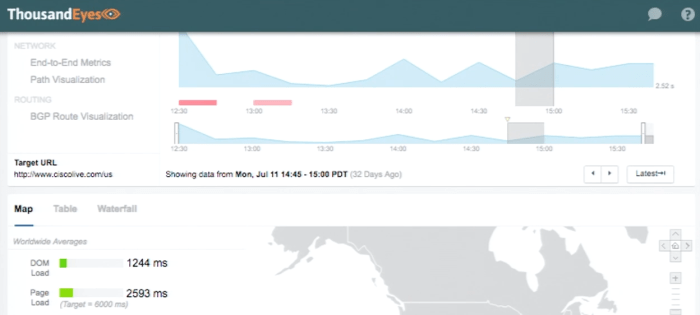
So above is a typical end of end metric for a web site – stay with me – lots of tools provide this, nothing ground breaking here.   The problem is we don’t know WHY things are slow, next step?  Blame the network.   Not so fast.

Visualize Your Path

tour03-visual-analysis-call-manager-path-visualization

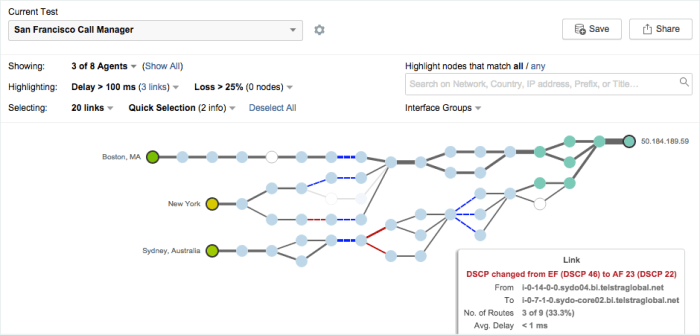
This would be your typical path visualization – but the tool built this – from the path of the probe, not a network map you provided.   Realize that the hops in the middle, are not hops that you own or control – but using proprietary technology, ThousandEyes can probe, test and analyze the health, wellness and performance of those hops.

Catch your ISP

thousandeyes-outage-detection

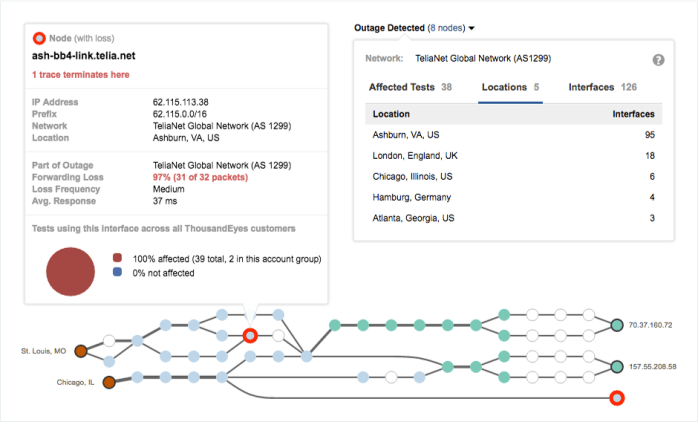
The above is a very typical scenario – people are calling, some users complain that things are slow, but some state things are just fine.  Take the far end node, starting in 157.   If you look, Chicago users would be fine,  St Louis users would be sometimes fine, but that depends on the path their traffic takes.

No question this scenario would end up on the desk of the network engineer – and without a tool like this, it would be near impossible to pin point the problem, because the problem is intermittent.  In this case I can call my ISP, and not only tell them the problem – I can even allow them temporary access to ThousandEyes if they want to see the data I have on their network.

Mean time to innocence?   Minutes.    Gone are the days where you check your infrastructure over and over again while the ISP feigns innocence.

Reverse Path?  YES! – Still innocent!

figure-2-2

Even reverse path can be troubleshot, in this case, due to issues beyond the network engineers control, and within the external network voice traffic is returning via multiple routes, and not all of them are healthy.   This might result in chasing after your SIP provider, troubleshooting gateways, looking at your internal LAN.      Open a ticket with the ISP and go grab a coffee Mr Network Engineer — this one isn’t you either.

Path Troubleshooting On Steroids

It is almost impossible for me to show you how great this is with still screen shots because you can zoom in and out, view individual nodes, look at peering – so here I have queued up the demo of the amazing path view capability courtesy of our team at Network Field Day 12, and a demo from Nick Kehpart – Sr Director for Product Marketing.

BGP Path Visualization and Internet Outage Detection

Again, No words on this – you have to see it.   In this clip we show the BGP Path Visualization, the ability to see the path from one site to another – and figure out what exactly is going on across that path including troubleshooting BGP routing.

In this case Internet Outage Detection is used to detect packet loss – in the past – and troubleshoot now.   Have you ever had someone say “yeah it was horrible yesterday but it is fine now” – wouldn’t it be great to be able to actually see what happened?  Was it you?  Was it someone else?


ThousandEyes Launches Endpoint Agent

This is big – in fact it is so big, one of our delegates literally jumped up in the middle of the presentation and screamed “TAKE MY MONEY”  he was that excited about how much this was going to help him.    The room was honestly full of people with their jaws down.

There are other vendors creating “end point” agents – but here is the difference – this one goes to network, it does not start off by blaming the network – it continues with the “Mean Time To Innocence” and helps to prove exactly where the problem is.   The same level of detail we get with the entire ThousandEyes suite is extended all the way to the endpoint, and I can drill down, ALL THE WAY to BGP if I want, from application to network layer even WiFi and not only that – retrospectively.

Remember my comments about Cloud?     It gets worse!

  1. Users working from home
  2. Users working from a hotel
  3. Public WiFi
  4. Corporate WiFi
  5. VPN

How are we supposed to find the true answer, and worse than that, normally the complaint is something like this

“So yesterday I was working in SalesForce and all of a sudden things were slow, I cannot get work done” – “Oh where were you?”  – “I was using public WiFi at an airport in Anchorage” —  the typical response is “I cannot troubleshoot that”

You can!   With Endpoint Agent – we can look at end users in the home, at work, at public wifi, and compare them – is it really the application?    Is it a large internet outage?     Perhaps a few users just happen to be on poor wireless, what might look like something, might be a coincidence – but without data how do you know?

So how do we get it on workstations?    You can push it out, it is lightweight and works as a browser plugin and a system service, the updates are all automatic and CPU consumption is less than 1% and less than 40mb of memory is ever used.      The license is NOT NODE LOCKED – so you can move your licenses around, lets say you have 1000 users, but you don’t want to monitor them all, you could monitor a select 100, or perhaps you have a few users who complain all the time – you can push it only to them.   Helpdesk agents could keep a few licenses on hand and deploy as necessary.

Endpoint Agent – DEMO

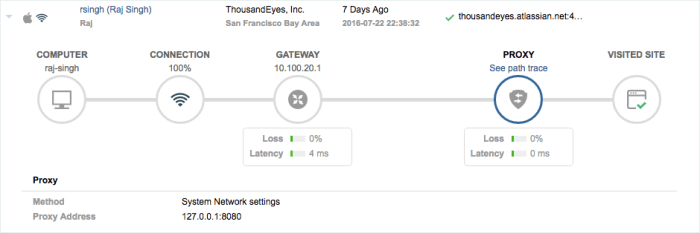
So before we get into the demo – we start with this,  client computer, they are on WiFi, they have internet – oh look, a proxy and the internet site on the far end.

endpoint-agents-user-session-proxy

The bottom line – I cannot explain this in a blog – the only thing I can tell you is – you have to see it to believe it.  In this demo they will show you a real scenario for what it looks like when troubleshooting real issues.   The key word here is DRILL DOWN!


Why does Cisco Spark need a Pen!?

UPDATE:  CLICK HERE FOR LAUNCH BLOG

https://cantechit.com/2017/01/24/cisco-spark-board-innovation-in-collaboration/

I’m sorry what do I need a pen for?

sparkpen

Rumors are everywhere on this one – but on Jan 24th, it looks like Cisco will be launching something big.    Sign up here

We know Cisco Spark has been growing over the last year

Apple Integrates Spark into iPhone in iOS 10

Integration with Spark and UCCE with Finesse

Salesforce and Cisco announce strategic alliance with native Spark integration

Tropo Integration with Spark

Along with all of that – Cisco Spark Telephony offering PSTN, and not to mention the SX10N integration complete with the ease of use of proximity.

So what now?

From what we can see is – it involves some kind of Pen, making my mark?   Maybe i’m way off and I am over reading into the marketing.   I’ve heard rumors – but I don’t do rumors.    We do know that Cisco is developing more and more for the Cisco Spark Platform with a strong API, including an entire site “Spark for Developers” – last time I checked, we don’t have “WebEx” for developers.

We already have a series of room systems we can run with Spark.

  • Cisco TelePresence SX10 Quick Set
  • Cisco TelePresence SX20 Quick Set
  • Cisco TelePresence SX80 Codec
  • Cisco TelePresence MX200 G2
  • Cisco TelePresence MX300 G2
  • Cisco TelePresence MX700
  • Cisco TelePresence MX800
  • Cisco DX70
  • Cisco DX80

Lots of phone options too..

  • 7800 Series: 7811,7821,7841,7861
  • 8800 Series: 8811 8841 8845 8851 8851NR 8861 8865

What is missing here?

Clearly the focus in Cisco Spark is collaboration – not collaboration technology, but actually collaborating, we have teams now, and we can do text, voice, video, calls, attaching files to messages.

The bottom line is something new is coming – and Cisco is talking all over town about how we all need to be there to watch.   They tell every customer, every partner and all the people on the street to sign up for this thing.

I’ll be there – and you will have my take on it as soon as I can get it posted because I am pretty excited to see what is next.


FlightChops in 2017 and the evolution of YouTube channels

One of the things on my bucket list, is my PPL – that is private pilots license.    Well, between Rally, and other hobbies, I have neither time – nor funds.    Like my other hobbies, I may need to take some time away from them to get this done.   My friend Steve is really inspiring me.    Making it worse was thanks to Spectrum Aviation, I was able to get a rare ride in the same Boeing Stearman made famous by Steve in many Flight Chops videos.     Nothing will get you addicted to wanting your PAL like an open cockpit flying almost upside down.

stearman

Photo Courtesy of Flight Chops

Until then I have been vicariously living through my friend Steve Thorne @flightchops from Flight Chops.   As a professional in the video media business, Steve started a great channel a few years ago over on YouTube, filming some of his flights so he could review what he did wrong – so he could get it right.   The big bonus was with Steve’s professional capabilities he could actually put some professional production value to his channel so things quickly took off.     Once the channel got serious, Steve made this quick video to show more of what was to come – and wow was it great.

It helps that Steve is super humble guy and has no fear of sharing, even entire videos of him screwing up landings over and over, or not being able to figure out IFR (he keeps saying he will get his IFR rating, but we are all still waiting Steve!).  Here is the 2017 preview.

Where is this all going?   Steve is proving in a manner similar to the likes of, Stevo1Kinevo, Live From the Flight Deck,  MrAviation101 and MZeroA that you can actually (almost) make a living on YouTube and while the content is focused on the aviation community, getting mass appeal like someone like Casey Neistat would be difficult when focused on a topic like Aviation. Steve is still proving that with sponsorship and Patreon (yes, I am a patron) that getting enough revenue to make this a real “job” is attainable, and while he is not quite there yet, the time might be soon.   The bigger things get, the most they cost, with full production budgets going into the channel now, air to air camera work, travel, extra camera crews (Brock does get himself into some interesting places!)

Justin’s Opinion

The bottom line is – YouTube is changing content creation in a big way, and to quote a talk from Kevin Spacey at Cisco Live! – “If you give people content they want, the way they want it at a price they are willing to pay, people would rather pay for it rather than steal it”.    Content creators are finding ways to make a living online without the big studios, with smaller budgets and niche producers, like Steve and FlightChops are able to finally spread their wings (pun totally intended) and create the show they really want to, and I am super happy for him, not just because he is creating amazing content, but because he is also able to realize his dream of doing what he wants to do every day.   Even if you want to build a channel about a unique topic, you can build content on YouTube and attain revenue, something that topics with less universal appeal could not do easily before.

To help out Steve and FlightChops, subscribe to his YouTube channel, check him out on Patreon if you wish to help the project and of course his sponsors are always worth a look.


ForeFlight:
http://www.foreflight.com/flightchops/

Bose Aviation
http://www.bose.com/a20

iCloth Avionics:
http://www.iclothavionics.com/flight-…

Scheyden Precision Eyewear
http://www.scheyden.com

CloudAhoy
http://www.cloudahoy.com

The Finer Points of Flying – Jason Miller:
http://adventure.learnthefinerpoints.com

Spectrum Airways Flight Training:
http://www.spectrumairways.com/

And thanks to PIVOT case!
http://www.pivotcase.com

Nonin Medical, Inc.
http://www.nonin.com/Finger-Pulse-Oxi…


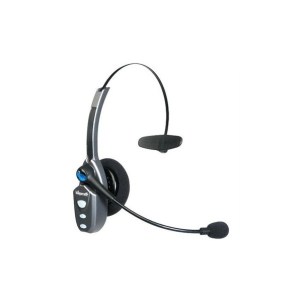
Review: BlueParrott B450-XT

A bunch of years ago I googled this “Best Bluetooth Headset Truck Driver” – I was on the hunt for a really good headset, and I did not want your typical “in the ear” design.   This is what I ended up with, the B250-XT from BlueParrott,  now they have a new model and I will show you why these things are second to none.

Original B250-XT

I found a bunch of truck forums, all talking about one particular headset, the “BlueParrott B250-XT” – it claimed to be the best headset of all time, so I went to find one.   The local truck stop had one, and I put down my $150 (Canadian) for it, which seemed like a pretty good deal considering the price of other headsets

blueparrot_b250

The battery life is ridiculous – they claim 16 hours of TALK time, never mind the days of “oh no I left it on” standby.

The noise cancelling was like nothing I had ever seen, I could drive with the windows open on the phone without problems.   Constantly people were asking if I was in the office.

The only fault I could ever find with this particular model was the charge port, it was a barrel connector, so you had to use their specific charge cord/plug.

No surprise that VXi has recently been acquired by Jabra / GN


New BlueParrott B450-XT

In full disclosure, they did have a B250-XT+, and a 350 model – but I didn’t review those models,  the new 450 is really worth looking at.

The big feature is the noise cancelling, so here is a video I created recently testing the noise cancelling of a few different headsets, including the previous B250-XT, a Plantronics Voyager Edge, and the B450-XT.


The new headset is exactly twice the weight of the old one, weighing in at 149gr (450)  vs 73gr (250)

The ear pads are great, you can select what works better for you.  The leather pad has significantly more acoustic noise cancelling (room / vehicle noise blocking) than the previous 250 model but your ear does get warm with limited air flow and you do get that “plugged ear” feeling.   The foam pad offers less ear blocking and a more open feel with less “plugged head” feeling – I prefer the foam pad as I can still hear out of my ear.

The only real complaint I have is the volume doesn’t go high enough for quiet calls and once you high max volume there is a beep sound that plays to tell you the volume is at MAX, and it is REALLY loud.    Previous models have also had concerns about audio feedback volume.   Considering we now have the VXi App we can adjust some headset functions with, please VXi give us the ability to either adjust or silence these tones and voice feedback announcements.

The previous B250-XT model was a little more “pocketable”,  it was lighter and thinner and I could toss it in a laptop bag – not so much with the B450-XT, it does need a home, maybe a soft or semi soft case offering would be useful.

Here is the basic feature set of the new B450-XT

b450-xt_call-out_960x600_100716

Final Thoughts

This thing is a total buy,  sadly I have to ship back this unit as it was provided to me as a review unit – I tried to buy it from VXi, but apparently they are limited in supply so this one goes back.

Yeah, you look like an aircraft controller – but it is so worth it,  besides you are in the car anyway,  or sitting at a desk – 24 hours of talk, killer noise reduction, great comfort.  All worth it.

These are the highlights for me…

  • Noise cancelling is better than the previous model, which was already better than any headset I have ever used.
  • Double the weight at 149gr is still pretty light weight, I didn’t find it weighing down on my head.
  • The new 450 claims 24+ hours of talk time over the 16 hours of the previous model,  the new model has noticeably more battery life over the 250 model – which by the way was already great.
  • Two different choices for ear pad give you different options for feel and noise isolation
  • USB Charging is a welcome addition over the old barrel style connector
  • HD Voice Support is very welcome.


FORD Delivers CarPlay Update for Sync 3

Well if you are a car nut, it is all over the forums, at least Ford has made good on their current promise.    While the dealers do not have all the info yet,  it would appear the software itself is floating around.

The upgraded USB hub is almost impossible to get, but it looks like they are trickling in, some of us (me included!)  found out what the part number was and ordered it a few months ago to avoid the out of stock issues with the part.

So at least I have the part, and I know the release is here, just working with my dealer on when I can get the software installed in my truck.  Finally my 2016 F-150 is getting CarPlay and Android Auto – the question is – when will we get WAZE on these platforms?  I am still confused why that hasn’t happened yet!


Meraki Launches Wallplate AP – MR30H

The MR30H

This is pretty big.    Wait others have been doing this for some time!

2016-12-08-12_27_55-cisco-meraki-cloud-managed-wireless-products

Ok, except the problem with having a ton of AP’s is management, the bigger problem having tons of AP’s at remote locations – is also management.

Stop me if you have heard it before – simple management – plug it in and you are off to the races, templated configuration.  All of what is great about Meraki starts to make a lot of sense when you think about having 100+ little AP’s all over the place.

Why would you want this?    I can give you a very good reason why the new Meraki MR30H is a great product.

It stands with their ideal use case – In-Room Hotel / Dormitory use.

The Science – 5GHZ

Let’s talk science for a second…   We have all been using 802.11B/G/N for some time on the 2.4GHZ band, that is an ISM band, ISM stands for  industrial, scientific, and medical – basically anyone can build stuff on 2.4, and run it – oh and don’t forget your microwave which will wipe out half the band each time you turn it on.    The bottom line is 2.4ghz is dead for most people, the band is so noisy, nobody is really designing networks for it anymore.

So now we move to 5GHZ, 802.11a/n/ac – but wait – most people do not seem to realize the coverage for 5GHZ at the same power as 2.4ghz is not the same.     In 2002 Magis Networks a semi conductor company did testing on various materials for loss metrics on 2.4GHZ and 5GHZ frequencies.

I’m going to try and explain this – hit me in the comments if I made a math error – but thanks to my good friend and colleague Jason Miles @photomediaguy for helping me check my thought process on this (If you need some amazing photo work, check out his website www.jasonmilesphotography.com)

Concrete is the enemy!

Dry concrete block has about 6.7DB of loss on 2.4ghz, while 5GHZ is has 10.3DB of loss – now that is 3.6DB of loss MORE – but before you think “Well that’s not much” – DB is logarithmic.

A loss of  6.7DB is  about 70% signal LOSS   and 10.3DB is about 90% Signal Loss.

If I had an access point right on the other side of concrete, and it was running 50mw – if I was on 2.4GHZ, I would get  about 10.7mw on the other side, or barely enough to even operate.    on 5.0GHZ – I’m looking at  4.6mw – or useless.

I think I am making my point – 5.0ghz is significantly more lossy through the same material than 2.4ghz, and while 2.4ghz was really difficult through concrete – 5.0ghz is pointless.

Even drywall is 37% more lossy on 5GHZ – through a typical office wall you are looking at 1DB per wall.

(Reference http://www.am1.us/Protected_Papers/E10589_Propagation_Losses_2_and_5GHz.pdf)

Modern WiFi Design – Comment

In Modern WiFi design, we actually design more for performance and density and less about coverage, it is more about low power AP’s, and many of them in order to deliver high-density high performance.    The days of running 100MW on AP’s to give us wide coverage with a single AP are long gone.    We worry about battery life, and co-channel interference – we don’t want to run high power.   So as we build this new world of many low powered APs in more places.

MR30H – Details

So we have talked about Wifi Design, a little about 5GHZ and Loss – now we can talk about the MR30H.     This is a pretty good retro fit solution for many clients especially hospitality, education, utility and government where installs are a problem and if could simply replace an existing jack, with an AP, we could easily provide spot wifi, and maintain 802.3af power to hang a phone off it with ease of install and no ladder.


2016-12-08-12_27_55-cisco-meraki-cloud-managed-wireless-products

Technical Details

  • 3 Radios – 2.4, 5GHZ and WIPS
  • Bluetooth BLE
  • 802.3AF Compatible – but 802.3at means you get 802.3AF Power Output
  • 2×2 MU-MIMO with 2 Spatial Streams
  • 867Mbit maximum Phy rate on 5GHZ AC


All of the normal Meraki benefits apply.

  • RF Optimization
  • RF Spectrum analysis
  • Full reporting
  • Enterprise security 802.1X