Enough said… Bag is looking pretty snazzy…
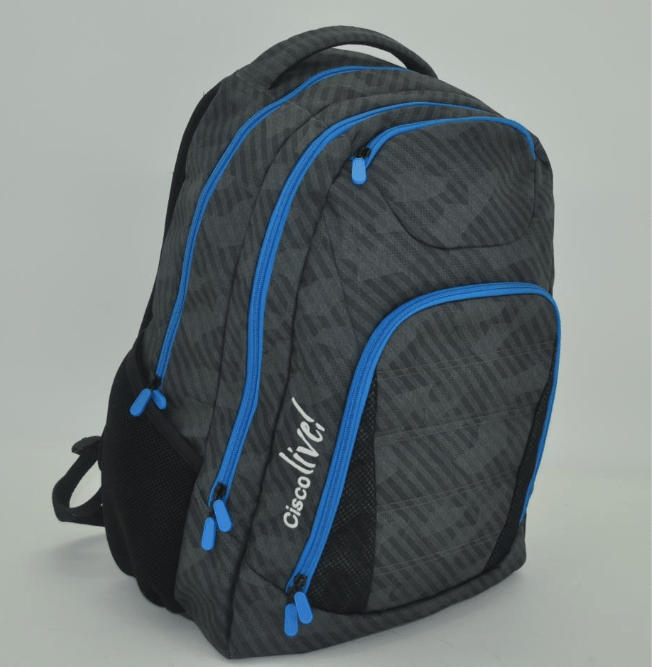
Enough said… Bag is looking pretty snazzy…
With a mere days left until Cisco Live! It’s been announced I will be speaking at the Think Tank about building your personal brand with Social Media. I am honored that Cisco would ask me to speak on such an amazing topic – I promise I will not monopolize the mic – too much.
My personal views over the last year, my journey into the Cisco Champions program, and most importantly how I have continued to maintain my independence as an online blogger and writer. I will also have some interesting announcements. Come to this session and find me – and get yourself a Cisco HyperFlex Gumby!

Join Kim Austin the Collaboration Snarketing expert from Cisco, Dustin Beare – Network Engineer for Midcontinent Communications and ME – Justin Cohen @CANTECHIT from Long View systems.
What will we talk about? Well, Social Media, how we have built, and are continuing to build our brands online
Click HERE to sign up for this session
In addition to that, Sunday Jul 10, 4:00 PM meet up with Cisco Live NetVet Jonathan Davis and me to help you find out how to get the most out of Cisco Live. Come to the New to Cisco Live Meet Up.

WOW! Cisco Live #CLUS is approaching, and my planning is in shambles!
This year I have been very surprised (and honoured) to be asked to speak at multiple Live! events and sessions this year. I am pleased to be speaking at Field Day as well as the Social Panel, and the Mentor-ship talk on Sunday. I’ve had others as well, and I am trying to get to see everyone.
I’ve also been contacted by vendors on the floor to come see their new wares as well, and I want to make time for the World of Solutions – because I love it in there.
Next year, i’m going on Saturday, simply because some of the personal things I always want to do – I never get to do, so next time I am going Saturday. I’ve done this in the past, and this year due to a personal conflict (The Galways Cavendish Forest Rally – GCFR is on Saturday here in Ontario) I was not able to go in Saturday.
So the plan this year will be arrive Sunday, run to the Hotel and check-in and drop my stuff, then rush to the venue to register, then off to do the ONE shopping trip I planned the entire week (5.11 Tactical has a store in Vegas, we don’t have those in Canada, so i’m planning 1 Hour to go and shop like mad, to be honest a limited time frame in that store is best anyway) and then rush to the hotel and drop that off, and then head back to the venue for the Tweet-Up / Newbie discussion. This will probably fail, and if my flight is late – i’m really screwed.
I needed another day, I should have planned my shopping day at the END of the week like I did with Kai @kajtzu in Orlando a few years ago, it worked out quite well.
The planning is killing me, first getting to the scheduler/planner on the Cisco Live! site is a real pain. You have to go to Learn, Session Catalog, My Sessions, that’s assuming you have logged in – which there is no obvious login button.
You cannot put personal appointments in anymore! This is horrible, I book my World of Solutions time, I also book my appearances and interviews.
The scheduler this year is a pretty serious let down – especially when planning is so important. I hope they can learn from it for next year.
The key here is to limit your focus. I know it sounds bad, but to take it all in – there is so little time. Get to each place, learn what you need to – and then move on.
I am totally against walking out of sessions, and I think it’s disrespectful a bit to the presenter – but i’ll say it in public now – this is why I sit at the back, so I can sneak out. There just isn’t enough time for everything. If the content isn’t going “as planned” or I “Got what I needed” – I sometimes will slip out, giving me more World of Solutions time, or to get to my next engagement – or sometimes to just use the rest room before the line up!
Wow a red letter day – the Cisco (Selsius) 12SP phone is officially dead. It had a good run. However along with this many that are actually more in use will also lose support in version 11.5 – this is the first release of Cisco CallManager / Communications Manager in the history of Cisco that has ever significantly removed support for telephones.

Cisco has officially announced that in 11.5, the 12SP+, 30 VIP, 7902, 7905, 7910, 7910SW, 7912, 7920, and 7935 will not be supported.
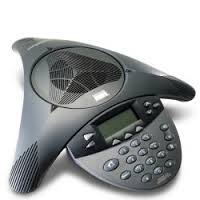

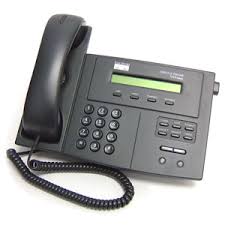


I’ll be honest, most of those do not surprise me, but 7920 and 7935? I have tons of clients – I might even go as far as to say many have 7935’s for sure – mostly because many are not a fan of the 8831 and the calculator style dial pad.
Release notes for 11.5 are found at Cisco HERE
Customers all over have 7912, 7905 as public area phones, they are very popular, 7920’s are still in use, and 7935’s are beloved.
I can understand the 7910, 12SP, and 30VIP phones being removed from support, but there will be customers who are unhappy about some of these others – many of these phones live in back alleys, hallways and as door phones.
The positive news is many of these are well supported on Asterisk and other geeky voice platforms, so expect ebay to light up with these models very soon.
So we are mere weeks away at this point, so it’s time to start thinking about what you will bring with you… If this is your first #CLUS then first – CONGRATS! You will be overwhelmed. Here’s my random ramblings about how to prep.
Do Not Show Up On Monday If Possible – If you can show up Sunday with time to register – do it, the line up on Monday is crazyness!
Here are some basic tips that you need to know
A) Assume you will leave your hotel in the morning – and you don’t return until your head is ready to hit the pillow
B) Consider the weather, and the effect it may have on you when packing
C) Comfortable shoes – forget the fancy leather unless you are really looking to make a fashion statement, you will be on your feet – a lot – and walking – a lot.
D) Day Bag – You will be gone all day, and you might get some swag – bring a backpack or a bag. The event provides a bag normally – but sometimes the bags have missed the mark, so bring another one just in case – trust me you will need an extra bag for swag you bring home.
E) There are shuttles. The event provides shuttles from hotels to the event venue on a very constant basis.
F) You could be busy – every – single – night. There are events all over every night.
G) Lunch is provided
H) Get your calendar, but plan some time for the World of Solutions. Sometimes there is just as much good stuff there, as there is in the sessions
I) Don’t fret if you didn’t get into a session – if you didn’t get the session you really wanted, don’t worry – go anyway, just before it starts they will let in a standee line.
J) Internet Access: Have a plan, especially if you are an international traveller, for Canadians I use ROAM Mobility. The event has WiFi and it has been good the last few years, check your hotel and see if it is included. Just a tip – Internet Access WiFi almost never works when in the large general sessions, you are better on LTE or 3G if you are blogging or vlogging.
K) Get A Map – Map where your hotel is, figure out how to get to the venue, then figure out how to get around. The good news is if you are rushing between sessions #CLUS has literally 300+ people just standing around to give directions, normally in a funny hat or shirt, use them.
L) Have fun.
Stuff to bring and things to plan
Yesterday we received additional details in a Podcast with Simon Tompson @merakisimon about how the MC74 came to be, and a small glimpse into what is ahead.
The Meraki MC74 isn’t the first phone they have built. The original phone had a full keypad and many more buttons, however it became very clear that they simply couldn’t built what they wanted using something that restrictive
The team has seen the 7″ IPS display as a “Blank Canvas” of which they can develop any features they please. Buttons are too restrictive.
They wanted to launch a “Flagship product” to show what they could do, and what is coming, it is a natural next step to offer up a more value oriented product which we could see in the coming months.
Reporting in the Meraki portal is a huge feature today, I am sure lots of reporting will be coming. Along with many features, and while I cannot prove it, I have a feeling – we are running Android here.
Everything in the MC74 is encrypted, all of the signalling, and all audio traffic is SRTP. Audio paths are all point to point for phones, or point to gateway for PSTN calls. Everything this phone does – is SIP.
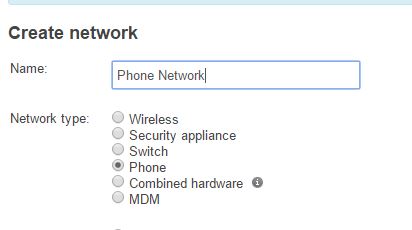
You can now create phone networks in Dashboard.
In my opinion the device itself is of exceptional quality in the hand
In a video I posted on Youtube at Cisco Connect Toronto I was able to put my hands on the device. It has a sculpted back which is rounded. 3 buttons, 2 for volume and one for hardware mute. The handset itself magnet locks to the phone and feels very natural even without a noisy old school hookswitch. The audio quality is SUPERB running G.722 and the handset feels good in the hand and comfortable to use. My only concern is the same with many other VoIP platforms – the lack of sidetone when using G.722 makes the phone feel hollow a bit.
I am sure you have seen this button
By now you might know, Meraki does actually READ these wishes, many are correlated with software, word matching and that kind of thing. Many features you see today in other Meraki products are derived directly from “Make a wish”
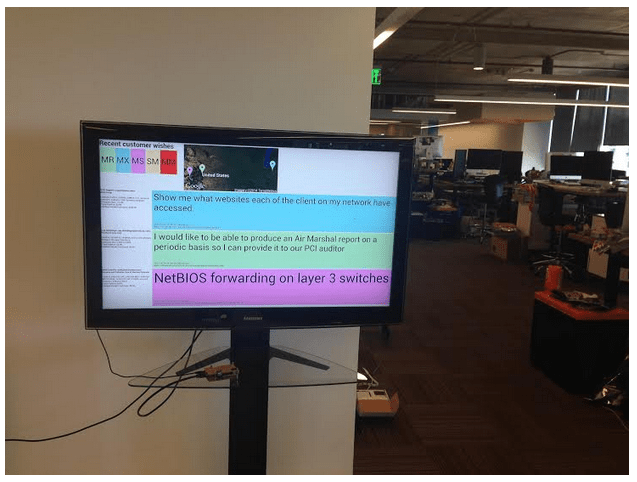
In a Meraki blog post they posted a view of the screen displayed in San Francisco that the developers see when you post. So go ahead and send in your wishes, they are listening. The MC74 team will be using this to generate new features and functionality.
Last but not least, go ahead and make a wish “Make me a sandwich” and when you are done that “Konami Code” – you will get a little surprise with both.
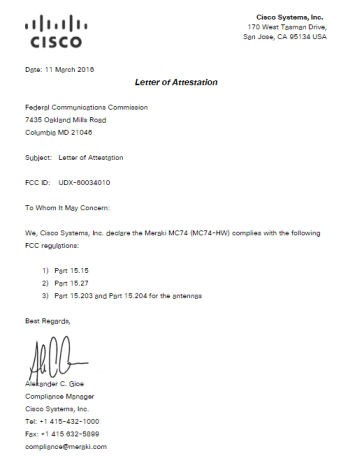
The information was leaked about a month ago, in a letter to the Federal Communications Commission, Cisco was providing letters of Attestation regarding a product called the “Meraki MC74”. Why is this important on launch day? Well keep reading
The only thing we knew then – was that it was some kind of WiFi Device.

Today I am extremely excited to show you something that will in my personal opinion – change the face of small and medium business IT. It’s no secret, I do work for a Cisco partner, and I guess I do drink the Cisco sauce a little bit.

This is the new Meraki MC74 – a cloud managed VoIP telephone. Meraki has not told us that it has WiFi inside, but FCC documents reveal this device does have Wireless inside, and the device DOES have bluetooth support – but comments about DFS compatibility, could that mean this has a WiFi chipset in it Meraki has not told us about?
The easy deployment and management of all Meraki products will still exist, including the one portal to rule them all.
This will be the “Premium” experience phone, and we should expect lower end phones coming at some point.
The intention is that you will be able to ship this DIRECTLY to a user, with no admin intervention from the device. The unboxing process has been “optimized” to provide a clean user designed unboxing.
Meraki’s launch team tell us that it was “Painstakingly Designed and Built” and will provide a 7″ IPS Display which will give them a blank canvas to create features. They will continue to iterate features from customer feedback, and will be the first in a series of telephones from Meraki.
They will have IVR and Auto Attendant type services available, and Directory Services are handled using a few options, one of which is CSV. Google Apps integration will also be offered.
The handset has a magnet to assist with location of the hook switch, which is also IR instead of the mechanical hook switch
Built in stand, and wall bracket which does include the Meraki bubble level if you want to wall mount it.
The key for Meraki in this new product is software integration and they are telling us that features will be announced in the coming months.
This is huge. I don’t even think Meraki realizes how huge this is. Today this means I can have Switching, Wireless, Security – and now Phones – in a single pane of glass, with a single interface. The interface is easy – very easy. This will reveolutionalize how small and some medium businesses see and use IT. This will drive the sales of additional Meraki services.
With more and more businesses moving to the cloud, Office 365, SalesForce, and the other cloud type SaaS providers, small businesses can now be agile. With the growing cost of IT, one of which is the people cost, the SMB market continues to try and do more, with less. Let us be honest here, many SMB’s operate with a single IT resource, or a single contracted resource. This means agility. This means servicing end users from anywhere, anytime and from a single pane of glass.
Ahh, the single pane of glass thing. We have all heard that one before, where a single pane really means looking through 8 single panes and then pretending to be a single window, which really just results in a foggy image of that single pane. Not this time.
This will be a big deal – ok now for some more details.
Phone Screenshot…

Interactive Voice Response (IVR)
Persistent conference bridges
Directory Integration – CSV, Google Apps
End User Web Portal, for Call Forwarding, Voicemail and Outbound Calls for access to this information when the user is away from the phone. Call logs, play voicemail all from any browser anywhere.

Click to Call Integration – Users can click phone numbers on their PC and the MC74 will dial.

There are three parts you need. The phone, the Meraki Cloud license – and the SIP Service. At launch it will be offered in USA only. Meraki WILL NOT be setting themselves up as a SIP provider, you can use a SIP provider in the USA.
Extension to Extension calls are “Not an Issue” so there is some indication that phone to phone calls are possible without the service.
Administration

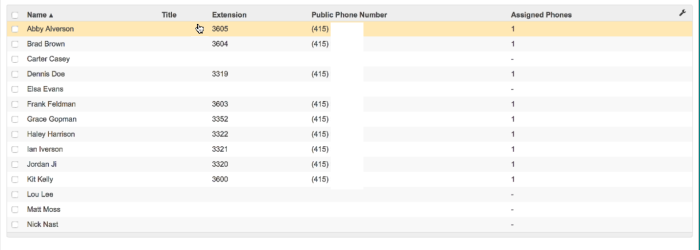
Just like looking at switches or access points, phones are no different. There is a very consistent look and feel.


Day 1 there will be service through IntelePeer but the plan is multiple service providers in the USA and around the world.

You will be able to order numbers directly from the Meraki Dashboard, confirm and activate immediately.
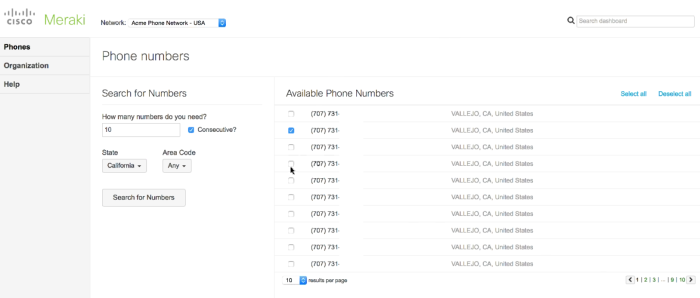
IVR Programming will be very easy.

That’s it! Cannot wait to get this in my hands to try it out.
Meraki add’s 2 new AP’s today.. MR52 and MR 53. Both have the same basic features

Along with the Meraki Features that we already have in the existing access points
This is where the similarity ends, the difference between the various models is in the interfaces
Meraki is entering into Multigigabit with up 8 mGIG ports up to 10GBe and also supporting UPoE 60W capability to support newer access points.
Launching Today – $7495 USD

Launching Today
MS425-16 – $14,000 USD
MS426-32 – $22,000 USD

Let us step away from Technology for a moment. I simply agree with Rex Murphy on this one..
In the wake of a 7.8 Magnitutde earthquake in Equador on April 16 the Cisco TACOPS team is dispatching teams from botth their San Jose, California and Raleigh, North Carolina hubs to the area. Bringing with it satellite, WiFi, Route/Switch, VoIP, Security and a plethora of highly skilled technical response engineers.
As aftershocks continue to plague the country as of this writing over 600 have been reported dead by Reuters.
http://www.reuters.com/article/us-ecuador-quake-idUSKCN0XI26F
The team is working to assist with the restoration of emergency management and first responder telecommunication and data networks in remote areas that continue to be cut off from both the original earthquake and the aftershocks.
Following this tweet from Chuck Robbins – CEO of Cisco Systems the TACOPS team went into monitoring mode and began coordinating how they could best lend their assistance.
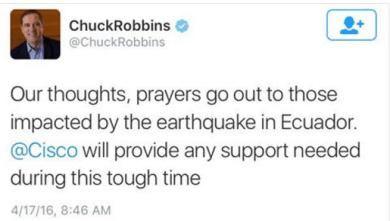
Cisco is also pushing additional equipment out from their global depot network and that gear will meet the team on site.
Cisco has built what has become the reference platform for emergency communications preparedness inside the NERV – Network Emergency Response Vehicle, with everything from Voice, Video, Radio and Data communications all over IP over just about any medium. GSM, LTE, Multiple forms of Satellite, Wifi, Mesh and everything in between.
If your organization is looking to build a response vehicle from mild to wild and beyond the Cisco NERV team is willing to help you with experience from their actual disaster response scenarios. Contact your Cisco partner today and ask them to engage the TACOPS team.

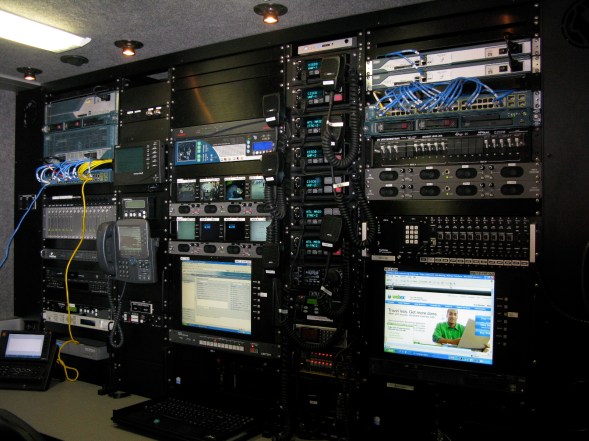
http://www.cisco.com/c/en/us/about/supplier-sustainability/tactical-operations-tacops.html
Uniquely Trained
The Cisco TacOps team comprises expert networking, radio communications, and systems engineers along with logistics and operations coordinators.
Members of Cisco TacOps and the employee-volunteer Disaster Incident Response Team (DIRT):
- Are trained in the U.S. National Incident Management System (NIMS) and Incident Command System (ICS)
- Participate in large-scale exercises to validate technology solutions and train alongside other responders
Uniquely Equipped
TacOps specializes in emergency networks that support the immediate needs of rescue, law enforcement and security, and humanitarian assistance teams. TacOps can also support traditional enterprise and service provider networks.
TacOps maintains many resources that are ready to deploy immediately, including:
- Cisco Network Emergency Response Vehicles (NERVs)
- Satellite-equipped support vehicles
- Fly-away networking kits that can be shipped or carried by hand
- World-class cybersecurity solutions that protect first responders and affected populations
A geographically dispersed network unites all these resources so that TacOps can easily scale the response based on needs on the ground.
Uniquely Supported
The team’s humanitarian relief operations are provided through the overall Cisco Corporate Social Responsibility (CSR) Program. To ensure delivery of high-quality expertise and equipment around the globe
 cantechit - Technology and IT BLOG