Insiders have confirmed that MAROON will be the Cisco Live Customer Appreciation Event Headliner! The CAE will be held this year at the T-Mobile Arena
Opening Act will be Elle King
If you have not visited Cisco Live! before, one of the greatest thank you’s for going is the Customer Appreciation Event – with free everything and a promise of an amazing time. Don’t forget to find your favorite #CLUS friends to party along with you.
Bring your camera (or just your mobile phone), and make sure you tweet all the photos of the amazing event, I will also use Periscope to share my experience again this year.
For more information on the Cisco Live CAE CLICK HERE
2015 Best Ever!
Aerosmith rocked Petco Park in 2015, I personally left with vocal chords strained so bad it took three weeks to recover.
Photo Courtesy of @BrianCSCO
Listening to “Dream On”, “Love in an Elevator”, or “I Don’t Want To Miss A Thing” was an absolute dream come true for me, as a long time Aerosmith fan, there was no better gift from Cisco than this amazing band.
Get Home with Ease #CLUS Pro Tip #2 – UBER for Free!
When leaving events at Live, Cisco does provide shuttle busses, but sometimes you may experience long lines and long waits while 15,000 people try and find their way back to their hotel. Share an Uber ride with others, and get out of there quick, and in style.
You can even get a FREE Ride, find someone in your group who is not an UBER user, have them sign up quickly on their mobile device and use YOUR promo code, they get a free ride, and so do you!
Meraki has dropped AMP – Advanced Malware Protection into the latest BETA.
In a continuing effort to “keep up with the Jones’s” at their internal competitor that is — everyone other department at Cisco. Meraki has added added Advanced Malware Protection to the MX line, currently in Beta.
One of the great things about Meraki is the ability to simply enable the BETA code trains in your dashboard, while I wouldn’t recommend this for production networks, anyone with lab gear, anyone with a CMNA or anyone with a strong business reason can enable BETA code at anytime on their devices.
I contacted Meraki to get the BETA AMP services installed on my MX64 by opening a ticket but was advised the MX64 beta with AMP was not released yet.
— AMP File Scanner – Downloaded file are checked against the database before a client can get a hold of it
— Security Centre Reporting – you can now report suspected malicious files right in the new Security Center. This page bring IPS and AMP togeather giving you a holistic view of your network threats.
— Retrospective Alerting – In english? If someone downloads a file and 2 days later that file is identified by AMP that it would have been blocked – you get an alert. Now this IS cool – Administrators should really value a tool that looks in the past to tell you “Hey, this file might have infected your network, better go look”
AMP does require Advanced Security License on MX – but let’s be honest, who doesn’t purchase that license these days.
Meraki continues to roll in new value with their gear, with ease and functionality. While Meraki used to be a great fit for the 200-300 and less customers with features like AMP, larger and larger organizations will start to consider the MX. However as I have said many times – we need proper dynamic routing protocol support in MX, it is the biggest thing holding it back!
All the best sessions at Cisco Live – book up early, now in the past I have had good luck with standby lines – but some of the best are always sold out, and you never want to be sitting at the back of the room.
The session catalogue is now live! CLICK HERE – to start planning which sessions you wish to attend, and then on May 3rd when the scheduler opens up you can be ready to book the sessions you want.
Cisco Live CAE Guest Announcement – I will have it for you the moment it becomes available, last year the Aerosmith event was without question the most amazing concert event of my entire lifetime, I literally had no voice for 3 weeks. I am combing my sources at Cisco to find out who it is but it is very tight lipped.
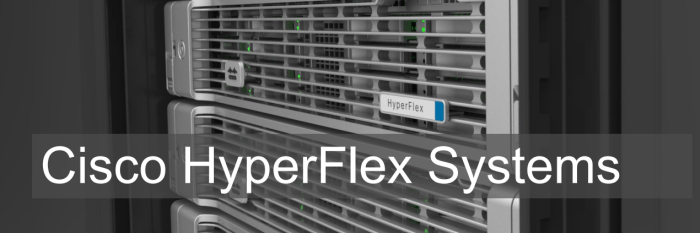
Cisco is unwrapping the covers on Hypeflex. Their direct and targeted attack on the hyperconverged market.
The headlines are basically this….
A true hyperconvered system that includes network connectivity
Built on the tried and true UCS platform
A revolutionary storage system
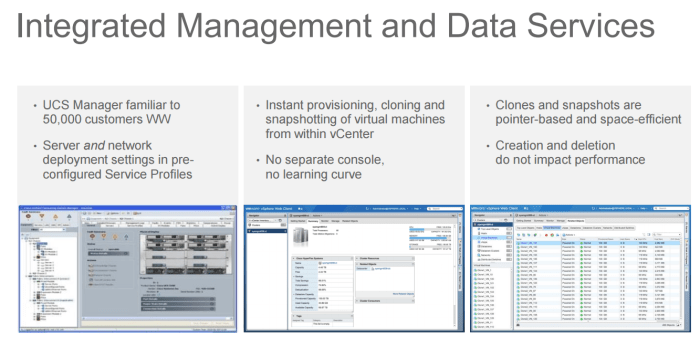
No new administrative platform – a plug in with VCentre
Competitive with other offerings
Tested and proven today
Actually turns up in an hour.
What does it look like?
The story is much as you have seen in the past. Server based platform, with on board disk. However remember, hyperconvergence is about using “commodity” hardware with onboard DAS disk in order to deliver converged type infrastructure for lower cost with easy expand-ability.
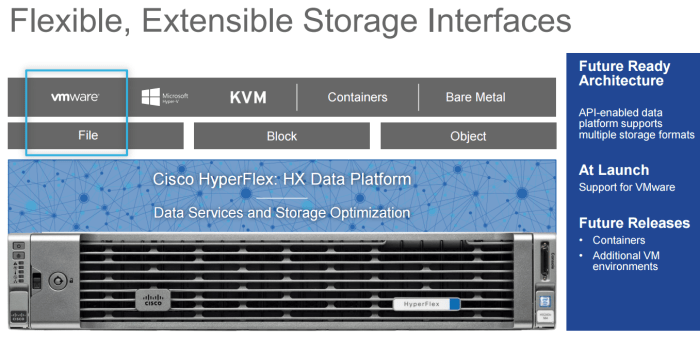
The system will launch with VMWare day 1, with other hypervisors and container support down the road.
The Secret Is In The Storage
The secret sauce with all hyperconverged solutions is in the storage layer, and Nutanix has always pried themselves on being the leader here, and they are, with developers from top tier companies they built a very mature product with demonstrated performance. Many others have tried to meet or beat this performance and they continue to be the market leader – HyperFlex plans to challenge that.
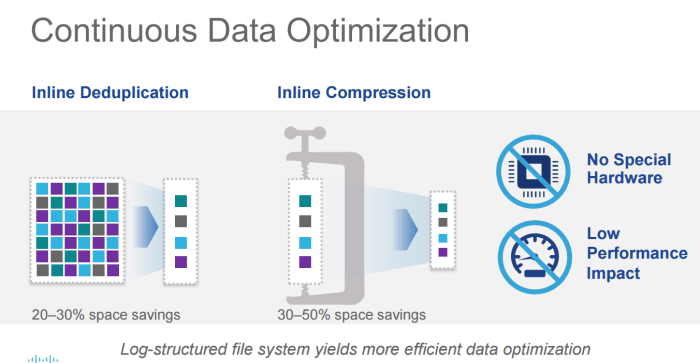
Cisco had to differentiate themselves. By using a log based file system, with intelligent caching they have eliminated the 3-phase commit performance problems. Basically with a 3 phase commit, we have to make sure that data is sent to all nodes before it’s committed as written. Cisco eliminates that by log shipping and caching. I am sure we will get more details as this moves on, and I will admit to not being a storage architect but the secret sauce is in the software.
De-duplication and Compression is all the rage, and they are delivering it here – with low performance impact. The technical experts tell me – this is all around their caching technology. Are you seeing a trend here?
What does this look like?
The Fabric Interconnect is right there on top – and HyperFlex is built on UCS – so the FI is how we control the hardware, manage nodes and provide the network. HyperFlex will deliver where other hyperconverged companies have not – in the network. While others tell customers “we use your network” – Cisco recognizes the important of engineering, and when building hyperconverged – the network is way too important to leave to the end users, the performance between nodes must be high, and predictable. The UCS Fabric Interconnect is perfect for this task. Why re-invent the wheel on connectivity, the FI delivers features and performance.
There will be a flexible deployment model – list prices around $59K USD to start, which is competitive – and you can build with balanced, capacity heavy or compute heavy nodes, or a mixture to create your own custom environment.
The administration is about familiarity here, with the hardware being managed by the very familiar and manageable UCS Manager, and the hyperconverged part being managed with a plug in to VCentre. No extra management portals or parts required. This means time to value is fast, and time to market is also fast and chances are you will not any training to work on this thing.
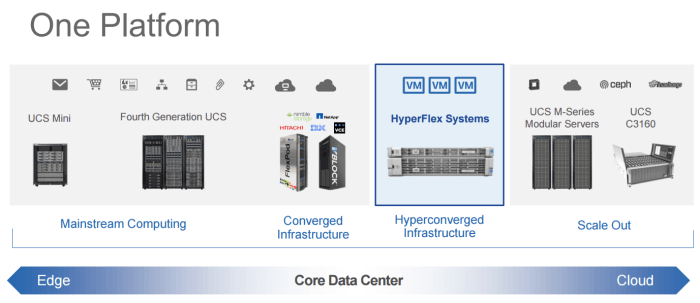
So where does this fit? Well, it’s a whole new product line – but the pedigree of UCS is there, so the trusted and hardened UCS platform is right there – and it fits into the core data centre portfolio.
Independent Scaling
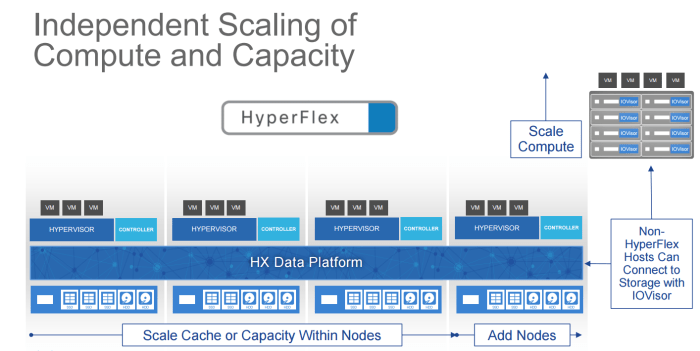
Expanding hyperconverged you need flexibility (HyperFlex?) and sometimes clients just want to add compute. Luckily using IOVisor, you can actually access the storage from non HyperFlex hosts using their IOVisor software. There is many instances when accessing this storage could be useful, call it migration or disaster recovery, or high availability. For all the reasons we cannot think of this type of flexibility is great.
Each node has a “controller” which handles the local node, and mostly storage activities and manages the cache on that node. Just like other platforms.
Failures
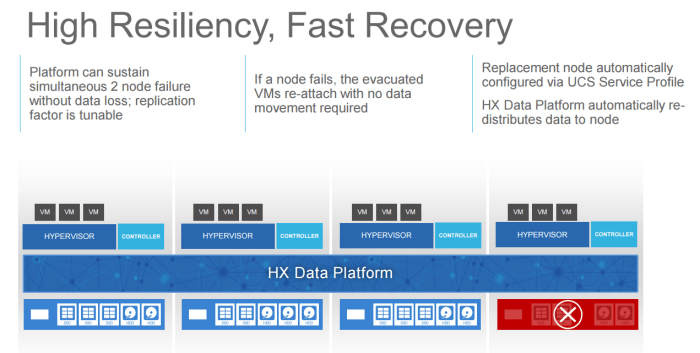
The system can handle two node failures, and because it’s built on service profiles, node replacement is obviously very easy. As soon as the replacement node comes up, data replications begins immediately over the high performance built in network.
That’s a wrap! Looking forward to getting my hands on this thing, if anyone was going to take a shot at this market – it’s Cisco and I cannot wait to get my hands on it.
Ran into a problem today adding an Exchange account to an Outlook 2016 installation
It seems Microsoft has removed most of the advanced settings as a result of the removal of MAPI support from Outlook, but what it means is that your Autodiscover – MUST work.
For lab environments, we don’t always setup Autodiscover, we just manually setup the accounts. I figured I would add an SRV record to fix it, so I did. However I had another problem.
Microsoft has a great tool called the Remote Connectivity Analyzer, which tests and tells you when it finds problems with connectivity – well – I passed most of them. Yes there were a few errors, as AutoDiscover has a few methods.
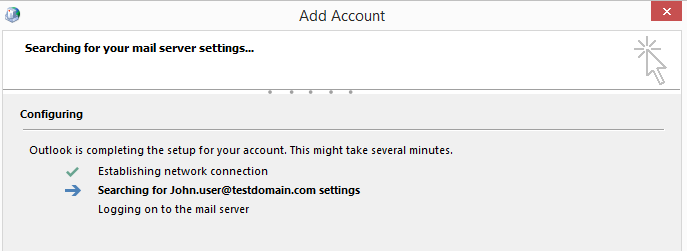
The mail settings panel would get “stuck” at this screen. It would search forever. Searching for your mail server settings stuck at searching for settings.
This is caused by the mail settings trying to auto discover using this URL
In my environment (and many others) this doesn’t exist. We have a mail server running on mail.domain.com or owa.domain.com – the root domain doesn’t have this. However unless Mail settings get’s a 404, 500 or another HTTP error, it will try 20+ times to connect, each with a VERY long 30 second timeout. – that means 15-20 minutes of trying before it will give up. Much longer than any users (And me in particular) is ever willing to wait.
That’s it, it tells Outlook to skip that step, and move on to other AutoDiscover methods.
A simple solution, which google didn’t immediately find me, I did find it buried in a few conversations on Reddit – but hopefully this post, will give it better goggleability.
Hopefully AutoDiscover Outlook 2016 and future versions will be come a little less problematic, a little less trouble, and not as slow.
There is any number of blog entries about why you should go to Cisco Live!, and while some are even lucky enough to hit up more than one event per year.
(Sidebar: I really want to try out Cisco Live Europe, I mean Berlin, really, but could they move it a few months later so that I can take a side trip to the Nurburgring on the way back?)
Here are a few online resources to help you justify your trip.
Let’s talk about the reasons you will get some resistance.
A week away from the office, if your are in professional services, that is lost work time
Cost – This is a complicated issue, especially when the company may not be able to send multiple resources.
Live vs Traditional Training
Traditional full training sessions tend to be 2-3 days of things we already know, and 2 days of real meat, with lunch and review crammed in there – so it is probably 1 maybe 2 days of really good stuff. Assuming you do not have to travel for those (which many do) you would still have a loss of work time for sure, but you are not getting 5 days of benefit out of that session.
Many of us pick up new information via technical briefings. Unfortunately those sessions are built for a wide audience, and tend to be “Powerpoint Hell” – not interactive, and sometimes remote. That 3-6 hour session you were in – had what? 2-3 slides of good information? These sessions just don’t have enough time to hit a real topic. Take a briefing on a new router, let’s say the ISR series. It would take literally days to explain in any reasonable detail everything that thing will do, you need multiple sessions even if it were possible. What if you were voice focused? Routing Focused? This is where Live steps in.
Cisco Live – Immersive Efficient Learning
That’s the message I want to get across here. It’s immersive, they cut through the junk and get right to the point. The sessions are targeted at a particular audience.
So you want to talk sessions on ISR?
Advanved Troubleshooting on ISR, Converged Branch on ISR, QOS Migration on ISR, ISR architecture overview, iWAN on ISR 4000
Sure, you can hit up that archtiecture overview if you want — or simply read up on that ahead of time and then hit up the “Advnaced Troubleshooting” session and get some real meat. That session would be 1 Hour and 48 minutes. This isn’t being delivered by a sales guy either – these are high end TAC engineers – that you can ask questions!
8 solid hours of sessions at least – per day, that’s 2 hours, so you have 3 other sessions. See where I am going?
The right speakers
We have all had our Cisco account managers or Technical Marketing Engineers deliver training or PowerPoint sessions – but really they are not the experts in the field.
You get amazing speakers like
Samer Theodossy – Sr Technical Leader of the Catalyst team
Denise Fishburne – CPOC Engineer and Lab Rat
Robert Barton – SE – Wireless
These are people that really know their stuff, and you can ask them questions!
World of Solutions
I call it “The Floor” – but what I really call it, is the ability to talk to everyone – because any vendor who is anyone is at Cisco Live, and they bring the best people. Solarwinds, IPSwitch, Plantronics, Splunk, HP, Intel, NetApp, EMC – you name it. Take advantage and talk with them about your ideas, they bring high end brains to this event – grab one and talk.
Not to mention, Cisco has their own section demoing pretty much every single product, with product designers ready to answer questions.
Get Answers
I always have ideas, problems and things burning in the back of my head. This is the place to get it handled. Here’s a list of the ways you can collaborate and learn.
You can hit up a tech session and talk to the presenter after
Table Topics: Sit down with other people – just like you – who have experience in a topic and “Talk shop” over lunch.
Meet The Expert: Sign up for this! Validate an idea, work on a design or talk troubleshooting and strategy with REAL Experts. If you head in, and you need an extra expert – they will get you more. You simply CANNOT get access to this outside of Live.
The Cost Battle – The 1/20th Argument
How do you justify the cost, let’s get down to it.
Flights: For those of us who have to travel from Canada, or a far away location, we are looking at significant travel costs – but when you consider we can have 20+ training sessions for the price of a single airline ticket – with quality presenters. That’s a better deal.
Lodging: The 20 for the price of 1 argument still works on this one.
Food: No problem, the event has you pretty much covered on this one.
Event Cost: You have options here, don’t wait till the last minute!
Pre-Reg closes March 14, and the price goes up by $300, so don’t wait.
Use Cisco Learning Credits if you have access to them, if you don’t – and you purchase Cisco – you need to call your account team right now and make sure you are maximizing your Cisco Learning Credit eligibility on purchases from Cisco. 25 CLC’s get’s you a full conference pass.
Talk to your partners, some will help you out here.
Do the math – 1/20th means that you can get into Live for $2000 or $200 per session if you do the math that way, and it doesn’t even factor in all the other learning. Cisco Live costs about 1/2 or the same as some training sessions that deliver literally 1/20th the value.
Last Ditch Effort: Explorer plus 365. Ok so it’s not the best, and you miss out on technical sessions and the CAE, but you are there, you get to see the World of Solutions, and have acces sto DevNET and Innovations talks and Keynotes. This is worth it if it’s your only option or paying out of pocket.
Conclusions
Cisco Live is about VALUE FOR MONEY – You are away for a single week instead of multiple days that are broken up across the year, you get very high learning value per dollar and you are IMMERSED in it, which has been proven to cause better retention.
The networking capabilities with other professionals and Cisco engineers is something you simply cannot get anywhere else.
What are you waiting for? Go book a meeting with your management and make your case!
Cisco launched their merchant based 1830/1850 series Wave 2 AP’s with integrated controller, and we did get our hands on one – but have not done a full review yet.
Meraki has now hit the street with the M42, a full on AC Wave 2 AP 3×3:3 with support for MU-MIMO – or Multi User MIMO.
The new Bluetooth Low Energy and Beacon technology is in there as well – also a feature not commonly used yet. If you are still running on older Meraki gear without the dedicated security and RF optimization radio, this does have that and it will give you better security performance. Plus you can do cool real-time spectrum analysis from your couch.
It’s worth mentioning – investment in MU-MIMO technology for AP’s might be a little early, as MU-MIMO 100% requires client side support in order for it to function. Right now nobody is selling Laptops, Phones, or anything with 802.11 AC Wave 2 support – and it’s not something you can just upgrade.
You can still get the 802.11AC MIMO benefits on your existing AC clients — of which there are very few, most new Apple products support AC, but smaller products are generally 1 stream anyway, so it doesn’t make a big difference. The big deal here is once we have 1 stream Wave 2 clients, we can use multi streams for more clients instead of more speed. Which for multi user environments is more important.
Wave 2 – doesn’t help you right now – at all – so jumping on the Wave 2 bandwagon on your AP’s will give you great bragging rights but no more performance.
Ever since Meraki announced iWAN support – I have been thinking “Hmm, if Meraki does iWAN as easy as they do everything else, that’s one hell of a compelling story”
When I speak to collegues who have done iWAN on Cisco ISR platforms – it is
iWAN is still something many have not played with – but the value prop is pretty simple right? It boils down to two simple concepts
I can use my internet to transport some of my WAN traffic
I can lower costs by using smaller MPLS circuits because I can use my cheap internet pipe for that.
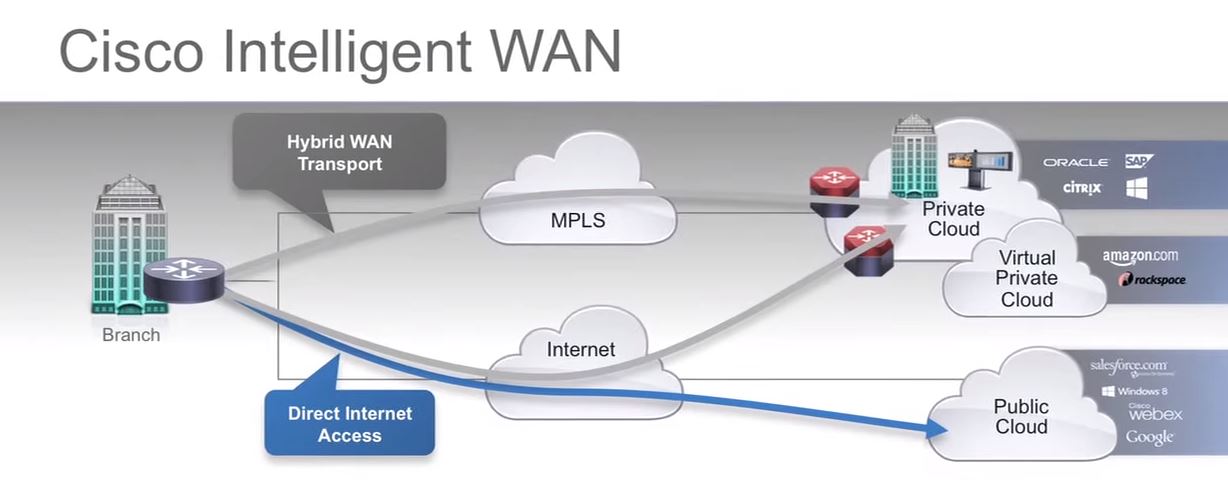
So really we are moving away from passive/active world of MPLS + Internet, and VPN over internet if MPLS fails. Everything is active/active, but unlike traditional load sharing type arrangements, we make intelligent decisions of what traffic goes where and when.
So the iWAN concept looks like this….
Sounds like marketing right? Well, it is a little bit. It’s really a concept based on a bunch of ideas.
Transport Independence – We can send the data on any link we have to get to the other side, that uses DMVPN
Application Optimization – That’s QOS and AVC
Intelligent Path Control – The ability to control what flows over what path and when – That’s PFR
Put all that together, and you get iWAN. Keep in mind your endpoints might also be running ZBFW, Voice or other applications that will make this difficult.
It’s Hard
I’m sure some will disagree with me — but iWAN is difficult. Not in a lab, in real world, it is alot to configure. Here is one document — on just the PFR part of iWAN.. http://docwiki.cisco.com/wiki/PfR3:Solutions:IWAN
So the concept is good, and sound but in practice, it requires a lot of skill to deploy, and to maintain the same skills are continually needed.
This is why many customers have not looked at it yet, if they have the skills in house, with time to burn – then perhaps, but to bring in someone from outside, is costly. As someone who is constantly working with clients to reduce cost and deliver value, it’s hard to say “Yes go spend $50,000 deploying iWAN to save yourself $1000 a month” — the math doesn’t work.
APIC-EM Managing iWAN
The APIC-EM is an ever evolving product but it quickling becoming the bespoke “software defined” network platform for edge, WAN and access. The benefits including path visualization, and application control are very cool and provide us with visibility like we have never had before.
Ok don’t get me wrong here, yes this is a GUI, and I am a hard core CLI guy, from the early telecom days and 3 letter mnemonics I love my CLI’s but there simply isn’t a way to visualize 10 pages of policies without a GUI, or I suppose if I was 20 again and had that level of brain power – but it simply isn’t there for me.
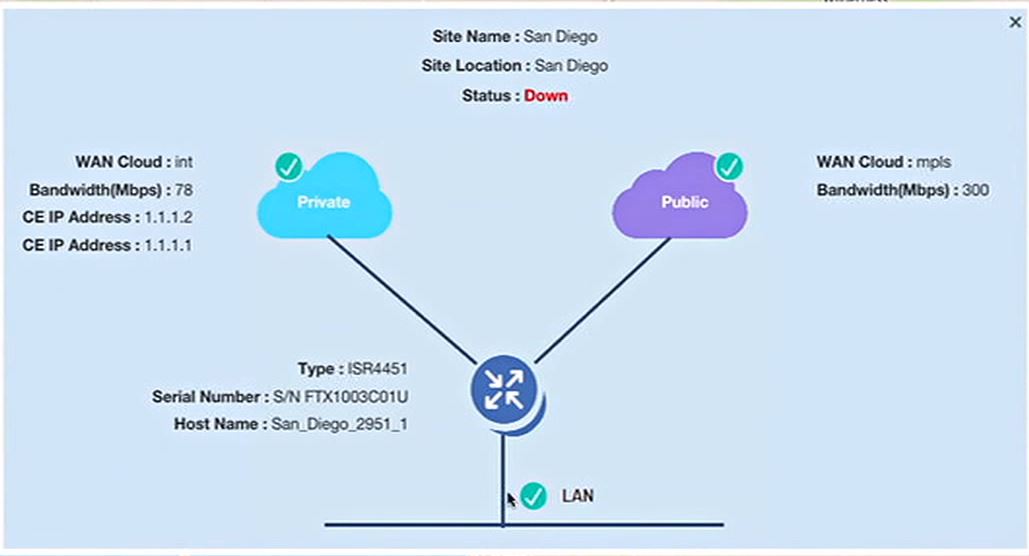
First we can see very clearly the status, and configuration of what our iWAN network looks like, including health, and a quick review of what is set up where and how, nice pictures, make things easier.
The APIC-EM gives us the ability to build, in a GUI the network policies that meet our business needs for our WAN. This means that people who are not network savvy, application owners can now understand and make intelligence decisions based on provided information . Where do we learn about the network? APIC-EM uses the NBAR data to find out what applications are running, and those that are not, we can define. 1200 Applications are in there by default.
Once defined, we can drag/drop/GUI Design what fits where, and over what link we want to use, either Internet, MPLS, or even balanced over both. All with full fail over, and remember we have not touched a CLI yet!
APIC manages all your certs, configures the DMVPN, handles IOS version deployment and takes care of endpoints. I make these statements from what I am told — is it really this easy? Well, that is a good question. I am working with the @ciscoDCloud team to see if we can get a real demo of it up to try out.
That Easy?
So that’s the question, iWAN was marketed well, but the costs / time and difficulty wasn’t really well explained until you get down into it. Is this going to make it easier? It sure looks like it. I just need to get my hands on it to find out – is it that simple?
I hope that this message reaches the people I want it to. Those in the marketing departments of the largest tech companies on the planet. I’m talking the big ones, Microsoft, Cisco, HP, VMWare, and of course all the others. Are you listening?
In the last few years I have attended Cisco Live!, Microsoft Management Summit, and other large IT conferences. I love to bring home some cool swag, and no better swag than the T-Shirt. The T-Shirt business is huge, with Cafe Press giving me the ability to make and sell anything I want. I literally have drawers of T-Shirts that I almost never wear. Why?
THAT’S WHY! I literally have drawers of shirts like this. They have HUGE designs on them that look goofy, or say things like “I’M INSECURE” on it. There is no way any reasonable person is going to walk around in public with this shirt on. I certainly will not visit any clients wearing this either.
I will not mention which IT company this is from – as this isn’t really the point, but the point is – 90% of my give away shirts are like this.
So what do I end up doing with these shirts? Well, I can tell you I don’t go out for dinner, or visit the mall. I wouldn’t even be seen at the local coffee shop in most of these..
This is what I use them for… That’s right… Shop shirts…
Hey don’t get me wrong I need a few shirts for banging around in the shop. However I could literally wear them once and toss them I have ended up with so many. They are relegated to protecting me from dirt in my shop, but never see the light of day in public — which is the point of marketing swag anyway isn’t it?
T-Shirt’s are supposed to be walking billboards. Moving marketing, that move, walk and talk around people who are probably your clients. This is targeted advertising! Except the only thing this shirt is targeting — is the greasy spot from my oil change.
Splunk Nailed It.
The team at Splunk do it right.
They even run around saying “We are a T-Shirt company that makes great software”. I know people that will actually find their booth, and WANT to listen to their pitch because they know at the end is a cool T-Shirt.
Not to mention – these ones you can wear! They are cool, classy, a little saying (Think Geek style) and their logo on the back. No huge designs, no flashy colours. Just a cool tech shirt that people actually wear. I see Splunk shirts more than anything else actually being worn.
When shirts are this cool, people even Tweet about them. Michael Brown @Supermathie posted this photo of him in one of my personal favourites.
Golf Shirts – Expensive – But Worn
It goes without saying, a good golf shirt, will get worn. However it has to be classy and simple, see this?
Basic, simple, the corporate logo on the breast side, no weird designs – something you could get away with on a work day. I know they tend to be more expensive – but again, I have these and wear them.
Conclusion
So a short blog post today, which hopefully reaches all the vendors before this years Cisco Live! 2016 event. With your help we can get the message to marketing departments across the country and the world. After all this is an ecological message. IT professionals, nerds and geeks alike are willing to be your marketing billboards around the world. However we would rather do it without the embarrassment.
After being in telecom and collaboration for almost 20 years, I have watched the video space evolve over many years. Everyone seemed to think they had “the next big thing”.
Telepresence is not point to point or desktop video. These are two very different technologies and you have to treat them different if you are going to respect each – because to compare them just is not fair.
This article might seem lengthy, and I am trying to avoid a history lesson, but my opinion is based on the history. So let’s take a walk back in time.
The advent of video calling goes back to the 60’s when AT&T came out with the Picturephone – however we will not go back there.
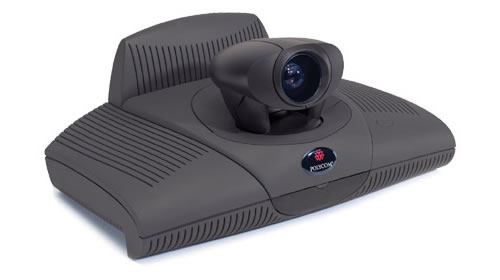
The first real game player started when Polycom started with the table or screen top “Viewstation”
These systems locked to ISDN-BRI technology over the PSTN, you had 128K or maybe 512K if you wanted to combine lines, but then you had to call someone who’s system would talk to yours. H.320 video was supposed to make things “just work” but it didn’t always work that way. The quality was decent, and the system even had a Pan/Zoom/Tilt (PZT) camera which was of good quality, and the audio was PSTN quality. Later versions worked with IP, but firewalling issues, bandwidth constraints (remember this was the early 2K’s) and other problems plagued the adoption of such products.
Nortel 1535 SIP Phone
In walks Nortel, a great Canadian company who continually innovates and in they walk with the first real mainstream enterprise ‘Video phone’ with the 1535 SIP Phone (Yes others came before it, but this is a mainstream conversation). The quality wasn’t great, but it was a integrated office video phone over IP. It was expensive, but you can pick them up for about $50 online now and they can be connected to Asterisk for FreePBX and other systems as well, so if you want some cheap SIP video phones for home – it is a good option – but why?
Cisco/Tandberg Alliance and Acquisition
Before Cisco purchased Tandberg in December of 2009 they were one of the leaders in the field, and many organizations, including Cisco were re-branding their products. Even today it isn’t difficult to see how the Tandberg T3, Looks like what became the Cisco CTS 3000 Telepresence.
If Tandberg had the marketing prowess of Cisco, they would have been even more successful, but it took Cisco’s marketing to bring these products mainstream.
Getting back to why we are here.. Tandberg and Cisco launch the absolute desk hog called the 7985, which was basically a re-badged Tandberg 150 MXP – it ran a modern H.264, but cost $3000+ and ate up all of your desk space.
Not very popular, they were in demo centres all over the place and mostly executive offices who got them for free from Cisco – because they were hoping for adoption. That didn’t work. Keep in mind that many shops back then didn’t have the WAN services to really support this kind of bandwidth use, the $3000 desktop phone was only part of the cost, and that problem doesn’t change today.
Cisco disrupts with Unified Video Advantage
This in my mind — is the perfect product. The phone is just a phone, and in this case it could be almost any phone. Even low end phones with grey scale phones worked with it. Unfortunately due to poor marketing and high cost, it didn’t catch on.
Why is this perfect? How often are you LOOKING at your phone? Chances are you are looking at your PC screen, possibly collaborating on a document or maybe taking notes – but chances are, you are not looking at your phone. It was also SIMPLE, a very small little applet detected the phone you were connected to, and when you got on the phone – video just started. Easy to install, easy to operate.
Except — Cisco Unified Video Advantage aka CUVA – is discontinued. It also started out very expensive, with a re-badged Logitech Camera with a Cisco badge on it, and custom firmware, it required this special Cisco Camera at a high price. They removed the requirement for the Cisco specific camera later on – but the product eventually just died.
Cisco Telepresence DX Series
Ok now we are getting somewhere. Cisco offers up a Telepresence / Video unit with a big enough built in monitor that you can use this as your monitor, and do Video on it. This makes a little more sense, but at $2500+ for the smallest version, it isn’t cheap and remember you still need the back end licensing and infrastructure to make it work.
Lync and Jabber Are Getting it Right.
Where do we see the biggest uptick in desktop video? It started with Skype at home, but now Microsoft Lync and Cisco Jabber is where I see the most use. The cost is low, the imapct is high and I still get to look at my documents at the same time. Not to mention the collaboration features of being able to share my screen. With the new generation being used to messengers, instant messengers and presence these types of platforms are gaining momentum quickly. The cost of entry is low, and the quality is “good enough”
For desktop video – the quality will never be a factor in my opinion – we have quality that is good enough. Video guys keep pushing the quality up, but it’s much like audio guys, they all push 24/96 — but the average consumer is fine with a lossy MP3 file. This is no different, 480P is fine, the user cannot tell the difference if it’s 1080P — especially with small video windows.
Not the Solution
OLYMPUS DIGITAL CAMERA
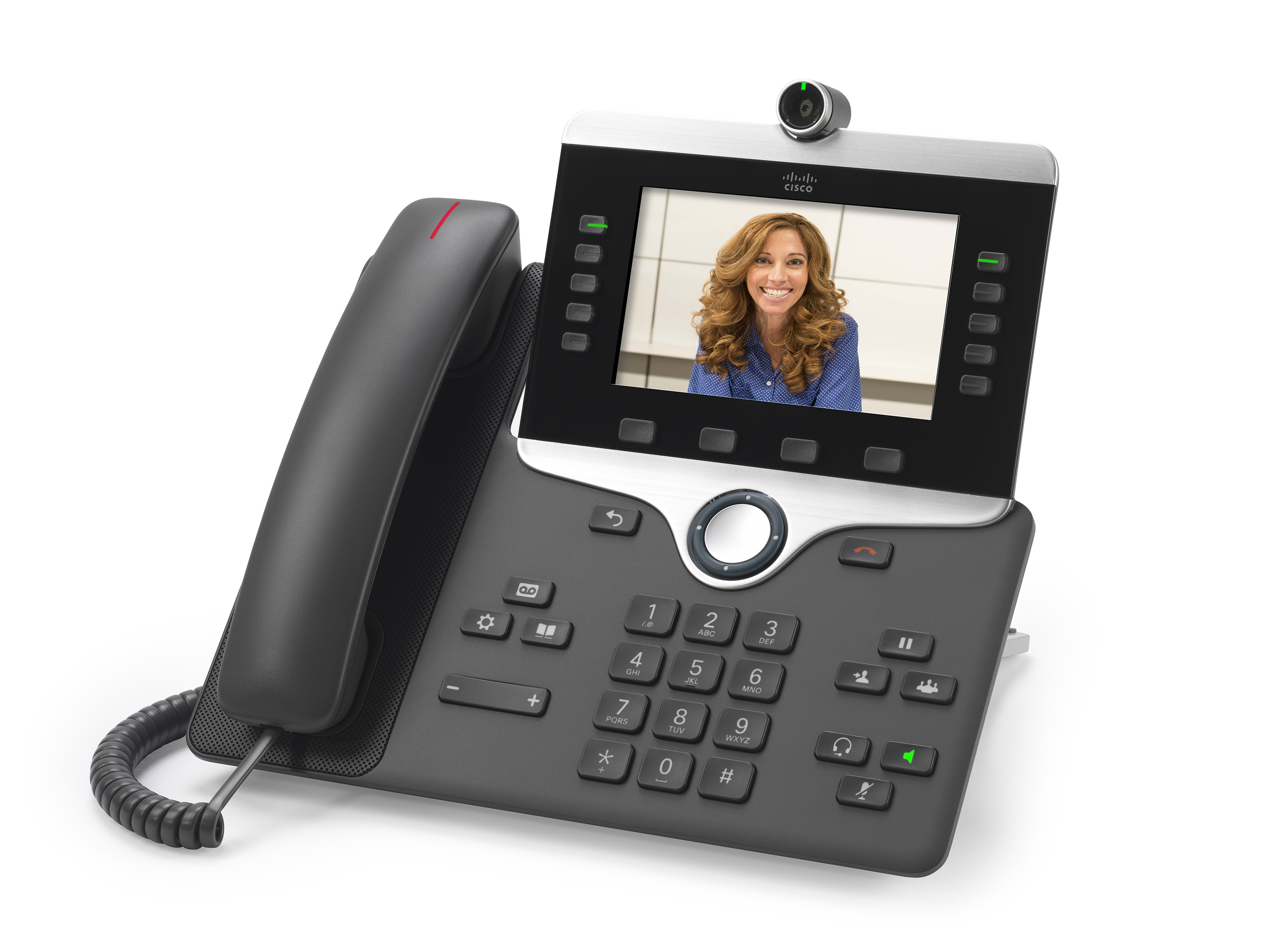
Remember what I said before – nobody looks at their phone. Cisco and Avaya are all touting 720P or better packing phones with high fidelity screens and high end cameras. I have two comments.
I never look at my phone
My laptop/pc which every modern desk has — already has a high end camera and nice screen
In modern terms, these are costly.
I just do not see these as taking off. That’s the bottom line.
Good Enough is Good Enough
Microsoft Lync and Cisco JAbber are what I call the “Just good enough” solution.
For the record, I am not bashing these products at all, infact on the contrary. Microsoft seems to have captured the “Good Enough” very well. Many clients aready own Lync, many have Lync licenses via Office 365, the service setup isn’t that bad. It does basic video/audio conferencing out of the box, the client is easy to use and even the room systems are pretty good, the Round Table isn’t telepresence, but it gives you 90% of what you need for around $5,000. Even Cisco’s SX20 will cost you double that by the time you license it and get it all running – not to mention it is arguably harder to use.
Jabber from Cisco also meets this requirement, you get easy point to point video, and you can do conferencing with Cisco’s telepresence line or an SX20 – but the cost sky rockets and it is significantly more expensive to deploy
Telepresence – Not Desktop (Almost)
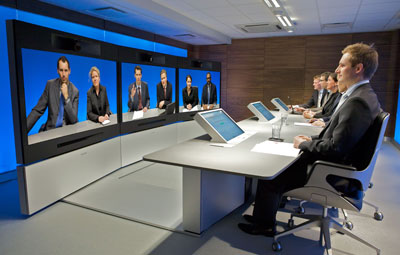
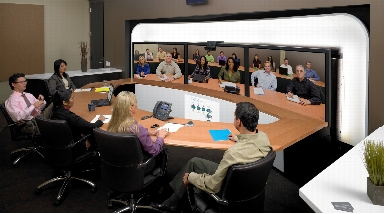
Cisco really brought telepresence main stream with the CTS3000
The idea was as you can see – extend the desk, full size people, amazing audio and visual experience, a high end engineered light bar. Cisco even issues specs for your room design, wall coverings and other things to make this a real experience. Everyone that used it the first time went “WOW!”. They also went WOW At the price – $300K for the system and $70K a year for support and a back end that could power NASA to make it go — but — nobody else was doing this, it was disruptive. This product continues to push the limits and show what can be done with telepresence and Cisco is taking full advantage of their Tandberg acquisition.
The new Cisco IX5000 is really something to behold, the cameras do not move, they are 4K, and they process for what they need. Take a few minutes and watch this video of the unveiling, this product is a work of art, and has amazing features.
Telepresence = feel like you are there. Telepresence does not mean “See the other person” it is much more immersive than that.
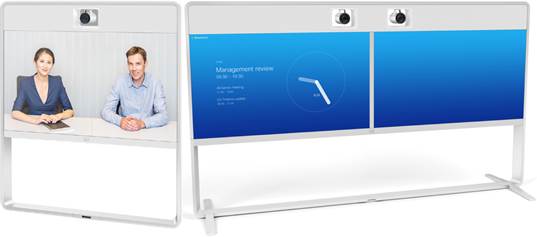
The new MX line is bringing telepresence prices WAY down, you still get the full experience, but in a smaller footprint. The quality is still top notch and the devices look elegant. They are even pulling in the RED DOT awards for the recent designs. http://blogs.cisco.com/collaboration/mastering-design-one-red-dot-at-a-time
The home executive is still getting the option for the DX series, you can join telepresence sessions with the utmost quality, a F2.2 lense and 63 degree view, a high quality screen and an “App” capable experience. It runs Android in the back today – but that is changing with Cisco optimizing the experience with a new operating system.
The Telepresence should not be considered in the same ball park as point to point or desktop to desktop style video. This is for full meeting room collab. If you purchase Telepresense you know what you are getting into, a very high quality product, well engineered that provides a very high end experience. It isn’t designed to compete with desktop. While the DX70/DX80 solutions do bridge that gap – I think those will stay relegated to desktops of executives, I would be surprised if we saw mass adoption.
Bring back CUVA via Jabber
Companies like Cisco need to keep the “Just good enough” crowd happy. This is where 90% of people operate day to day. The Video Advantage feature set was simple, and it worked, and makes more sense to me than video desk phones do.
I have heard rumours that the Jabber client may add this feature in the way of escalating a voice call on a controlled phone to video on the desktop, but the question is how easy will it be. Hopefully it will enable very easy, and quick ad hoc video calling, because that in my opinion is where the future of desktop video lies.

















 cantechit - Technology and IT BLOG