It turns out the Drone market isn’t quite as easy to get into as some companies think – even the big guys like GoPro. Turns out GoPro is saying about 2,500 Karma’s simply lost power while in flight.
GoPro has had a tough go as of late, trying to stay relevant, lauching a TON of products this year – and their stock jumped as high as 16.79 earlier this year and has now dumped it’s way down to 10.14 in after hours trading last night on the new of the Karma problems. A stock price we have not seen since June.
The bottom line – take it back where you got it – all of it, GoPro and Grip as well even though those are not a problem – you got a bundle so it all has to go back.
There is no replacement – it is a full on recall with refund – if/when they fix it, they will just start selling it again.
I’ll admit, I purchased a GoPro Hero 3 Black a few years ago, and while the video performance is stellar, the batteries have been total garbage, and some tell me “Oh the 4 they fixed it” but I still hear of issues on the GoPro 4.
Part of why I have not purchased another GoPro is because of the problems I have had – I even considered a Karma because I wanted the new GoPro, plus I wanted the Grip. That being said DJI Osmo Mobile is probably in my future.
Prediction
If DJI comes out with an action cam – GoPro is finished.
Cisco has recently released a new video around the anatomy of a hack. Most people think hackers are script kiddies sitting in their basement (or their grandmothers basement) wearing a hoodie writing “scripts” and damaging infrastructure.
There is no question the script kids are out there – but organized crime and foreign governments have become the real bad actors.
This video is actually pretty realistic, and many of my friends and colleagues have gone through these exact scenarios at work, or at their clients.
So for the previous blog entries where I was critical of some of Cisco’s marketing videos – this one is bang on.
I have updated info with how to actually FIX this yourself at this link
https://cantechit.com/2017/04/22/ford-still-not-delivering-carplay-to-2016-vehicles/
When Ford announced CarPlay in the 2016 F-150 – it wasn’t quite ready for prime time, but they sure spent alot of time talking about it, and marketing the idea to get customers to purchase trucks from them. For the record – I am one of those people, so this might come off a little ranty.
Demos hit YouTube as early as Jan of 2016 with a demo of how Sync 3 with Apple Car Play would work.
The statement from Ford was clear – announced on the show floor at CES 2016 in January 2016. Ford even demonstreated Apple Car Play and Android Auto.
In Ford’s own marketing document they state “future, over-the-air updates via Wi-Fi will help ensure it keeps up with the latest technology” – but to date there has only been a single update from 1.0 to 1.01 – and that required a dealer visit. The 2.0 update which is purported to provide Apple Car Play and Android Auto support – will again require a dealer visit we are told. More broken promises.
“In North America, Ford is making Apple CarPlay and Android Auto available on all 2017 vehicles equipped with SYNC 3, starting with the all-new Ford Escape. Owners of 2016 vehicles equipped with SYNC 3 will have an opportunity to upgrade later in the year” – A statement that was actually revised.
Sales people – including the ones that sold me my Ford F-150 promised the upgrade by “end of summer” Ford is now shipping 2016 F-150’s (same model year as mine) with Ford Sync 3 Version 2.0 – with Apple Car Play and Android Auto enabled. So they seem to be more interested in delivering new cars to new customers – and forgetting about the promises they have already made to customers. All of that text related to “end of summer” has now been changed to “end of year”
Sources also tell us that a hardware upgrade with a cost of $50-$300 (unsure of cost of the part, and labor) will also be required, it seems the USB Hub unit in the vehicle doesn’t work with Car Play and will require replacement (Android Auto users are fine) – a cost that sales people did not disclose to buyers.
Social media marketing teams from Ford operate accounts on various forums – including f150forum.com under the name “FordIVTeam” “Ford In Vehicle Technology Team” but have since clammed up on the issue, with many owners mad they were sold promises that Ford did not deliver. That social media account continues to point people to a website that basically teases the consumer about all the features they are not getting – but paid for.
It would seem Ford used the flashy lasso of cool technology to rope in a lot of buyers – unfortunately the failure to deliver may result in unhappy consumers – but I guess they already got our money.
For those who think “Who the hell is VXi” – no kidding. They are not very well known, and 2 years ago at #CLUS I ran into their tiny little booth. I was actually a big fan of one of their products – I was actually disappointed to see such a small both – this company really needed some marketing muscle!
First, these guys make the best headset – I have ever owned. This little baby is the BlueParrott (by VXi) B250-XT – a bluetooth headset that has insane battery life and the best darn noise cancelling on the market today – PERIOD.
I am not kidding when I say high performance – I drive in a Jeep TJ, no top and no doors – and I can actually take phone calls. How about a modified Subaru STi with a loud exhaust – no problem, have a business call, everyone thinks I am in the office.
The only complaint? You look like an air traffic controller wearing it – but I will be honest, for the performance – bring it on!
Everyone I tell about this wants one – everyone loves them. The biggest problem – no marketing!
Last year they launched the revamped B350 version of the product, but now big news from the VXi camp.
VXi Aquired By Jabra / GN
Jabra has acquired VXi Corporation, inclusive of the VXi and BlueParrott brands. The idea is that they will share channel, and gain portfolio. Personally this has got to be about VXi’s IP – because no headset works like the BlueParrott – nothing. From the news relase “It also gives GN Audio the opportunity to leverage VXi’s best-in-class expertise within “high noise”communication environments”
This is also about marketing and channel space – Quote ““We are delighted to have reached an agreement with VXi. The acquisition further strengthens our position on the North American market, where we have shown strong progress in recent years. We will build on VXi’s strong presence and reputation in the US and combine it with the international reach and professionalism of GN Audio and the Jabra team,” said Paul Hamnett, President for GN Audio in North America.”
This is great news – someone like VXi with great products needs the power and marketing arm of someone like GN/Jabra. My only hope is that what made VXi great – is not lost at GN.
VXi Launches B450 Flagship Bluetooth Headset
A few new features on this B450 BlueParrott next gen headset, first the charging cord, the old B250 had a barrel connector, which was a pain – because i had to use THAT charge cord – now they have changed it to Micro-USB which means all my existing charge points can be used and commodity charge cables. More buttons which can also be programmed for functions I want. The close mic noise suppression design is still there. They have added VoiceControl to the headset itself – I have this feature on one of my other headsets and never use it – I will be honest, I just use SiRi on the iPhone, or on Android I use the speech rec on there – I’m not sure this feature is really required but as a check box against the competition – it is there.
The ear pad is WAY more comfortable than the B250, yes the unit is larger, but more comfortable – hey you already looked like an ATC operator with the B250 – nothing is changing and now it is more comfortable. My only concern with the extra size is portability, before I could kinda fold it up and it it in my bag, not sure this will be as portable.
As of this print – I have not had a chance to try the B450, and I only had a chance to try wearing a B350 – right now no B450’s exist here in Canada – I am trying to get my hands on one and when I do – I will get you a review side by side right here on the blog.
Malware is everywhere. Symantec reported more than 430 million new unique malware packages in 2015, 36% more than in previous years.
Here are some additional statistics to explain how serious the Malware issue is right now (Statistics courtesy of Symantec’s 2016 Internet Security Threat Report)
One new zero day vulnerability was found every week in 2015 – double the number from 2014
500,000 personal records were lost or stolen in 2015
Spear-Phishing campaigns targeting employees increased 55 percent in 2015
Ransom-ware Increased 35 percent in 2015
20.8 Million devices are predicted by 2020. All of these – are at risk for malware.
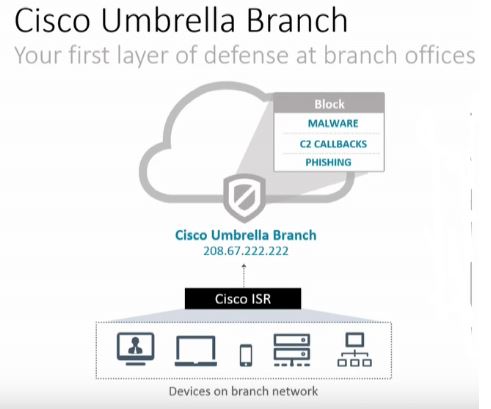
As traffic moves from branch to branch around your environment, we have a few challenges. This traffic may not traverse firewalls and IPS devices, malware protection is common at the edge but not at the branch. Branch offices also sometimes have limited security features, perhaps they only have a small ISR.
Cisco is using a recent acquisition of OpenDNS to help block 90% + of malware. The architecture is called “Cisco Umbrella Branch”.
“What if I am using direct to IP?” – At this point, not yet, but this is a new technology they are working on. DNS powers most malware, so when you add in OpenDNS protection, we can short circuit a significant amount (Cisco says 90%) of malware. A good security protection strategy includes multiple methodologies – this is one more which is quick, short circuits a lot of malware with limited programming and low cost.
With direct internet access becoming less expensive, and customers moving more to VPN technologies as high speed internet becomes significantly less costly than WAN services, end users are accessing the internet directly from the branch.
Intelligence in the Cloud
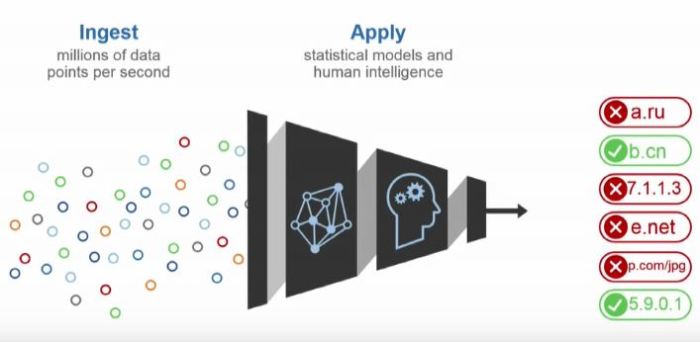
Cisco along with OpenDNS has created an intelligent cloud to manage all of this data, so using all of these data points they can validate the safety of these web sites in real time without having to update any kind of local database. As every query is sent, if a domain is found by the Cisco security cloud, it will be marked as bad very quickly in OpenDNS and you are protected.
How it works
On Cisco ISR 4000 devices, the ISR will register to the cloud, a secure tunnel is created and then it is ready for DNS queries to be filtered by the OpenDNS cloud via the Cisco Umbrella Branch Connector. The Stealthwatch Learning Network will also provide netflow based security analysis.
The intelligence is all in the OpenDNS cloud, and the verdict of the DNS lookups is forwarded to the ISR. All ISR configuration for DNS is managed by the connector once it is enabled.
Keep in mind this is in addition to the rest of the OpenDNS feature set that you will also receive like URL filtering.
All DNS entries are filtered and captured by the Cisco Umbrella Branch Connector – the users and servers do not have to use the ISR as the DNS server, you can have the users, or servers using internet DNS – the ISR will intercept it, tunnel the request to OpenDNS and return the response.
A great idea from @ghostinthenet – Jody Lemoine for a great future idea was that it would be cool if the ISR created a dynamic access list based on good verdicts to OpenDNS lookups so a positive response to a DNS lookup would be required before you would even be allowed out of the office.
The Demo
The team at Tech Field Day has a great demo video on the Cisco Umbrella Branch technology in technical detail.
I have deployed the Meraki MX series many times, along with the MR access points. One of the most popular articles I have written to date was Meraki Guest Access – The Better way an article about another way to deploy guest access in the network with fine grained policies across perhaps multiple networks.
One of my recent deployments I had a customer who wanted to tunnel all guest traffic back to an MX – similar to how his existing legacy wireless system does it, so that he could send that traffic back to a dedicated connection OUTSIDE the firewall. Basically the idea is that we want guest traffic to never get anywhere near the corporate network. We also had multiple sites in play across a L3 WAN, so simple VLAN segregation would not work. (yes yes, I know there are other ways to do it, but we are keeping it simple here)
Meraki MR has the ability to L3 or VPN tunnel traffic back to an MX – but be aware of the following warning and important design considerations.
This configuration is designed for use with an MX in passthrough/concentrator mode, tunneling to an MX in NAT mode is not supported.
This warning comes from the Meraki web site, right here where it discusses the various modes in the MR. The problem is – it will not stop you from trying, and even in NAT mode, the “Wireless Concentrator” options still show up in the MX config screens. It even tries to work if you configure it, and in some cases it actually functions – but – not supported.
Important MR L3 Tunnel Caviats
1) Only Pass through / Concentrator mode is supported
As mentioned above, even though it might appear to let you configure it – and while I have had it working at clients before, it is not supported. As a result there are many core MX features that are disabled, for this reason, I would not buy the advanced security license for a dedicated MR concentrator device. Those features do not really function in this mode if you are using it primarily as a concentrator (they do work if traffic is traversing through the device interface to interface)
2) Content Filtering is not supported in passthrough mode
While layer 7 filtering is a component of the wireless access point – web page content filtering by category is an MX function, and in pass through mode the traffic from the MR’s doesn’t really pass through the MX, so the content filter is skipped. Funny enough URL blacklists do still work, but the categories do not.
3) No DHCP
You don’t get a DHCP server in this mode, which means you need some kind of DHCP for your guest users. Whatever your edge device is or switch could handle this. DHCP requests are tunnelled back to the MX and broadcast at the MX – so you can have a remote DHCP for this.
4) Tunnels can only terminate on the “Internet” interface
If you are trying to do this in NAT mode (Which you shouldn’t be doing) this will trip you up. Either way understand that the way it works is that the MR contacts the Meraki Dashboard and reports the public IP it is on, so does the MX, and then the VPN tunnel is created between the two devices using those IP’s as a baseline. So this traffic is really designed to go to the internet. You can override this behaviour in case your MX is on the inside of the network (has a private IP on the INTERNET interface), if you go into the MX Wireless concentrator screen you can put an internal IP on the MX and make it take the “inside” route if you want. Your mileage may vary here. However if you try to use NAT mode, and force the AP’s to use the “inside” interface of the MX — forget it — that will not work, the VPN process in the MX isn’t listening on the inside interface – only on the outside – again NAT mode is not supported.
5) SSID’s with down Tunnels do not transmit
If your MR cannot open a tunnel to the MX – the SSID will NOT transmit. So keep this in mind, if you do not see the SSID broadcasting out of your access point – that is a real great indicator you have a tunnel problem.
You might need 2 MX Devices
So some might ask “Wait, in some designs I might need 2 x MX devices to acheive what I want to do then, one in pass through to terminate my tunnels, and one at the edge” — Yes that is correct. As the MX you use for the tunnel termination cannot do content filtering on that traffic – and it also can not provide DHCP, you will need another device to get involved in this case. Another MX would be the right solution. If you are smart the way you deploy the VLAN’s on the second MX, you could create different SSID’s with different security zones and it would be quite easy to manage it all as well.
Watch out for hair-pinning
You may run into some hair-pinning issues with this design, so be careful of your packet flows. It’s possible that you could end up going out your firewall, back in, and then back out again. Packet Capture is your friend here.
Use Packet Capture to Confirm
When troubleshooting the tunnel creation on the MR, take packet captures of the AP, while pressing the “test connectivity” button in the SSID configuration – you should see the MR attempting to bring up a tunnel with the MX – do the same on the MX interface as well to see if there are responses. Isn’t it great we can take “remote” PCAP’s on this platform.
I hope this provides everyone with some important rules when it comes to this design, and tips on architecture for your next project.
As a delegate for Tech Field Day Xtra at Cisco Live this year I was pleased to sit in on a presentation from Veeam about their new Cloud Connect product.
Previously only available to large enterprise, rapid DR response times, DR data centre space and IP mobility were things that smaller organizations could only dream of doing. Veeam is responding to that need.
First, let’s remember the rule as a reminder
3 – Copies
2 – Different Media
1 – Off Site
We have a few challenges to getting this data “Off-Site”. Many are still using tape, but more and more people want to get this data off-site automatically, and more often.
Many organizations are trying to reduce RTO – Recovery Time Objective. How fast can we get back online after a serious problem?
Here is a quick intro into Veeam Cloud Connect by Clint Wyckoff @clintwyckoff –
The RTO Challenges
“15 Minutes” is a common theme these days. With current technology this is pretty easy to do — On Site. Once we decide that for whatever reason we want to recover off site we have a few challenges.
Backup Copies – that data has to be off site, we have to get it there
Data Availability – That data has to be AVAILABLE. No tapes stored in a vault or a box, and nothing that we have to “restore” in order to bring it online
Connectivity
I want to discuss a few options we have for #3….
Assuming you have data centre space, either yours, or rented.
1) Over the WAN – Different IP – This has all sorts of challenges, application issues, hostname resolution, firewall considerations, NAT if it is published. There are some tools out there that help you with this, but it always has been a bit of a dogs breakfast.
2) Over the WAN – Same IP – This gets complicated fast, your choices are move the entire subnet, use a protocol like OTV (expensive on the hardware side) or some other method.
Option 1 is what we have been doing for years, various tools have tried to make it easier (Think DoubleTake) but it was very hard to get working, and you need infrastructure – real infrastructure on the far end.
Options 2 is expensive, and complex, not something many customers want to invest both time, money and resources in.
Veeam NEA
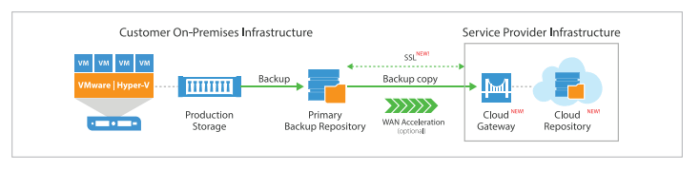
Without any “geekery”, without OTV, or VPN links, Cloud Connect with NEA – Network Extension Appliance allows your virtual machines to power back up at the DR data centre with zero effort by the customer. The IP does not change – the application comes up, and the Network Extension Appliance simply transports the traffic destined to and from that VM back to the customer site. They operate as a proxy-arp on site for the IP and MAC of the server.
The reverse replication can happen, and then when ready you can fail back.
This is bringing the benefits of very large scale enterprise level availability – to the SMB sized customers. With a personal level of control.
You don’t need any special network gear, storage or servers. You don’t even need to own data centre space. You purchase resources from a Veeam Cloud Connect provider, and your service is up and running in shared infrastructure.
Reduced Operating Costs
This means reduced operating costs, you are not paying for dedicated DR infrastructure at your provider, your machines are not running consuming resources, and the product is designed for “Pay as you grow” so you can start small and grow without significnat capital outlay
Wrap
This is a great idea – the complexities of the network connectivity alone associated with the traditional method make many shy away, and when you add in the Veeam backup product which is already well respected in the industry and now provide off-site recovery with the click of a mouse, in my opinion, Veeam has a winner here.
DEMO
Watch below as Veeam provides a great demo of the product while the Tech Field Day team asks the hard questions
I flew back from Las Vegas on Friday from Cisco Live 2016, after a horrible day of flying, and getting home, and a day of jet lag recovery – plus a day out at http://www.racelab.co another thing that I have now committed my personal time to – I find myself back at my regular day job.
It is not without complete and utter amazement that I return to “real life” completely overwhelmed by Cisco Live 2016 this year. I felt every waking moment, I was feeling the beat of the event in ways I have never experienced before.
Honestly the event could have gone an extra 3 days for me to get everything I wanted out of it – but I don’t think my body would have held up. Each day I walked in excess of 20,000 steps (The American Heart Association recommends 10,000 as a “goal”). This is no picnic vacation, waking at 6AM every day, to be in sessions for 8AM, and then not getting to bed until midnight (or later for some)
I was overwhelmed – more than ever with what was happening at Cisco Live – and in the coming days I am expecting to pen BLOG articles on the following topics.
Cisco Live – 2016 Wrap Up
Cisco Live – Social Pass Benefits
OpenGear
VEEAM
Cisco Cloud Connected ISR Security
APIC-EM / EasyDNS
Cisco Digital Network Architecture
Coming from an event where I was asked to be a speaker, I will also talk about my experiences as a speaker, and what I got out of that.
I had an amazing technical experience, learned a ton of information thanks to Tech Field Day (More on that later), and those mentors and amazing technical people I was hanging with. I mean at one point I was having a few drinks with two product designers listening to them wax and wane over design. Is this where innovation happens? I think so.
Add to that the best Pink Floyd rendition for a friends birthday in the end and you cap off an amazing week of learning from both the event and friends alike.
Like I said in my own session – content is king, and at least I have a fair bit to work with for the next while.
We all say that technology moves even faster than the speed of business.
Right now Meraki MC74 and Cisco Spark Voice services are available in the USA, but currently not in the Canadian market. Hosted Skype for Business (Lync) and Broadsoft based offerings have been available for YEARS here in Canada.
The biggest push from IT manufacturers and VARs these days is of course all forms of Software as a Service (SaaS), with the obvious push by all organisations for recurring revenue, and customer looking for a more “user cost” based model the industry is changing to a service based model.
Disrupt or be Disrupted
This has been Cisco’s latest trend, go and disrupt a marketplace. Something like the MC74 is a dream for SMB, ok the features are limited today, but for the travel agent, or retail store – it’s dialtone – many don’t need more. A single IT manager could manage 20-30-50 locations of Meraki infrastructure with ease.
Cisco SPARK aims at a more medium business, more feature rich, a collab and instant message service platform, and full voice services.
However like anyone who has played Command and Conquer (throwback!) if you let your enemy build their base while you are popping the popcorn and going to the bathroom, you may find yourself fight off SCUD missiles with nothing more than a weak infantry.
Ok, let me get past the video game references. Skype and Broadsoft offerings are everywhere, and they are now quite mature. The MC74? Well it’s a new offering, once again not in Canada. How much market share will be lost in 8+ months – and let’s remember, the push is multi year contracts for the big discount. So these customers are lost for years
The Phone Lock In
Telephones are the lock in – once I have sold you MY phone, which doesn’t work on another service – that will prevent you from leaving. Why are so many clients still using M2616 telephones on old Nortel CS1000 systems (Option 11-81C) – because telephones are $300+ items, so an office of 100 people is $30,000 in hardware. 1000 people? Now we are talking $300K
TDM System Retirement
CS1000 systems are getting old in the tooth – with many clients looking to remove it. As basic voice becomes the new requirements, and online services prodiving the rich experiences, “Basic Voice” is what many SMB’s are looking for.
Nortel Norstar customers are finally seeing hardware start to fail on these bulletproof systems – these customers need out, and they need out now.
Older TDM systems are coming out – right now – how many will be removed in 8+ months?
Some just need Dial Tone
Skpye (consumer), Spark Free or paid, and other platforms provide a lot of rich capabilities, many for free. I could go ahead and just buy Spark non voice later on if I wanted.
Retail, basic commercial and other markets really just need dial tone, and those basic needs could be augmented with services later on.
Is 2017 too late for Cisco Spark and Meraki?
I guess we will find out – my opinion is that a lot of market share and ground will be lost in the meantime to competitive solutions, and all of these will be multi-year contracts.
The Cisco Champions – A group of very experienced Cisco Live attendee’s share tips and tricks to get you to, and from the event to make the most of your week.
Join me and my fellow champions on this weeks episode!

 I am not kidding when I say high performance – I drive in a Jeep TJ, no top and no doors – and I can actually take phone calls. How about a modified Subaru STi with a loud exhaust – no problem, have a business call, everyone thinks I am in the office.



 cantechit - Technology and IT BLOG