Let us step away from Technology for a moment. I simply agree with Rex Murphy on this one..
Let us step away from Technology for a moment. I simply agree with Rex Murphy on this one..
For those who are a fan of iWAN, or just want to get their hands on it, the Cisco #dCloud team has launched a new APIC-EM V2 Lab around iWAN.
dCloud is a virtual demonstration and lab cloud service available free to Cisco partners, but it can be extended to clients by request. The best part is you get the time to go through their pre-defined lab, or just kick the tires, on your own time – this is no power point or video virtualized demo. It’s the real deal.
The new V2 version adds a more realistic version for those looking to showcase, test or try out iWAN in a true dual DC format. They have also added some very important elements to testing iWAN, including virtual WAN impairment and Traffic generators.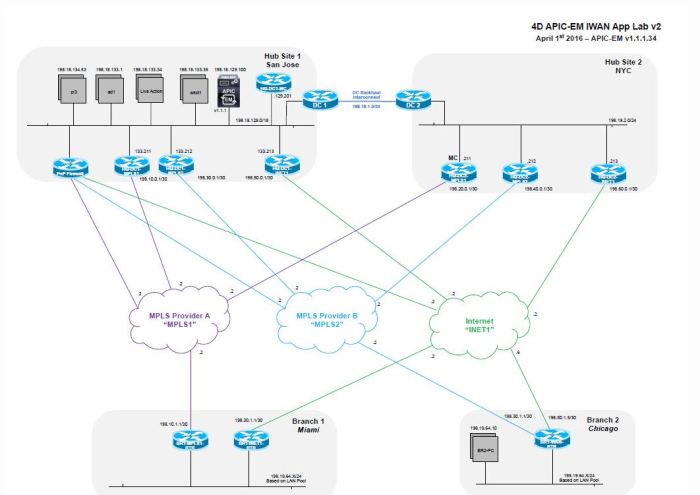
To access this lab hit up dCloud.cisco.com – it requires partner level access but your partner can extend the lab to you for free, so contact your partner to try this out.
The lab also includes Prime and LiveAction
In the wake of a 7.8 Magnitutde earthquake in Equador on April 16 the Cisco TACOPS team is dispatching teams from botth their San Jose, California and Raleigh, North Carolina hubs to the area. Bringing with it satellite, WiFi, Route/Switch, VoIP, Security and a plethora of highly skilled technical response engineers.
As aftershocks continue to plague the country as of this writing over 600 have been reported dead by Reuters.
http://www.reuters.com/article/us-ecuador-quake-idUSKCN0XI26F
The team is working to assist with the restoration of emergency management and first responder telecommunication and data networks in remote areas that continue to be cut off from both the original earthquake and the aftershocks.
Following this tweet from Chuck Robbins – CEO of Cisco Systems the TACOPS team went into monitoring mode and began coordinating how they could best lend their assistance.

Cisco is also pushing additional equipment out from their global depot network and that gear will meet the team on site.
Cisco has built what has become the reference platform for emergency communications preparedness inside the NERV – Network Emergency Response Vehicle, with everything from Voice, Video, Radio and Data communications all over IP over just about any medium. GSM, LTE, Multiple forms of Satellite, Wifi, Mesh and everything in between.
If your organization is looking to build a response vehicle from mild to wild and beyond the Cisco NERV team is willing to help you with experience from their actual disaster response scenarios. Contact your Cisco partner today and ask them to engage the TACOPS team.

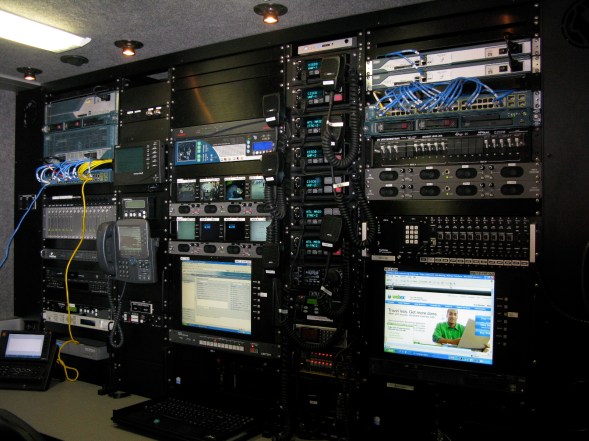
http://www.cisco.com/c/en/us/about/supplier-sustainability/tactical-operations-tacops.html
Uniquely Trained
The Cisco TacOps team comprises expert networking, radio communications, and systems engineers along with logistics and operations coordinators.
Members of Cisco TacOps and the employee-volunteer Disaster Incident Response Team (DIRT):
- Are trained in the U.S. National Incident Management System (NIMS) and Incident Command System (ICS)
- Participate in large-scale exercises to validate technology solutions and train alongside other responders
Uniquely Equipped
TacOps specializes in emergency networks that support the immediate needs of rescue, law enforcement and security, and humanitarian assistance teams. TacOps can also support traditional enterprise and service provider networks.
TacOps maintains many resources that are ready to deploy immediately, including:
- Cisco Network Emergency Response Vehicles (NERVs)
- Satellite-equipped support vehicles
- Fly-away networking kits that can be shipped or carried by hand
- World-class cybersecurity solutions that protect first responders and affected populations
A geographically dispersed network unites all these resources so that TacOps can easily scale the response based on needs on the ground.
Uniquely Supported
The team’s humanitarian relief operations are provided through the overall Cisco Corporate Social Responsibility (CSR) Program. To ensure delivery of high-quality expertise and equipment around the globe
Last year Cisco Live! launched a new mentorship program last year, where NetVets (Those are attendees who have attended 3 out of the last 5 events) sign up to offer mentorship to new attendees.
In a word? Yes – you do. If you have never attended Cisco Live! before, and you do not have a friend or colleague who has who can walk you through what your week will be like – you may come away from your first Live! event thinking “Wow, I wish I was better prepared” or “I wish someone could have shown me around”
This is exactly what the mentorship program is designed to do. Help you find the sessions that matter, make sure you get to all the places you need to get to – and there is a good chance you might make some new friends, colleagues or find your way to the next social event.
That is the easy part, go to this link
Click Here for to sign up as a first time Cisco Live! attendee
NetVets will be contact by electronic mail, if you are not a NetVet but still want to be involved, you can contact @CiscoLive on twitter

I am glad you asked… Taken from the Cisco Live! web site, click here for more information
NetVets play a unique role in the Cisco Live community. As long-time attendees of Cisco Live and Networkers events, they have a unique perspective — one that makes them a valuable resource to their fellow attendees and for Cisco itself.
If you have attended at least three previous Networkers or Cisco Live conferences globally on a Full Conference or IT Management registration type in the last five years (making Cisco Live U.S. 2016 your fourth event since 2012), you’re eligible for NetVet status.
Along with recognition of your loyalty to Cisco, you’ll also enjoy special benefits that can enhance your Cisco Live experience. The perks include a pass to the NetVet Lounge, a free e-book from Cisco Press*, and priority session scheduling. You’ll also receive a unique conference badge that showcases your NetVet status.
See you at Live!
Unless you have been living under a WiFi faraday cage for the last many years, you have probably used Ekahau’s amazing site survey and design tools.

I am quite the fan, as seen in the video below, interviewed at Cisco Live last year by the ESS team talking about how I love their product. In full disclosure, they sent me a REALLY nice box of chocolates and an Ekahau shirt afterwards as a thank you.
Ekahau has announced they are divesting their RTLS design tools to Arista, and focusing only on WiFi design tools.
I see this as a great focus for Ekahau, they are the leader (IMHO) in the WiFi design space, and this will allow them to focus on their WiFi design tools. They have added some additional features as of late, including the spectrum analysis built right into the survey.

Insiders have confirmed that MAROON will be the Cisco Live Customer Appreciation Event Headliner! The CAE will be held this year at the T-Mobile Arena


If you have not visited Cisco Live! before, one of the greatest thank you’s for going is the Customer Appreciation Event – with free everything and a promise of an amazing time. Don’t forget to find your favorite #CLUS friends to party along with you.
Bring your camera (or just your mobile phone), and make sure you tweet all the photos of the amazing event, I will also use Periscope to share my experience again this year.
For more information on the Cisco Live CAE CLICK HERE
Aerosmith rocked Petco Park in 2015, I personally left with vocal chords strained so bad it took three weeks to recover.

Photo Courtesy of @BrianCSCO
Listening to “Dream On”, “Love in an Elevator”, or “I Don’t Want To Miss A Thing” was an absolute dream come true for me, as a long time Aerosmith fan, there was no better gift from Cisco than this amazing band.
When leaving events at Live, Cisco does provide shuttle busses, but sometimes you may experience long lines and long waits while 15,000 people try and find their way back to their hotel. Share an Uber ride with others, and get out of there quick, and in style.
You can even get a FREE Ride, find someone in your group who is not an UBER user, have them sign up quickly on their mobile device and use YOUR promo code, they get a free ride, and so do you!
Meraki has dropped AMP – Advanced Malware Protection into the latest BETA.
In a continuing effort to “keep up with the Jones’s” at their internal competitor that is — everyone other department at Cisco. Meraki has added added Advanced Malware Protection to the MX line, currently in Beta.
One of the great things about Meraki is the ability to simply enable the BETA code trains in your dashboard, while I wouldn’t recommend this for production networks, anyone with lab gear, anyone with a CMNA or anyone with a strong business reason can enable BETA code at anytime on their devices.
I contacted Meraki to get the BETA AMP services installed on my MX64 by opening a ticket but was advised the MX64 beta with AMP was not released yet.
AMP uses a global threat intelligence database with a database of over 500 million known files, and they get 1 million new samples every single day. More information about AMP is available on this link HERE.
So what does AMP get you in this new beta?
— AMP File Scanner – Downloaded file are checked against the database before a client can get a hold of it
— Security Centre Reporting – you can now report suspected malicious files right in the new Security Center. This page bring IPS and AMP togeather giving you a holistic view of your network threats.
— Retrospective Alerting – In english? If someone downloads a file and 2 days later that file is identified by AMP that it would have been blocked – you get an alert. Now this IS cool – Administrators should really value a tool that looks in the past to tell you “Hey, this file might have infected your network, better go look”
AMP does require Advanced Security License on MX – but let’s be honest, who doesn’t purchase that license these days.
Meraki continues to roll in new value with their gear, with ease and functionality. While Meraki used to be a great fit for the 200-300 and less customers with features like AMP, larger and larger organizations will start to consider the MX. However as I have said many times – we need proper dynamic routing protocol support in MX, it is the biggest thing holding it back!
All the best sessions at Cisco Live – book up early, now in the past I have had good luck with standby lines – but some of the best are always sold out, and you never want to be sitting at the back of the room.
The session catalogue is now live! CLICK HERE – to start planning which sessions you wish to attend, and then on May 3rd when the scheduler opens up you can be ready to book the sessions you want.
Get a jump on the competition! Check out the schedule now
Cisco Live CAE Guest Announcement – I will have it for you the moment it becomes available, last year the Aerosmith event was without question the most amazing concert event of my entire lifetime, I literally had no voice for 3 weeks. I am combing my sources at Cisco to find out who it is but it is very tight lipped.
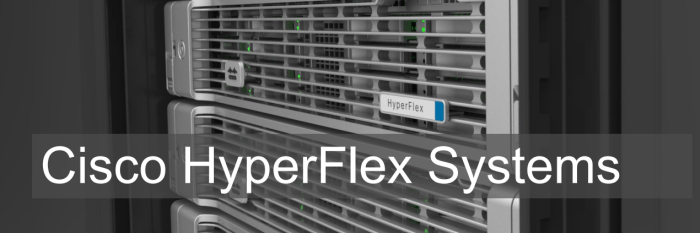
Cisco is unwrapping the covers on Hypeflex. Their direct and targeted attack on the hyperconverged market.
The headlines are basically this….
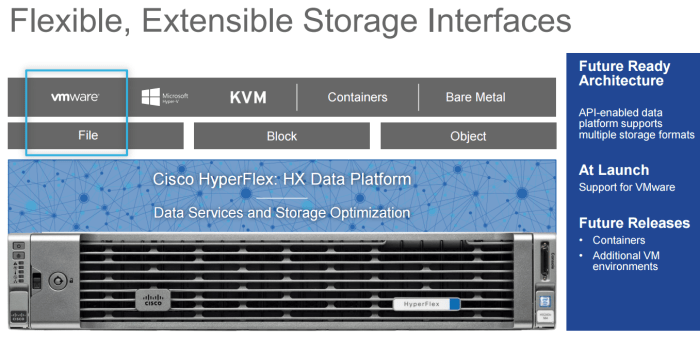
The story is much as you have seen in the past. Server based platform, with on board disk. However remember, hyperconvergence is about using “commodity” hardware with onboard DAS disk in order to deliver converged type infrastructure for lower cost with easy expand-ability.
The system will launch with VMWare day 1, with other hypervisors and container support down the road.
The secret sauce with all hyperconverged solutions is in the storage layer, and Nutanix has always pried themselves on being the leader here, and they are, with developers from top tier companies they built a very mature product with demonstrated performance. Many others have tried to meet or beat this performance and they continue to be the market leader – HyperFlex plans to challenge that.
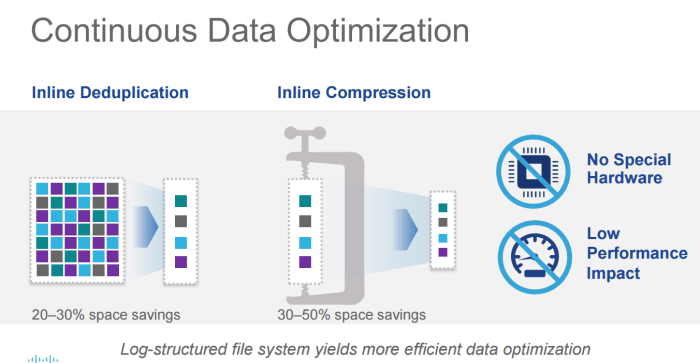
Cisco had to differentiate themselves. By using a log based file system, with intelligent caching they have eliminated the 3-phase commit performance problems. Basically with a 3 phase commit, we have to make sure that data is sent to all nodes before it’s committed as written. Cisco eliminates that by log shipping and caching. I am sure we will get more details as this moves on, and I will admit to not being a storage architect but the secret sauce is in the software.
De-duplication and Compression is all the rage, and they are delivering it here – with low performance impact. The technical experts tell me – this is all around their caching technology. Are you seeing a trend here?

The Fabric Interconnect is right there on top – and HyperFlex is built on UCS – so the FI is how we control the hardware, manage nodes and provide the network. HyperFlex will deliver where other hyperconverged companies have not – in the network. While others tell customers “we use your network” – Cisco recognizes the important of engineering, and when building hyperconverged – the network is way too important to leave to the end users, the performance between nodes must be high, and predictable. The UCS Fabric Interconnect is perfect for this task. Why re-invent the wheel on connectivity, the FI delivers features and performance.
There will be a flexible deployment model – list prices around $59K USD to start, which is competitive – and you can build with balanced, capacity heavy or compute heavy nodes, or a mixture to create your own custom environment.
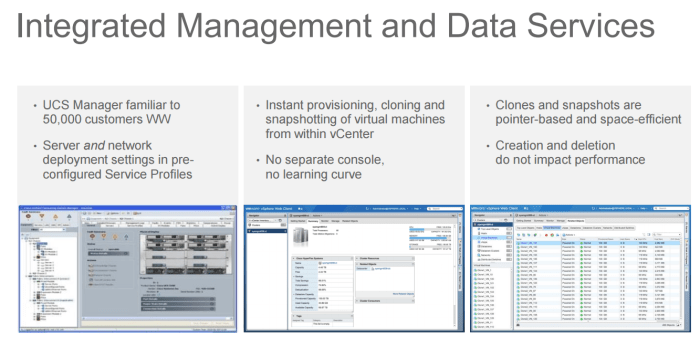
The administration is about familiarity here, with the hardware being managed by the very familiar and manageable UCS Manager, and the hyperconverged part being managed with a plug in to VCentre. No extra management portals or parts required. This means time to value is fast, and time to market is also fast and chances are you will not any training to work on this thing.
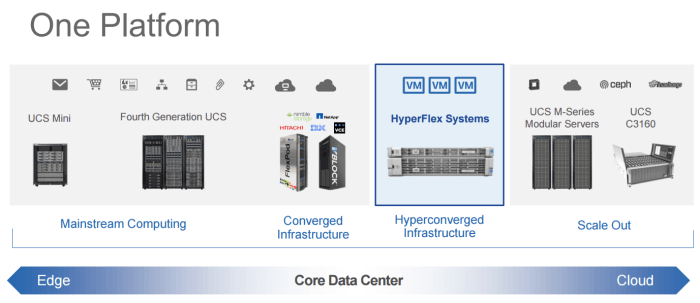
So where does this fit? Well, it’s a whole new product line – but the pedigree of UCS is there, so the trusted and hardened UCS platform is right there – and it fits into the core data centre portfolio.
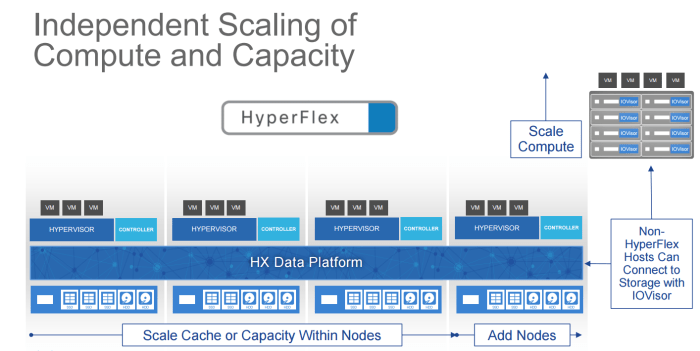
Expanding hyperconverged you need flexibility (HyperFlex?) and sometimes clients just want to add compute. Luckily using IOVisor, you can actually access the storage from non HyperFlex hosts using their IOVisor software. There is many instances when accessing this storage could be useful, call it migration or disaster recovery, or high availability. For all the reasons we cannot think of this type of flexibility is great.
Each node has a “controller” which handles the local node, and mostly storage activities and manages the cache on that node. Just like other platforms.
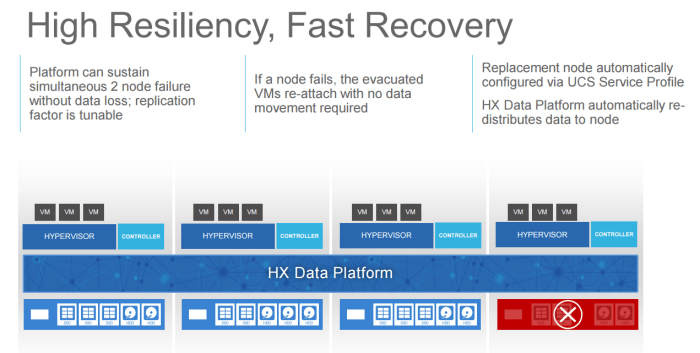
The system can handle two node failures, and because it’s built on service profiles, node replacement is obviously very easy. As soon as the replacement node comes up, data replications begins immediately over the high performance built in network.
Where do you find out more?
That’s a wrap! Looking forward to getting my hands on this thing, if anyone was going to take a shot at this market – it’s Cisco and I cannot wait to get my hands on it.
Ran into a problem today adding an Exchange account to an Outlook 2016 installation
It seems Microsoft has removed most of the advanced settings as a result of the removal of MAPI support from Outlook, but what it means is that your Autodiscover – MUST work.
For lab environments, we don’t always setup Autodiscover, we just manually setup the accounts. I figured I would add an SRV record to fix it, so I did. However I had another problem.
Microsoft has a great tool called the Remote Connectivity Analyzer, which tests and tells you when it finds problems with connectivity – well – I passed most of them. Yes there were a few errors, as AutoDiscover has a few methods.
The mail settings panel would get “stuck” at this screen. It would search forever. Searching for your mail server settings stuck at searching for settings.
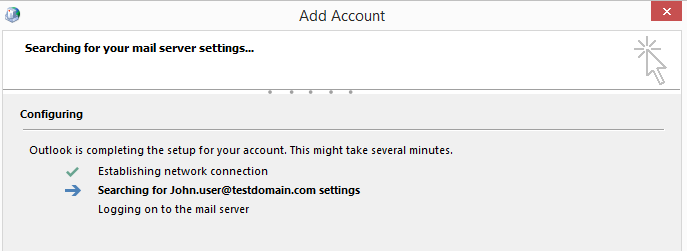
This is caused by the mail settings trying to auto discover using this URL
https://testdomain.com:443/Autodiscover/Autodiscover.xml
In my environment (and many others) this doesn’t exist. We have a mail server running on mail.domain.com or owa.domain.com – the root domain doesn’t have this. However unless Mail settings get’s a 404, 500 or another HTTP error, it will try 20+ times to connect, each with a VERY long 30 second timeout. – that means 15-20 minutes of trying before it will give up. Much longer than any users (And me in particular) is ever willing to wait.
Solution? Registry edit.
[HKEY_CURRENT_USER\software\policies\microsoft\office\16.0\outlook\autodiscover] “excludehttpsrootdomain”=dword:00000001
That’s it, it tells Outlook to skip that step, and move on to other AutoDiscover methods.
A simple solution, which google didn’t immediately find me, I did find it buried in a few conversations on Reddit – but hopefully this post, will give it better goggleability.
Hopefully AutoDiscover Outlook 2016 and future versions will be come a little less problematic, a little less trouble, and not as slow.
 cantechit - Technology and IT BLOG